Tag: Dark Mode

  • Enjoy The New Dark Mode On Whatsapp Rolling Out From Today

    Enjoy The New Dark Mode On Whatsapp Rolling Out From Today

    Whatsapp has become an inevitable part of our daily lives. Whether we want to have any personal conversation or an official discussion, WhatsApp is the go-to option for us! With some very convenient features and easy accessibility, WhatsApp has become the appropriate choice for every person! According to the updates, now the dark mode on Whatsapp is all set to go for users.

    Enjoy The New Dark Mode On Whatsapp Rolling Out From Today

    The darker version of WhatsApp makes it even better and interesting!

    Enjoy the darker and better version

    Who doesn’t enjoy change? Whatsapp from Facebook is here to bring a feature that is new, attractive and fantastic. The change of background from the subtle white to the fierce black is just fantastic.

    Once you open the Whatsapp, you would be able to find the glowing dark Whatsapp screen before you. The screen shall look extremely attractive with the chats popping out amidst the dark background. The white fonts shall ensure reading clear.

    Learn how to change to a dark mode on Whatsapp

    If you are willing to change to the Whatsapp darker version know it right here.

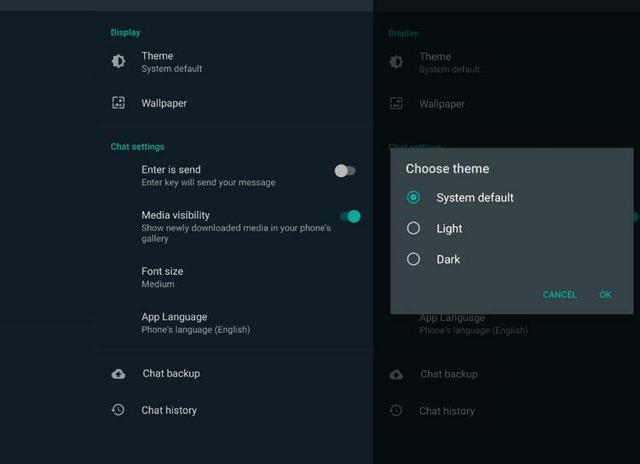
    Start by updating the Whatsapp application followed by settings. Once you go to settings, click on Theme. Choose dark to switch to the darker version of Whatsapp.

    With the rolling out of the darker version, Whatsapp has gained immense popularity. This change ensures a visionary pleasure that is attractive to users. Also, it breaks the mundane nature and display of Whatsapp giving it a boost.

    So, start switching to the version and enjoy the dark mode on Whatsapp now because it is new and better. It is time to bid goodbye to the lighter version and enjoy using the darker one!

  • Dark Mode Finally Available On Instagram

    Dark Mode Finally Available On Instagram

    Available in the latest update for some users, the feature provides an entirely different view of the app and answers users ‘ complaints.

    Dark Mode Finally Available On Instagram

    Both iOS 13 and Android 10 provide the users with the ability to switch on a system-wide dark mode and turn the background black.

    The mode wasn’t available on Instagram, meaning users who would browse through their otherwise darkened phones would open Instagram to be caught off by the bright white background, which can be particularly irritating while scrolling at night.

    Twitter is full of users waiting for Instagram to implement the feature.

    Now, with the launch of dark mode, Instagram will no longer open with the white background as long as the phone has the dark mode enabled in settings.

    The photographs don’t look different; the dark mode only disables the default bright white background and swaps it with black.

    To enable this feature, the app needs to be updated on the latest version and have the feature enabled in both the app and the settings of the phone. The feature is rolling out slowly in different regions.

    With the rollout of this new feature, the excited fans of Instagram are delighted and satisfied.

    How To Turn The Amazing New Instagram Feature On iPhone?

    After a few weeks of rumors, the dark mode of Instagram has started with every iPhone model using the newly released iOS 13 system from Apple.

    Yet allowing mode on Instagram is not as straightforward as you would imagine. Just as anybody who has updated the newest Instagram update from the Apple App Store would inform you, the app does not contain a single setting that allows you to toggle on or off the new theme.

    Only when the consumer has dark mode enabled system-wide on their iPhone can the latest esthetic, dominated by black noises, be heard.

    That means you need to enter your iPhone’s settings to switch on the dark mode of Instagram. Without system-wide dark mode enabled, you cannot use this feature on any app, let alone iPhone.

    To do this, head to Settings > Displays where a switch to select between light and dark subjects is displayed.

    It’s also worth mentioning that you must run Instagram’s latest version on the iPhone to turn off the lights. You should install the new update from the App Store manually since the auto-update option is not enabled by default.

    Instagram users have been waiting for the latest feature for months. The release of the feature makes the app dim, making scrolling at night comfortable.

    When using an iPhone with an OLED display, dark mode will not just protect your eyes; it will also help conserve battery.