Author: Adam Taylor

  • The Most Popular Apps For Teenagers

    The Most Popular Apps For Teenagers

    With so many apps readily available to download on phones and computers, and new ones popping up every day, it can be challenging to keep track of which apps your kids are using. Here is a list of the most popular apps for teens right now, along with what you need to know about each app.

    Messaging Apps

    Parents always worry about the messaging apps on their kid’s phones, since any messaging app lead to inappropriate conversations, and raises the risk of exposure to predatory and improper behaviour. Here is a list of some of the most popular messaging apps, and what parents need to know about each of them:

    #1 Kik

    • Kik is super popular – reportedly used by 33% of American teens aged 13-17.
    • Kik has been in the news a few times, because of cases involving online predators.
    • The company that develops Kik offers a safety guide for parents.

    Kik
    Kik

    #2 WhatsApp

    • WhatsApp was one of the top-ranked apps on Apple’s list of the most popular apps in 2018.
    • Children over 13 can use this app.
    • Users can send unlimited messages and photos on WhatsApp without worrying about data limits.
    • Users can also share their locations and contacts while messaging – but this feature can be turned off.

    WhatsApp: Popular Apps
    WhatsApp: Popular Apps

    #3 Telegram

    • With Telegram, users can send texts, images, and videos.
    • Users must be aged 16 and above.
    • Users can send secret messages and use X-rated stickers and plug-ins.

    Telegram
    Telegram

    Anonymous Messaging Apps

    Apps that facilitate anonymous texting can lead to cyberbullying. Some of the most used anonymous messaging apps are:

    #1 Tellonym

    • The app has over 10 million users.
    • Children aged 13 and up can use the app; however, anyone under 15 must get permission from their parents.
    • Tellonym claims that it monitors the chats for inappropriate content. They also have a section on their site about safety concerns.
    • Several schools have warned parents about cyberbullying connected with the app in England.
    • Users can block messages from people who are not registered in the app.

    Tellonym
    Tellonym

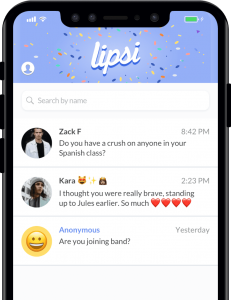
    #2 Lipsi

    • Users must be at least 17 years old.
    • Lipsi encourages users to leave their Lipsi link in their Instagram bio so that they can receive anonymous feedback about their posts.
    • All users can easily erase chat history.
    Lipsi: Popular Apps
    Lipsi: Popular Apps

    Live Video Chatting Apps

    Live video apps often raise concerns about the child’s privacy and the potential for exposure to inappropriate content and interaction with predators. These are some of the most widely used live video chatting apps:

    #1 Holla

    • The app allows users to engage in live video chats with strangers.
    • Several users complain about users performing sexual activities during chats.

    Holla
    Holla

    #2 Houseparty

    • Houseparty is a group video chat service and is reportedly the fourth most downloaded app on the App store.
    • 60% of its users are under 24.
    • Chats are not monitored – which raises the risk of your kids being exposed to inappropriate content.
    • Users can only add friends from Facebook or people in their contact list.
    • Houseparty has an option to add people nearby based on location, but it can be disabled.
    • The privacy settings can be configured to reduce the risk of strangers joining a chat.

    Houseparty: Popular Apps
    Houseparty: Popular Apps

    Entertainment apps

    Entertainment apps can expose children to inappropriate content and potentially lead to interaction with strangers. Some of the most popular entertainment apps are:

    #1 YouTube

    • According to a Pew Research Center study from 2018, YouTube is the world’s most popular internet platform, with 85% of teens aged 13-17 using it.
    • The company recently reiterated its policies, prohibiting harmful content.
    • Past efforts to ban inappropriate content have been unsuccessful. Inappropriate content has even managed slipped through YouTube Kids – an app specifically designed for use by children.

    YouTube
    YouTube

    #2 Zepeto

    • Zepeto is a fast-growing app that allows users to create animated versions of themselves and interact with other users in a chatroom.
    • It allows users to interact with strangers using an anonymous follow function. Users can also message each other directly.
    • The app has a ton of ads. Users may feel pressured to make purchases to get more likes and followers.

    Zepeto
    Zepeto

    #3 BitLife

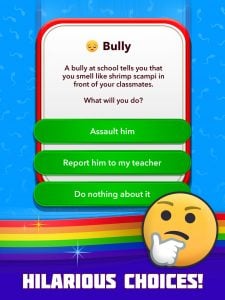
    • BitLife is a text-based, life simulator app.
    • Users must make adult choices – for instance, whether to have a one-night stand or use drugs.
    • Teens under 17 should not use this app.
    BitLife
    BitLife

    #4 Discord

    • Discord is a text and voice chatting tool for gamers.
    • It has over 100 million users.
    • Some users discuss games meant for older teens and adults; hence there is a high risk of your child accessing age-inappropriate content.
    • Users can direct message each other, so there is the potential for interactions with strangers.

    Discord
    Discord

    #5 TikTok

    • TikTok is the new Musical.ly – the two companies merged in 2018.
    • The app has over 80 million users. It was also one of the top-ranked apps on Apple’s list of the most popular apps in 2018.
    • TikTok was in the news because teen users were receiving inappropriate messages from other users.
    • Accounts are public by default. If the account isn’t private, anyone can contact the user directly.
    • There is some explicit content on the platform, but a restricted mode helps filter it out.

    TikTok: Popular Apps
    TikTok: Popular Apps

    Photo-Sharing Apps

    There is a high risk of exposure to inappropriate content on photo-sharing apps.

    #1 Snapchat

    • The same Pew study from earlier revealed that 69% of teens aged 13-17 use Snapchat more than any other app.
    • The app has been in the news frequently, for instances of predator encounters and users self-harming as a result.
    • One of the most alarming features of the app is its “Discover” feature, which enables individuals and companies to create their own channels.
    • Some of the channels are age-gated, and users must say they’re at least 18 to access the sometimes-explicit content.

    Instagram: Popular Apps
    Instagram: Popular Apps

    #2 Instagram

    • This photo- and video-sharing app is the second most popular app for teens aged between 13-17.
    • Teens often set up alternative accounts on Instagram to post photos they don’t want their regular followers (such as parents) to see.

    Snapchat
    Snapchat

    Knowing what apps your child uses is the first step to ensure they’re safe online.

  • TikTok Safety – What Parents Need To Know

    TikTok Safety – What Parents Need To Know

    Social media is great – it helps you stay connected with loved ones near and far and keeps you in the loop about world events. When it comes to a child’s activity on social media, parent supervision is a must. However, there are too many social media apps to count, and keeping track of your child’s activity on each one can be difficult. TikTok is the new ‘happening’ platform that helps create and share short videos.

    Overall, parents do not need to be worried about their child’s activity on TikTok, since most TikTok videos are harmless and creative. They’re both fun to make and watch. Keeping a close eye on your child’s activity is still as crucial as ever. Fortunately, it is easy to monitor your child’s activity on TikTok and take control of what content they can and cannot see. This post will answer all your questions and concerns about TikTok and also help you ensure your child’s safety on the platform.

    Is TikTok safe?

    Using any social network is a little risky, but it’s possible for kids to safely use TikTok with adult supervision (and a private account). When your child signs up for TikTok, the account is public by default – which means anyone can see the videos they post, send them direct messages, and see their location information.

    TikTok
    TikTok

    You must ensure that you turn on all the privacy settings on the account your child is using, so only people you know can message them and interact with the videos your child may post. You can do this by either turning the account into a private account or changing the settings for duets, comments, reactions, and messages from “Everyone” to “Friends.” You can also turn these features off completely.

    How does TikTok work?

    TikTok users sign up with an email address, a phone number, or a Facebook or Instagram account. Once logged in, users can search for videos by category or hashtags, or follow popular creators. The user can also use the list of social media followers or phone contacts to find friends that are already using the app. Many kids like to create videos, but other kids use the app to follow content creators and don’t post any videos themselves.

    Is TikTok appropriate for children?

    Because of the platforms’ emphasis on popular music, many videos on the app include swearing and sexual lyrics. The app is not age-appropriate for kids to use on their own. It is also easy to find people wearing revealing clothing and dancing suggestively. TikTok won’t let users search for objectionable content, so if you supervise your kids and stick to songs you already know, TikTok can be a kid-friendly experience.

    TikTok Safety
    TikTok Safety

    In 2019, after settling with the FTC for child privacy violations (children under 13 could freely sign up), the developers created a separate section on the app for kids that only allows them to access curated, clean videos.

    In this section, the child cannot comment, search, or post videos. However, bypassing this section is easy and requires entering a false birthdate. As long as you supervise your child, they should have a clean experience. You must also keep in mind that it is possible to spend real money in the app by adding virtual coins to your wallet.

    How to make a TikTok account private

    • Go to the profile page and tap on the three-dot icon in the top-right corner.
    • Here, select “Privacy and Safety.”
    • Next, toggle “Private Account.”

    You can also choose who can comment on the videos and send direct messages, and who can do a duet using the “Friends” setting. You can also turn these features off entire and limit contact with strangers.

    How to restrict your child’s activity on TikTok

    TikTok universally blocks certain search terms on their app, and the app also furnishes a Digital Wellbeing section to help parents limit the time spent on the app and restrict the appearance of inappropriate content.

    To turn these features on:

    • Tap on the three dots at the top-right corner of your user profile.
    • Next, tap on the “Digital Wellbeing” option.

    A four-digit passcode protects these features, so the child cannot change any settings.

    How to delete a TikTok video

    To delete a TikTok video posted to your child’s account, tap on the video you want to remove from the profile.

    Next, tap on the “…” icon in the bottom-right corner and tap on the trash can icon or the “Delete” button.

    You must then confirm if you want to delete the video. When you confirm, the video will be removed from the profile.

    How to delete a TikTok account

    • Open the app and go to the profile. Then tap on the “…” icon in the top-right corner.
    • Select the “Manage My Account” option, and from here, you must add a phone number if you haven’t already.
    • You will receive a text on the phone number provided to verify the account.
    • After adding the phone number, scroll to the bottom of the “Manage My Account” menu and tap on “Thinking of removing your account?”.
    • A new page will appear, prompting you to enter a verification code. Tap on the “Send Code” option, and you will receive a message with a verification code.
    • Type in the verification code and tap on “Continue.”
    • You will see a list of the data that will be deleted with the account. Tap on “Continue” once again to confirm that you want to delete the account, and then tap on “Delete Account.”

    Your child can use TikTok as long as you create a buffer between the child and the content they consume.

    You can also use the app with your child by dueting with them.

    Basic parental controls exist and limit your child’s activity to a certain extent – which should do the trick for children over the age of 13.

    However, if your child is little, you must keep a close eye on their online activity.

    If you feel uncomfortable with your child using the app, you can delete the app by following the steps above.

    Overall though, TikTok is safe and fun to use – making it an app both children and adults can enjoy.


  • Xiaomi Launches a 144hz mode for the Redmi K30 5G

    Xiaomi Launches a 144hz mode for the Redmi K30 5G

    Just last month a Redmi phone with a higher refresh rate screen came out: the Redmi K30 and its 5G variant with 120Hz IPS LCD panels. But that may not be just the best that the K30 can do. Taking the whole of the internet and the mobile tech industry by a storm, The Vice President of Xiaomi, Lu Weibing posted a 15-second video of the Redmi K30 5G screen which is seen operating smoothly at 144Hz.

    However, the VP says that this was just a test run in the laboratory and did not specify whether the company will or will not release an official update that will push the screen to the higher refresh rate. This happened on Chinese micro-blogging site Weibo, where Redmi executive Lu Weibing shared a video depicting a Redmi K30 5G achieving a display refresh rate of 144Hz.

    Redmi K30 5G
    Redmi K30 5G

    The 15-seconds-long video is also on YouTube, which you can find here https://youtu.be/ckFN_fWImLY.

    If Redmi has already decided to do so, it will also require other backend help and most likely achieved it via a software update. Considering that the Redmi K30 5G model already has capable hardware, the dedicated team will only have to take care of the software side of the situation. Maybe it was the issue with the software aspect that resulted in Redmi curbing the display refresh rate to 120Hz at the time of launch, there are a lot of buzzes and theories throughout.

    Technically speaking, 144Hz refresh rates can be found on monitors aimed at gamers, mobile gaming actually comprises 37% on the entire worldwide gaming industry, with a whopping 50 billion dollar revenue stream. It is also the fastest-growing corner in gaming – 29% every year, especially in Asia – 3.5 times faster than PC gaming growth, so it is refreshing to see it brought to a smartphone’s display.

    However, whether this move was necessary or not remains to be seen. We all know, a higher refresh rate means that the phone will have more to do, which could result in the phone’s battery being drained excessively, also there is the issue of whether or not people will be able to tell the variation, particularly between 120Hz and 144Hz where the contrast is bordering. For what it’s worth, the leaked specs for the Xiaomi Mi 10 and Mi 10 Pro propose a 90Hz OLED will be used, so this is unlikely to be a hint of what is to come. Truly, this will be the first phone in the premium Mi-series to offer 90Hz, never mind 120Hz or higher.

    However, it should be kept in mind that the Redmi K30 5G will come with an IPS LCD display, and not an OLED panel. We’ve already seen loads of 120Hz display refresh rates on various LCD panels. The 90Hz display refresh rates on Google Pixel 4 and the OnePlus 7T and are considered to be of a higher quality mainly because of their OLED design. The 120Hz refresh rate displays anticipated on the OnePlus 8 and Samsung Galaxy S20 series will also likely be more suited to the rate on the Redmi K30 5G.

  • Introducing Samsung Galaxy S20 Plus

    Introducing Samsung Galaxy S20 Plus

    You must be aware of the latest announcement made by Samsung and that too about two weeks ago, the company announced the latest flagships models, which are Galaxy S10 lite and Galaxy Note 10 lite. Just a few days later, another Samsung smartphone has been leaked, and that may be announced soon to the public as well. For weeks, there has been some confusion in the team and reporters that what could be the name of the series of the new flagship models. Some reports suggest that it would be S11 or note 11 series, whereas some of the reports insist that it would be called the S20 series, probably the Samsung Galaxy S20 Plus.

    To clear the confusion, some live images of a Samsung smartphone have actually been leaked, which claims that the device is an S20 variant. Thanks to XDA Developers for obtaining live images of Samsung’s new flagship model, which claims that the smartphone is called the S20+ 5G. Additionally, the boot screen, as you can see in the live images, reveals the camera specifications of the latest flagship model of Samsung S20+ 5G.

    Samsung Galaxy S20 Plus
    Samsung Galaxy S20 Plus

    Specifications

    The camera of the latest flagship model of Samsung S20+ 5G will generally include 12 MP 1.8-micron primary camera, an ultra-wide lens, a telephoto lens, and possibly a macro lens. The report also suggests that there might be a rear microphone to boost the audio quality and can be beneficial for recording more transparent sound while recording videos. If we look at the front, then the Samsung S20+5G sports an Infinity-O display that has a centred punch hole. However, Samsung is continuing with its 2.5D Curved display, but the actual curve rate would be lower than before for sure.

    Moreover, the leaked images and reports show that the screen would be flat to touch and will come with a 120Hz display for a silky smooth experience. It is evident that the phone will be running on the latest Snapdragon 865 chipset processor, the newest of the processors right now.

    We know that Samsung’s annual Unpacked event is just a few weeks away, and most probably Samsung will announce its latest flagship smartphone model S20 plus 5G aka, S11. However, according to the reports and leaks, it is confirmed that Samsung is stepping away from the S11, aka, nomenclature models and probably the name of the model will be S20 only. Samsung Unpacked event is currently scheduled for 11 February, where we can expect to get all the low-down on the three variants from Samsung that have been officially announced.