A few weeks after iOS users got the WhatsApp update that enables call waiting, Android users too started receiving the update. As the name suggests, the feature allows users to see incoming WhatsApp calls when they are already on a call with another user. The feature has been made available on WhatsApp version 2.19.352 – which is the latest stable version available on the Google Play store. If you have not updated WhatsApp in the last few days, now is the time to head to the “My Apps and Games” section of the Google Play store and look for the update.
Once you update the app, the feature will automatically be enabled, and you do not need to set anything up. While the feature is called “call waiting,” it is slightly different from how the regular call waiting works. In a phone call on the cellular network, you can put people on hold, and switch between calls and carry a conversation with two parties. WhatsApp does not allow you to put people on hold. On WhatsApp, you can only speak to one party at a time.
Here’s how WhatsApp handles call waiting
If someone calls on WhatsApp
You can do either of these two things:
End and Accept Incoming Call: You can end the WhatsApp call you are currently on and accept the incoming call.
Decline: You can decline the incoming call, and continue with the current call.
Call Waiting On WhatsApp
If someone calls on WhatsApp and you’re on a call
When someone calls you on WhatsApp, and you’re on a call over a cellular network, you have three options:
End and Accept: You can end your current call and accept the incoming call.
Hold and Accept: You can place the current call on hold and accept the incoming call.
Decline: You can decline the incoming call and remain on the current call.
Essentially, WhatsApp introduces a priority system, and you can only speak to one person at once.
The group calling option helps if the other person is trying to connect to you and the person you’re conversing with, but if not, there is no hold button, and you will have to hang up on somebody.
Before the update, WhatsApp would automatically reject incoming calls from other WhatsApp users and notify you later. But now, users have a choice to either accept or decline incoming calls.
Battery Drain Fix And New WhatsApp Group Privacy Settings
Apart from the call waiting feature, the new version of WhatsApp (version number 2.19.352) brings some other features and fixes to the app. These include:
New Privacy Settings: The new privacy settings allow you to control who can add you to groups. You can configure the options by going to the app’s Settings> Account > Privacy > Groups.
Fingerprint Unlocking: You can now set up a fingerprint to unlock WhatsApp. You can configure your fingerprint to open WhatsApp by heading to the app’s Settings> Account > Privacy > Fingerprint lock and then enabling the ‘Unlock with fingerprint’ option.
Battery Drain Fix: The new version fixes an issue that caused rapid battery draining on some devices. OnePlus users complained about the battery drain issue, and the update fixes it.
Phones are compact and have decently sized screens – making them the perfect portable media machines. However, downloading or transferring a video to your phone only to have Android throw the annoying “Can’t open file” or the “Unsupported audio/video codec” error can be super frustrating. Fortunately, there’s an easy way to resolve this error in seconds. In this post, we will go over codecs and containers and also discuss fixes for the errors.
What is a codec?
A codec is an abbreviation, and it means coder-decoder. The name explains it’s function: codecs are used to encode and decode data – specifically compressed data. Codecs take in data (in this case, video data) and either decompress it so it can be viewed or compress it so it can be saved or transferred. Codecs are different from containers. AVI, for example, is often mistaken for a codec when it actually is a container.
What is a container?
A container is also referred to as the file format. The container takes care of the packaging, transport, and presentation of the data, whereas the codec prepares the file for these actions. Containers are the software components that take care of synchronizing the audio and the video of a video file.
MX Player – Codec Error On Android
Why won’t the video play?
In most cases, the reason why Android throws that weird error message is that the operating system does not have the right tools to play the file you’re asking it to play. Media players are as sophisticated as the phones themselves – containers may have a codec that your media player does not support by default.
How do I fix Codec Error On Android?
As mentioned above, your media player most likely does not support the video or the audio codec of the file. The easiest way of fixing the error is by installing a different media player from the Google Play Store. Modern media players can play any video you pick. MX Player is one of the most robust media players available for Android.
MX Player
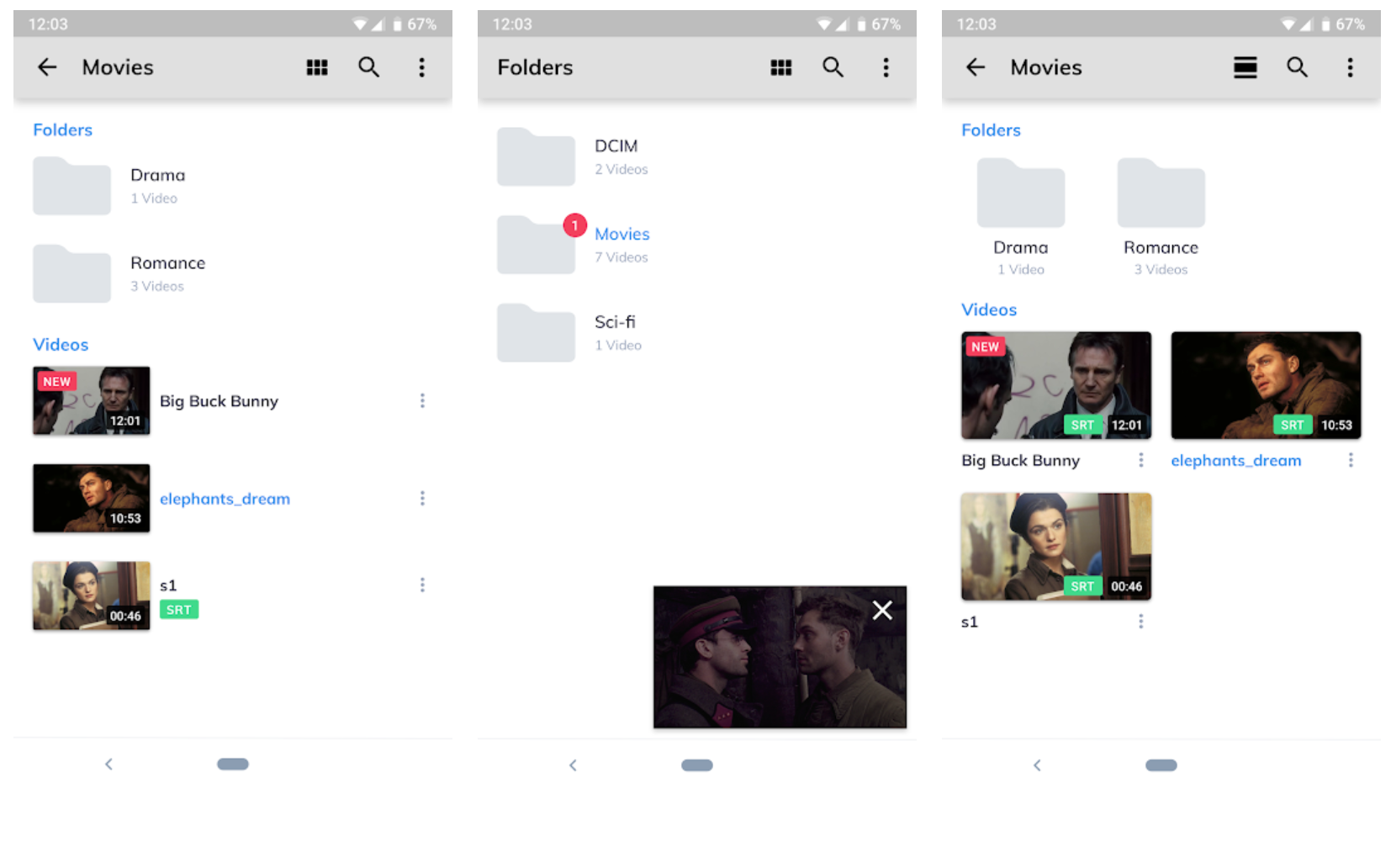
If you’re looking for a lightweight and easy to use Android media player, MX Player is perfect for you. MX Player supports multiple file-formats or containers and can play almost every kind of video you ask it to. The media player also supports a variety of subtitle formats, such as .sub, .srt, .txt, and .idx files. The gesture controls make the software easy to use – swiping up or down on the left or the right ends of the screen increases or decreases the brightness and the volume.
Swiping left and right will fast forward or rewind the video. The UI is relatively basic, which makes using the app simple. However, one downside is that the app has ads. If you dislike ads, you can get the ad-free paid version from the Google Play Store.
Resolving the “Can’t open file” error is super easy, and you can quickly fix it by downloading a robust media player like MX Player or VLC for Android. In just a few taps, your phone will be ready to play any video.
A new messaging app called Lipsi is quickly climbing to the top of the App Store’s charts. Lipsi is an anonymous messaging app available for both iPhones and Android phones that lets you receive and send messages without revealing your identity. You can use it to get anonymous feedback and even compliments by plugging the link on your social media bios.
What makes Lipsi unique is that it’s a location-based messaging app – meaning, anyone withing a 100-yard range can message you anonymously. The app officially launched in late 2017, but recently has started climbing the App Store’s top free apps chart rapidly. At one point, the app was the 16th most popular free app – beating even Pinterest and Twitter! Signing up for and using Lipsi is super easy. In this post, we’ll briefly discuss the features of the app and how you can sign up and use the app.
How To Use Lipsi
It is a location-based anonymous messaging app that enables you to chat with people near you without revealing your identity. In the app’s advertisement, Lipsi is used to compliment someone you see in real life or let them know if they’ve dropped or forgotten an item. Lipsi’s target audience includes people aged between 15 and 25 – primarily those in high school or college. When you first download the Lipsi app, you will need to agree to the app’s terms of use. Obscene, abusive, or sexist content is not allowed on the app, and going against the terms of use will lead to your account being banned.
Lipsi
Lipsi makes the rules clear on several pages in the app – Lipsi does not tolerate offensive behaviour, and it seems that anonymous apps have learned their lesson from popular predecessors like Sarahah and Yik Yak. Both of those apps were reported for cases of bullying and threats. The issue was there was no moderation, and since users were anonymous, there weren’t any repercussions for saying cruel things to other users. The anti-abuse message is echoed when you first sign up for the app, and again before you get started with using the app.
The developers warn the users that if any offensive content is posted on the app from your account, Lipsi will reveal your identity to other users. Post sign-up, there’s not really much else to the app. The main page on Lipsi shows Lipsi users around you. The radius is about 100 yards, and if anyone is using the app within 100 yards, they will pop up on the main page.
To chat with anyone in the 100-yard radius, tap on the pop-up, and a chat box will appear. From here, you can text the person freely.
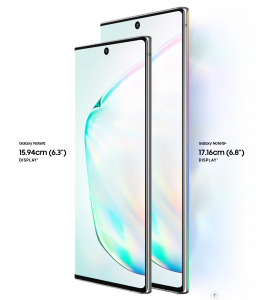
The Mi Note 10 and the Galaxy Note 10 Plus are an odd match-up – comparing a decidedly mid-range phone with a full-fledged flagship does not seem fair. The similarity in their names has nothing to do with the reason we’re comparing the two phones. The upcoming Galaxy S20 will reportedly feature a 108MP primary camera as a part of a multi-module setup – which is a massive upgrade from the 12MP camera setup.
Galaxy Note 10 Plus
A Quick Comparision
Comparing the two phones will give us a clear picture of how much better the cameras on the S20 will be. First things first, the 108MP camera is not nine times better than a 12MP one. Camera systems are complicated – and since the two cameras come from two different generations of sensors, a direct comparison of area, size, or megapixels is not practical. Regardless, getting the numbers out of the way will help.
The 108MP sensor has roughly three times the area of the 12MP sensor. There are 2.25x more pixels on the Xiaomi Mi Note 10‘s camera. When you combine four adjacent pixels into one, the resulting pixel is about 30% larger than the average pixel on the Galaxy phone. Modern mobile camera systems boast not only stellar hardware, but they also make use of cleverly designed software. Multiple photos are stacked seamlessly in the background, which helps reduce noise, enhance dynamic range, and capture better night shots.
Galaxy Note 10 Plus Display
You would guess that a photo by a 108MP camera would be much, much better than a photo captured by a 12MP camera that has been around for several years now. In general, yes, the pictures have more detail; however, the greater detail does not necessarily make the photos better. Let us first look into both the phone’s hardware before drawing any conclusions.
Camera Hardware Overview
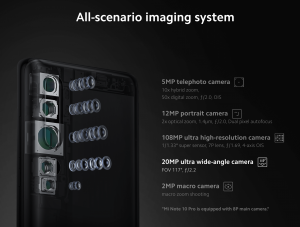
Xiaomi’s Mi Note 10 is the first phone to come out with a 108MP primary camera. The camera sensor is an extension of a lineup that comprises of a widely used 48MP model, a 64MP model that’s getting increasingly more popular, and a robust 32MP model primarily utilized in front-facing camera applications. All of these sensors have different sizes, but they work on the same concept – they use a Quad Bayer filter array (and not the Bayer filter).
Mi Note 10 Features
The semantics of why it’s called ‘Quad’ are a bit murky; however, the essence of it is that the filter groups four neighbouring pixels under the same Red, Green or Blue colour filter. The grouping allows the four of them to capture the same primary colour at different exposures.
In this way, a 48MP Quad Bayer sensor ends up capturing a 12MP image that has a better dynamic range, lesser noise, and a little extra detail that the conventional 12MP sensor would capture. Applying the same principles to the 108MP sensor in the Mi Note 10, we get a resultant 27MP image in the default camera mode. The hardware specifics of both the cameras are consequential to the images we capture from the two.
Mi Note 10 Imaging
Camera
First up, the Mi Note 10’s primary camera sensor is adequately large – coming in at 1/1.33″, it is the largest camera sensor found on a phone’s camera in modern times. When you couple that with a bright f/1.7 aperture lens, the result is the thinnest depth of field on a phone camera. It can mean different things – either a nicely blurred background in portraits you shoot or a loss of sharpness in the scenes with varying depth. The loss of sharpness is particularly apparent with nearby subjects since the depth of field gets even shallower.
On the other hand, the Galaxy Note 10 Plus features a dual aperture mechanism on its primary camera setup, and hence, can stop down to f/2.4 in a good light. In good lighting, you will get some extra sharpness and extra depth of field in the images you shoot, but the camera is capable of opening up to f/1.5 to gather more light (when the scene calls for it).
Mi Note 10 Fingerprint
Even though it is a smaller sensor, it is no match the Mi Note 10’s light gathering capability. Technically, the Mi Note 10 should have the edge over the Galaxy phone, on the grounds of sensor size and optics rather than mere resolution. However, looking at the samples themselves before concluding makes it much more apparent why exactly the 108MP camera is better than the 12MP camera.
Daylight Samples
On comparing the daylight samples of both the phones, here are the differences you will notice:
The Xiaomi phone has resolved the dotted pattern on the balcony blinds. Meanwhile, the Note 10+’s lower resolution camera combined with Samsung’s sharpening algorithms results in a ‘made-up’ rendition of the patterns.
All 12MP cameras fail at this in one way or another, so the revelation is not shocking by any means.
The Mi Note 10’s higher resolution benefits in this case.
There is also finer detail and crispness in the image captured by the Xiaomi phone – and you
Mi Note 10 Vlog and Night Mode
will begin to notice some of the details the Samsung phone did not capture.
The Galaxy Note 10+’s rendition of random detail like the grass looks particularly artificial, while the Mi Note 10 captures a much more natural photo.
The Mi Note 10’s images could use post-processing tweaks, and a little sharpening and contrast/ adjustment will go a long way and bring some more pop in the photos.
Galaxy Note 10 plus Imaging
Verdict
The Xiaomi Mi Note 10 offers meaningful resolution benefits over the Galaxy Note 10 Plus; however, the increase in detail is visible when viewing the images up close only. On the other hand, for social media sharing purposes and at standard magnifications, other aspects of the image’s quality take centre stage.
Galaxy Note 10+ Storage
These include colour renditions and HDR processing, which is where the lower resolution Galaxy Note 10 Plus still reigns supreme. The highly anticipated Galaxy S20 will likely feature a 108MP sensor, and it will be interesting to see how well Samsung uses the sensor to bring ultra-high resolution cameras to the mainstream smartphone market.
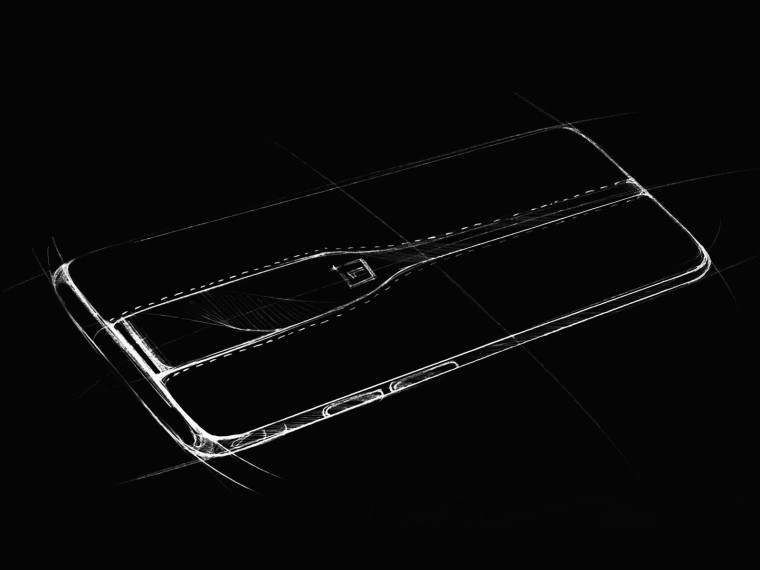
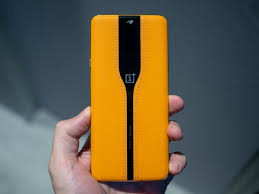
The OnePlus Concept One impressed crowd with its ‘Invisible Camera’ technology at CES 2020. And the same tech is coming to a future OnePlus smartphone. Pete Lau, OnePlus’ CEO, confirmed this during a recent podcast with The Verge. Mr. Lau made his first-ever appearance on a podcast as a guest at The Verge. During the half-hour podcast, he confirmed that the OnePlus Concept One’s ‘Invisible Camera’ technology would come to a production smartphone in the future.
He did not say exactly when, though, and no further details have been revealed. Mr. Lau did say that it will happen soon. In the same podcast, the CEO also confirmed that OnePlus doesn’t plan on releasing a foldable smartphone anytime soon.
OnePlus Invisible Camera
OnePlus Concept One: Invisible Camera
Now, if you’ve been out of the loop, the ‘Invisible Camera’ technology is quite impressive. OnePlus implemented an electrochromic glass in the back panel of the OnePlus Concept One. This electrochromic glass turns opaque when a current passes through it. The glass turns opaque, causing the camera lenses behind the glass to disappear – giving the phone a modern and sleek look.
Once you turn off the current by opening the Camera app, the glass becomes transparent, and the cameras work normally. The glass is not just a cosmetic feature since the lenses also use the glass as an ND filter. The ND filter can be activated via the Concept One’s ‘Pro mode’ option in the Camera app. The ND filter offers a ton of benefits. The filter enables you to have longer shutter speeds, which blocks excessive light from reaching the lens.
OnePlus Concept One
ND filters are a technology that digital cameras on the market have been using for quite some time now. It is possible that OnePlus will release the Concept One smartphone at some point, and not create another phone as a whole. Mr. Lau did not clarify whether this will happen, or the tech will come packed in an entirely new phone. We can assume that the OnePlus 8 series phones will not come with the electrochromic glass. Nothing suggested that it will, at least till now. Plus, the Concept One wouldn’t have featured it if the were to come with the OnePlus 8 series.
The OnePlus 8 series is expected to arrive in April or May of 2020. The company is expected to announce the series in May, although the phones may even come sooner than expected. If OnePlus sticks to the release cycle, the OnePlus 8 series will launch in May. However, since rumours and leaks have begun to circulate a lot earlier than before, the handsets could arrive in March or April. The OnePlus 8 series will have three phones – the OnePlus 8, the OnePlus 8 Pro, and the OnePlus 8 Lite.
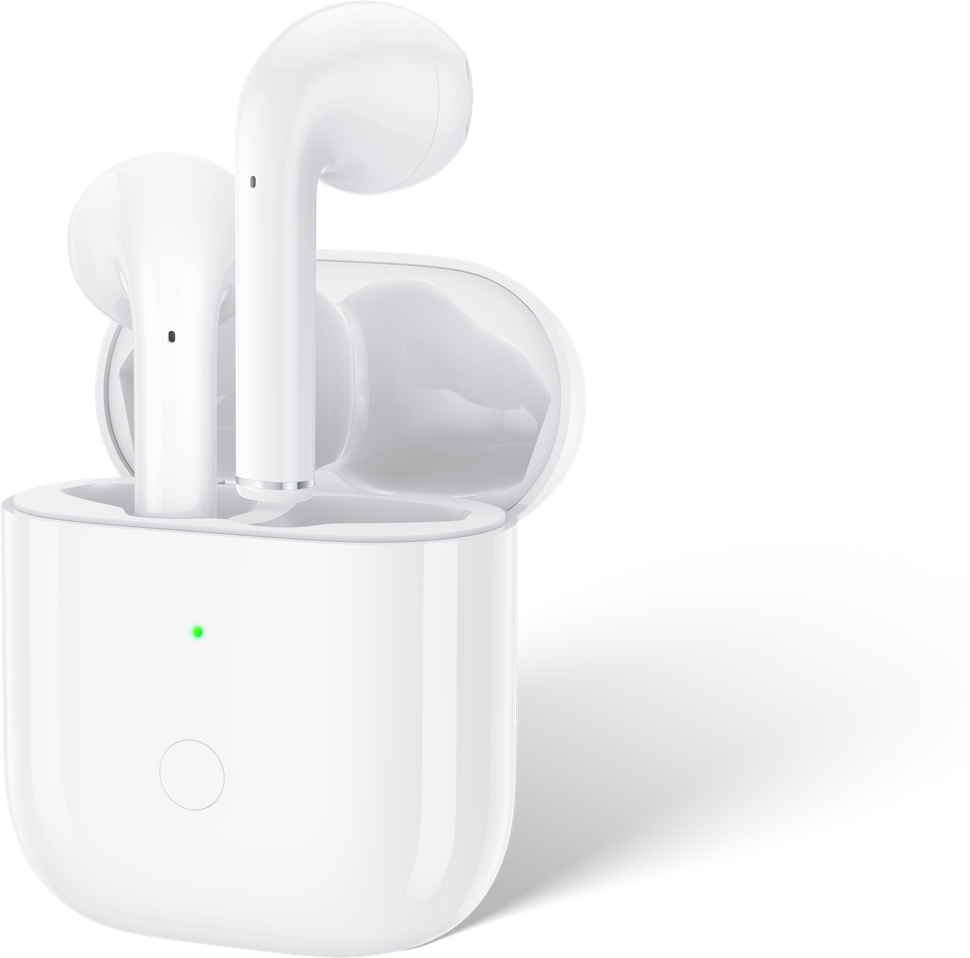
The Realme Wireless Buds Air earphones have finally launched, and they look exactly like the Apple AirPods. As previously teased, the case supports wireless charging – which is surprising considering none of Realme’s current-gen smartphones supports wireless charging. As one would expect from Realme, the Buds Air earphones are super affordable and supply excellent value for money.
In this post, we’ll briefly go over the Realme Wireless Buds Air’s features.
Realme Wireless Buds Air Features
Wear Detection
Open-up Auto Connection
Wireless Charging
Dual Mic for Calling
Super Low Latency
Dynamic Bass Boost Driver
Similar to the AirPods, the Realme Wireless Buds Air are truly wireless earphones and feature extended stems. With the earphones themselves, you get the pod-like case that holds enough power to make the earphones last for 17 hours on a single charge. The earphones themselves have a 3-hour battery backup, which is decent considering the price.
Realme Buds Air
You can use the tap controls to control music playback and play or pause the music. Double tapping the earphones triggers Google Assistant, and you can also make calls and decline incoming calls. The wireless earbuds have a dedicated gaming mode, which can be activated by long-pressing both the earphones at the same time.
Realme reports that the special gaming mode will reduce audio latency by up to 51% – from 243.8ms to 119.3ms. Additionally, the earphones also boast noise cancellation capabilities. Realme calls this feature “Environment Noise Cancellation.” The feature can only be used when you’re taking a call with the earphones on. The headsets use the dual microphones on the stems to amplify your voice and filter out unwanted background noise.
What else?
The wireless earphones use a custom-made R1 chip that supports Bluetooth 5.0. They also support Google Fast Pair technology, which allows you to pair your headsets to any device instantly, just like the Apple AirPods would. The Fast Pair feature is not currently available on the device, and the feature will be added to the earphones via a software update in Q1 2020. The earbuds feature an optical sensor that will automatically pause your music when you remove the buds from your ears, and the music will resume once you put them back on.
The charging case can be charged wirelessly using a charging pad or via USB-C. Realme has also announced its very own 10W wireless charger, which will come to the market soon. The Realme Wireless Buds Air earphones are available in three colours – White, Yellow, and Black.
In just the first sale, the company sold over 11,000 units in a couple of hours. There’s no word about its global availability yet; however, the excellent features and the fantastic price make the Realme Buds Air a great buy.
If you enjoy playing video games with a narrative, action adventure games are perfect for you. 2020 is a big year for video games with highly anticipated new titles and sequels in all genres set to launch around the year.
In this list, we will cover the most anticipated Action Adventure Games due to make their release this year.
#1 The Last of Us Part 2
Ellie and Joel left a mark on many hearts in The Last of Us back in 2013. A new instalment of The Last of Us series is coming out in 2020. The game follows Ellie several years after the events of the first instalment – but the adventure is pivoting away from the zombie-virus. A cult group has killed Ellie’s love interest, causing Ellie to decide to get rid of the group once and for all. The game’s story revolves around Ellie’s revenge. Fans will likely see Joel appear on her journey, but it is unclear how he will be involved.
The Last of Us Part 2
#2 Cyberpunk 2077
Cyberpunk 2077 is easily one of the most highly anticipated video games of all time. Although it was set to come out in April 2020, the launch has been pushed to September 2020. The game is under development by CD Projekt Red, the creators of The Witcher series.
Cyberpunk 2077
The open-world RPG game highlights a futuristic world where crime and greed flourishes. You take on the role of a mercenary who must take up odd jobs and earn street cred to gain respect and get higher-paying gigs.
#3 The Legend of Zelda: Breath of the Wild (Sequel)
In a surprise announcement at the end of E3 2019, Nintendo revealed that it is bringing out a sequel to their hit release, The Legend of Zelda: Breath of the Wild. The game’s story will revolve around a new foe that Link and Zelda discover living under the surface. No other specifics have been revealed, and all we know is that the sequel is in the works.
The Legend of Zelda
#4 Marvel’s Avengers
The Marvel cinematic universe saw a massive boost in popularity after the release of Endgame. A gorgeous-looking video game instalment from the Marvel universe is in the works over at Crystal Dynamics with Eidos Montreal.
Marvel’s Avengers
Titled “Marvel’s Avengers,” fans got a glimpse of the game and what it will be about at E3 2019. You will play as theEarth’s mightiest heroes that fight for the survival of humanity when it is caught in extreme peril.
#5 Twin Mirror
Dontnod Entertainment revealed that they have a new episodic adventure title in development. The development studio is best known for its Life is Strange series, but their next game is not a sequel to it. Twin Mirror is an upcoming psychological thriller game that follows Sam, who returns to his old hometown to attend his best friend’s funeral service.
Twin Mirror
Things take a turn for the worse when he wakes up with no memories of the previous day, and he also happens to be covered in blood.
#6 Final Fantasy VII Remake
Final Fantasy VII was a massive hit when it first launched on the original PlayStation. For years, fans have been pleading Square Enix to re-make the game for current-generation platforms. Square Enix finally obliged and unveiled that Final Fantasy VII is under development and would receive a remake for the PlayStation 4.
Final Fantasy VII Remake
The game will follow the same premise of Cloud, the protagonist, joining the Avalanche group as they fight against the Shinra corporation. Square Enix decided to alter the direction of the game a little bit, and instead of featuring the old-school turn-based combat, the game will feature action-RPG style gameplay.
#7 Senua’s Saga: Hellblade II
Developed by Ninja Theory, Hellblade II is a hack-and-slash psychological horror title that follows Senua, a warrior, venturing her way into Helheim. Seeking to rescue her deceased lover’s soul, Senua will battle a series of otherworldly entities – but since the protagonist has psychosis, her venture into Helheim may be too much to handle.
Senua’s Saga Hellblade II
The sequel was announced during The Game Awards 2019, and the game will be released on the new Xbox Series X. The trailer looks fantastic, and fans are hyped for the game’s launch later this year.
#8 Gods & Monsters
Ubisoft unveiled their brand new IP during the press conference at E3 2019. Gods & Monsters is a title that visually mimics Nintendo’s The Legend of Zelda: Breath of the Wild; however, it does have a twist. The game is set in a Greek fantasy world, where players must save the gods fallen from a monstrous creature called the Typhon.
Gods Monsters
Our hero must embark on a journey to defeat dangerous monsters and solve a series of puzzles along the way. Gods & Monsters is being worked on from the team that created Assassin’s Creed: Odyssey, and hence, fans have high expectations for the game.
#9 Tales of Arise
After Tales Berseria first hit shelves back in 2016, a new instalment to the Tales game franchise is finally coming out in 2020. Bandai Namco Entertainment is working on Tales of Arise, an RPG game that will launch on current-generation consoles.
Tales of Arise
If you’re familiar with the series, you will know that there are several instalments, but they are not always connected. Fans hope that this game will shed some more light on the lore and tie some loose ends.
#10 Beyond Good & Evil 2
The game will follow the protagonist from a struggling pirate to a captain of a massive vessel. If the upcoming Beyond Good & Evil game is anything like the first title, we can expect an entertaining narrative full of adventure. It will be an open-world video game, but it’s uncertain how engaging the world will be and if there will be enough events to keep players occupied as they explore the world.
Beyond Good _ Evil 2
Wrapping Up: Action Adventure Games Of 2020
2020 will leave its mark as one of the best years for Action Adventure Games, with new, stunning-looking titles coming out every other month. We are also likely to see more and more glimpses of the next generation consoles and the games coming out for them. The year will end on a high note, with the release of the PlayStation 5 and the new Xbox.
I can understand the pain that comes with taking hundreds of photos, none of which turns out to be any good. But do you know what is a good remedy? Instead of trying to achieve that perfect click, maybe we should just devote ourselves to photo editing apps. There are some excellent options out there that make life easier for us. The photo editing apps that we will discuss here are all Android-friendly ones, with some of them having an iOS version as well.
#1 PicsArt Photo Studio
This is one of the most comprehensive Android photo editing apps out there. It features a collage maker, camera, and tons of different tools. It is completely free to download and use. However, you may need to purchase the premium version if you want specific features. The collage maker offers hundreds of free templates while the Cutout Tool lets you create and share custom stickers. The PicsArt’s tools allow its users to add text on images, clone, stretch, crop, and do much more.
Best Photo Editor Apps: PicsArt Photo Studio
#2 Camera360
Camera 360 features a user-friendly interface and is one of the better apps out there for photo editing. It is very easy to find your way around here. You will find more than a hundred exquisite filters. In addition to this Camera 360 also offers 3D Funny Stickers and regular stickers. The app also has a real-time makeup beauty camera that can beautify the images in no time.
#3 AirBrush
This photo editing app comes with many different features, such as awesome filters and user-friendly tools. Thanks to the number of tools at your disposal here, you will not find it hard at all to edit your pictures. The app allows you to remove pimples and spots using its blemish remover feature. You can also whiten your teeth, make your skin look flawless, and do so much more with AirBrush. It also has real-time editing technology and lets the users retouch pictures.
AirBrush
#4 Flickr
Flickr is a photo editor app that can also be used for uploading and sharing pictures. Users can modify images by adding frames, filters, and more. They can also use the tools offered here to crop, rotate, and reshape the images. Its interface is neat and user-friendly.
#5 Photoshop Express
The Photoshop Express boasts of a simple interface with intricate features. You will find all the necessary features, such as rotating, flipping photos, cropping, and resizing the image. The app is completely free. However, for more advanced features, you will have to sign in using an Adobe ID. The app offers 15 borders and frames, ability to add text on the image, use filters, and more.
Photoshop Express
#6 PhotoGrid
You can use this app to remix your clicks and share your photos on your social media account. Users would be able to add filters, use stickers, and choose from over 300 collage templates. You will even be able to customize the templates. In addition to using graffiti, texts, and stickers, you will be able to edit your picture’s brightness, contrast, and other details. The facial recognition tech here will help decrease wrinkles and blemishes.
#7 Pixlr
Previously called Pixlr Express, it is a dynamic app featuring Colour Splash and Focal Blur options. There are tons of options for adding effects. You can add texts, change the background, resize the image, and do plenty more.
#8 Photo Lab
Photo Lab is an Android application that is designed to make your photos stand out. With over 900 effects, dozens of different frames, and tons of filters, you are sure to have a good time using this app. With the Face Photo Montage feature, users will be able to swap their face and work out some tricks. Another blessing is that the interface is quite simple and pretty intuitive, making it easy to understand and use.
#9 PicLab
PicLab is a convenient editor app that offers users to add text in dozens of different ways, use filters, adjust opacity, and let your creativity flow with the drawing tool. You will also be able to have fun with the stickers and frame. As always, you can adjust the brightness, saturation, blur, contrast, and more.
PicLab
#10 PhotoDirector
This is another Android photo editing app with an intuitive interface and contains all the basic features. You will notice that it has an in-app camera that can be used for live photo effects. You will also be able to edit and share your photos on social media. The app offers photo effects, HDR effects, colour editing features, and other usual options like cropping, increasing brightness, adding text, and so on.
#11 YouCam Perfect
As the name suggests, YouCam Perfect ensures your photos emerge flawlessly after editing. You will be able to beautify the photos, add collages, frames, edit it, and do a lot more. Popular features include Eye Bag Remover, smile feature, magic brush, and so many others. You can also reshape your face, add contours, smoothen skin, and more.
#12 Retrica
This app is an excellent option for taking selfies and personalizing pictures. You can make use of their attractive filters, create collages, and use the stickers as well. In addition to this, you can also create video pop-ups and upload your selfies to any social media platform.
Retrica
#13 BeautyPlus
This is one of the more popular Android photo editing apps out there. The reason is that the developers have worked closely with makeup artists and photographers to create this app. The app removes blemishes, dark circles, whitens teeth, and adds a radiant complexion. Besides these features, you will find all the regular editing tools as well at BeautyPlus.
#14 TouchRetouch
The app is slightly different from the other apps on this list. While you cannot make any major adjustments, you will be able to remove the elements that disturb the picture. The app is not free. You can make people or things in the background disappear using the Blemish Remover. There are plenty of other stunning features here as well.
#15 Snapseed
Snapseed is a powerful editing app is completely free. It offers tons of filters, ability to precisely tune the image, add texts, adjust the colour, and do so much more. As an added advantage, it is incredibly easy to use.
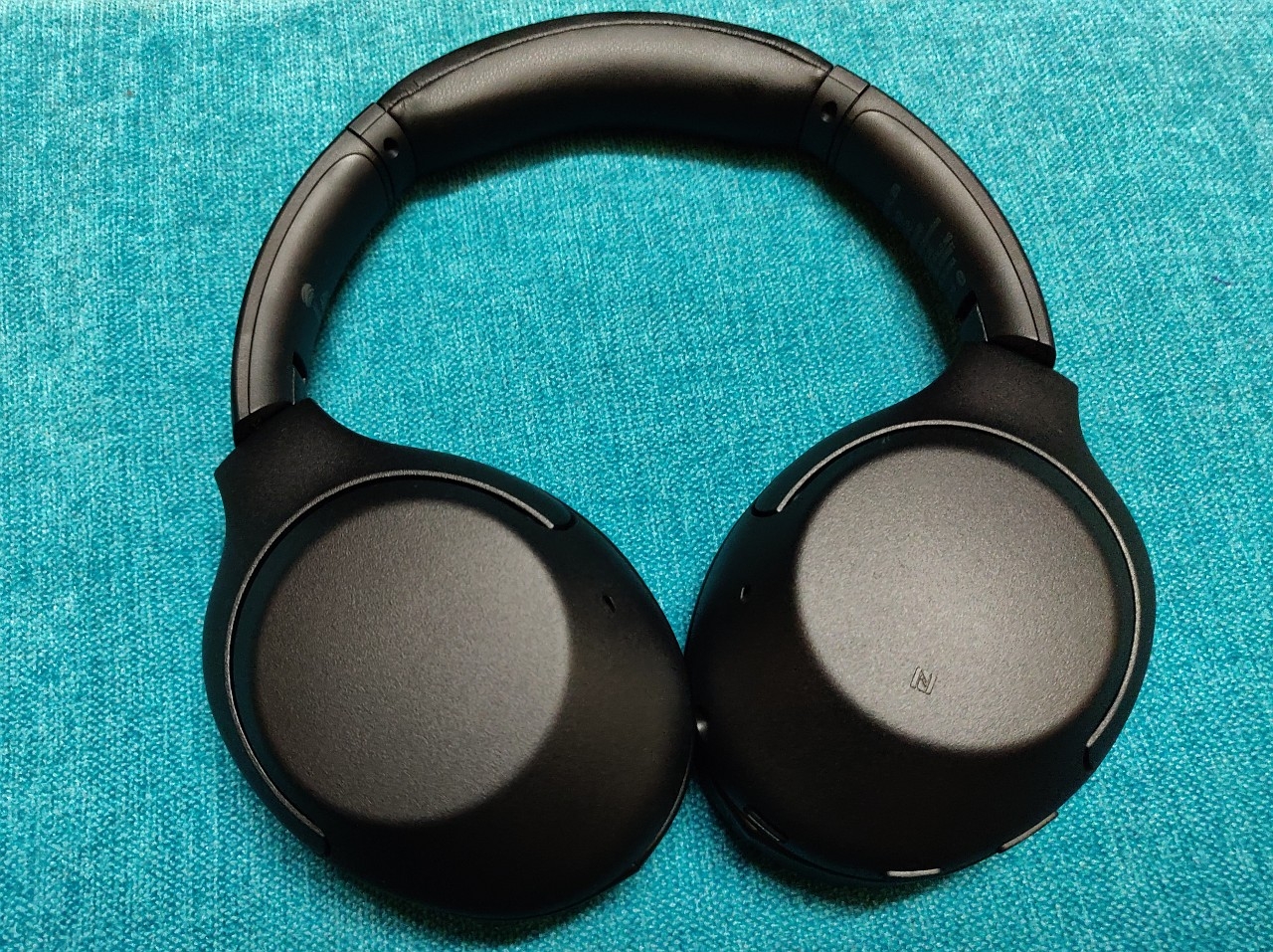
Noise-cancelling headphones are the latest trend. The Sony WH-XB900N headphones could possibly be one of the best ones out there, especially considering its price. If you are on the lookout for headphones that not only offers excellent audio but also gives you noise cancelling feature, this is the one for you. Wireless headphones and earbuds are fast becoming the major smartphone accessories. If you have done your research properly, you might have noticed that the place for the best over-ear headphones with active noise cancellation or ANC feature till now was held by Sony WH-1000XM3.
Sony WH-XB900N Review
However, the Sony WH-XB900N launched recently at a lower price and with some better features, making it a better bargain. Inspired by WH-1000XM3s, the headphones have a similar build but tons of different features. It has managed to improve the drawbacks of the older model while retaining its best quality. While most of its alternatives don’t feature virtual assistant support, this model comes with Google Assistant integration. If you use an Android smartphone, you can be sure that this one is just perfect for you.
Design
Over-ear headphones usually look pretty much the same at first glance. It is when you look closely you differentiate the many particular features, indicating each brand’s design involvement. If you want to compare the latest headphones by Sony with its older model, you might be hard-pressed to find noticeable differences. Since they are both designed and manufactured by Sony, they do look quite similar.
A flexible plastic is the main material used here, but it features a textured matte finish, giving it a more sophisticated look. Where the XM3 model worked with just plastic, Sony has decided to give this one a better finish. Besides looking nicer, it makes sure dirt and grease are not as noticeable as before. This also makes it less prone to scratching. One of the first things you will notice here is the lack of many buttons. The buttons that are here are strategically placed. On the left earcup, there are two buttons – one for Custom use and the other a power button. The former can be set up to activate Google Assistant or Amazon’s Alexa on your Android phone. Under the earcup on the left, there is a USB-C charge port and a 3.5mm input port.
Sony WH-XB900N Aesthetics
The right earcup has a touchpad for device control. Here, you can make use of swipes and taps to manage calls and audio. The company includes a 3.5mm audio cable along with a USB-C charge cable in the box. One thing missing here is a hard carry case. It has been replaced by a canvas pouch that unfortunately looks and feels cheap. The XB900N has been efficiently designed to fold up perfectly, making it very frustrating that a proper case has not been provided. However, you can always purchase one separately to keep your headphones safe.
Comfort and Fit
The over-ear design of the XB900N is a very nice touch here. It fits great as well. The pads are comfortable and the cans are extremely lightweight. You will find a piece of spongey cushion on the underside of the headband. This is such a simple feature, yet not many headphones feature it. This cushion ensures the headphone sits exactly where you want it. If you wear it for long periods, you can be sure that it takes off much of the pressure. You can also make use of the extendable arms should you wish to. Many users have mentioned that Sony WH-XB900N is one of the most comfortable headphones they have ever owned. There is literally no earcup pressure, regardless of how long you wear it for.
Audio Quality
Just as the name suggests, Sony WH-XB900N, the headphones are designed to deliver extra bass. The XB in the name refers to this core component. At standard EQ settings, you will find that the low-end is emphasized. The highs are crisp and clear while the mids are more balanced. The microphone within the model works excellently by capturing ambient sound to improve the noise cancellation. In addition to this, it can also listen to voice commands, regardless of how noisy your surroundings are.
Sony WH-XB900N
Noise Cancellation
There are plenty of very good noise cancellation headphones out there. However, the price point is equally high. However, Sony has risen to the challenge. The WH-XB900N not only offers better ANC than its competitors, but it is also priced very reasonably. At this price, the ability to adjust and control the level of background noise is something one can witness very rarely. You can always adjust the settings so that the ANC allows more ambient sound.
The App
Among the top headphone apps, Sony takes the lead. It is one of the best companion apps if you want to tinker around with the settings and more advanced features. The headphones feature an Adaptive Sound Control toggle that aims to understand what you are doing as you don on the headphones. This could be sitting, walking, and so on. Once it detects the activity, it will try to adjust the ANC depending on the activity. If you want, you can adjust it manually as well. It also has a 360 sound feature where it will ask you for a picture of your ears. The app will then make related audio adjustments based upon these images. However, users have mentioned that there is no noticeable difference here.
Verdict
With excellent audio, stylish aesthetics, and a functional app, the Sony WH-XB900N is truly a great purchase. With regards to the battery, the company claims that the headphones can last you for about 30 hours on one charge. However, practically speaking, it can easily give you 40+ hours. Exceptional comfort and user-friendly controls all play a role in making this headphone one of the best in the market right now. The only drawback we see here is the lack of a proper carry case. However, you can always get one separately.
The Skagen Falster 3 has a slightly different smartwatch design if you compare it to the usual standard. Its clean, minimalist look is a clear win, especially when you consider it against its previous model, the Falster 2. The smartwatch features GPS, a heart rate monitor, NFC, and a built-in speaker. It is one of the perfect models for sale in 2020. This third iteration by the company has been designed to be simple yet perfect. The watch is set to run on Android’s wearable OS. The elegant design coupled with the top features in the market easily make it one of the best contenders out there.
The release date of Skagen Falster 3 is January 7. It was also the day it was announced. If you are in Asia or the US, the smartwatch has already hit the market and is available for purchase right away. For other regions, like Europe, the Falster 3 will make its way there by the end of the month. The price is only slightly increased when compared to its predecessor, but the extra features added here make it completely worth it.
Skagen Falster 3 Review
Design And Display
In this third iteration of the smartwatch, Skagen has worked hard to refine the aesthetics of its Falster series watches. You will notice that the strap lugs are more rounded, the aesthetics cleaner, and an overall elegance that is apparent at first glance. The watch is designed to sit comfortably on the wrist without feeling overly large but still suiting quite well indeed. The central crown button rotates, making it easier for you to scroll through the apps and the menu. The button located above and below can be customized, enabling you to launch your favourite apps in no time.
The watch body has been designed to be swim-proof up to a depth of 30 meters. A nice touch here is the fact that you can track your swims via the fitness apps. When you purchase the watch, you will be able to choose from three different strap materials, including leather, metal, and rubber. All of them are priced the same. You will not have to pay anything extra even if you choose to go with Skagen’s mesh metal strap. We wish every manufacturer worked like this!
Skagen Falster 3
If you ever notice the Fossil group’s watches, you would have observed that most of them tend to have different designs. Skagen’s Falster 3 features a circular face and a slightly more rounded look than its predecessors. This slick smartwatch has three buttons, including the crown and the two shortcuts buttons. Thanks to these, you can easily navigate yourself without having to use the screen.
Performance
The Skagen Falster 3 runs on Qualcomm’s dedicated Snapdragon 3100 wearable chipset with 1GB RAM. This feature enables it to run Google’s Wear OS software. Here, you will also receive 8GB storage, which is pretty much double the limit of other models. On the left side of the smartwatch, you may have noticed a vent. This houses the built-in speaker. This comes in useful for using Google Assistant, playing music, playing notification tones, and taking phone calls directly on the watch. The feature of being able to take calls directly from the watch is indeed a novel one. The best part is that you will not require a SIM card in the wearable to achieve this.
A Skagen press release mention, “Using our proprietary phone app, both Android and iPhone users will be able to make and receive phone calls directly from their Bluetooth-enabled watch.” Besides the heart rate monitor and the app, the company has also pre-installed the Cardiogram app on Falster 3. This will continuously monitor your heart rhythm and notify you it something irregular has been detected. While diagnosis is not possible, this alert could be useful as an indication to visit the doctor.
Features of Skagen Falster 3
Coming to the battery, the smartwatch has an extended battery mode which can help you enjoy days of battery life. You will not have to sacrifice any of the features, such as receiving notifications or the continues heart rate monitoring. Coming to the aesthetics, the Falster 3 has about three strap options, none of them which costs extra. If you are like me and love to change the watch faces, you might the collection here quite nice. Just like the design, the faces are clean, minimalist, and elegant.
Skagen Falster 3 Wear OS
Of course, with this model, you will be able to interact with Google Assistant thanks to the presence of the in-built speakers. You will even be able to attend calls and talk. This is applicable for both Android and iPhone users. The smartwatch features built-in GPS for tracking runs accurately. In addition to this, you will notice that it comes with an HRM and NFC. You can now make payments without ever worrying about leaving your wallet at home.
X By Kygo Edition
There is a surprise for all the music fans here. A special edition of Falster 3 is in the works, created in partnership with Swedish DJ Kygo. The well-known DJ has his own range of tech products under the ‘X By Kygo’ brand. The Falster 3 is the most recent addition to its headphones section. All the features will essentially be the same here as well. The only difference will be minor design tweaks to be more in line with the X by Kygo brand as well. The strap will feature an ‘X’ logo while the ‘X by Kygo’ will be present on the white strap pusher. This edition will launch later this month. With regards to watch faces, it will have a few exclusive faces keeping in with the theme.
Verdict: Skagen Falster 3
The Falster 3 by Skagen is a neatly designed smartwatch without any clutter. The Scandinavian design might attract some customers as well. Surprisingly, the company has made the model not too expensive either. It is quite affordable, stylish, and has tons of features that will make life fun. The long-lasting battery, huge storage capacity, and different straps all count towards its pros.