Author: Jessica Robinson

  • Klipsch T5 True Wireless Stylish Earbuds | Detailed Review

    Klipsch T5 True Wireless Stylish Earbuds | Detailed Review

    Classic American audio brand Klipsch is an iconic manufacturer of some of the best loudspeakers of the vinyl era. The brand is known for leaving the expensive stuff to smaller boutique brands and instead prides itself on making products that serve up a retro design and a premium listening experience at great prices.

    Klipsch T5 True Wireless Stylish Earbuds

    The company recently launched its first truly wireless earbuds, the Klipsch T5 True Wireless. The T5’s are premium wireless buds, but just other Klipsch products, they aren’t designed to be shown off as status symbols.

    The combination of impressive sound, excellent 8-hour battery life, and eye-catching style makes them well worth the $40 premium you’ll pay over Apple’s AirPods.

    Design

    The T5’s boast an impressive design, and come with a beautiful metallic wireless charging case. The brushed metal job makes the case look like a fat Zippo lighter.

    The case is quite hefty and feels as heavy as a paperweight. Snapping it open is super satisfying – it has a weighty lid that pops up to reveal the premium earbuds inside.

    Although the case boasts a sturdy build, the finishing is delicate. Casual use will scratch the surface of the case, so be wary that the case will attract scratches and won’t look sterling over time.

    Despite its stout characteristics and physical weight, the case is small enough to fit perfectly in most pockets.

    The ergonomic rounded edges help you remain comfortable when you’re walking around.

    The earbuds feature the same compact and ear-filling style you will see in other premium earbuds like the Samsung Galaxy Buds and Jabra’s Elite Active 65t earbuds.

    It looks like manufacturers are forgoing bulky earpieces, and the AirPods’ golf-tee design is going out of fashion.

    The Klipsch T5 are black in-ears that feature Klipsch’s signature copper accents and logo on the caps.

    The logo and accents give the earbuds a unique look that differentiates itself from other models in two significant ways.

    First, they feature long and slender acoustic tubes to carry the sound to your ears, which allows the outer part of the housings to sit at the very center of your ears exceptionally comfortably.

    Second, the earbuds have oval-shaped tips that snap on (there are three sizes in the box), making for a great seal, especially for those that have smaller ear canals.
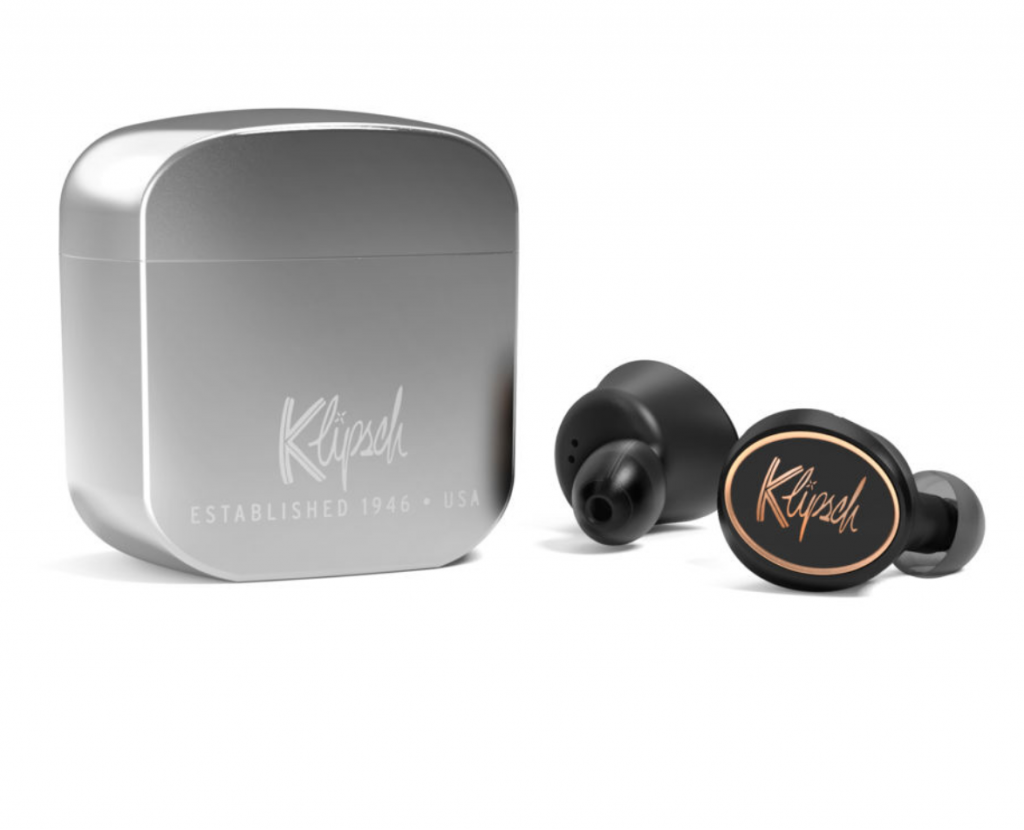
    Klipsch T5 Design

    Features

    Apart from their stylish design, the Klipsch T5’s distinguish themselves with features like the excellent battery life and waterproof design.

    The earbuds deliver 8 hours of use per charge, and sport a claimed 24 hours reserve battery in the charging case. The battery life puts them up with the best on the market, including Apple’s much larger and pricier PowerBeats Pro that offers 9 hours of use per charge.

    Unlike Apple’s Powerbeats Pro, the T5’s don’t come with earfins or ear hooks that keep them secure in your ears during workouts. However, the snug fit mitigates much of this need.

    The IPX4 water-resistance rating makes them capable of resisting rain and sweat better than the AirPods. Having waterproof earbuds is not only great for when you hit the gym but also super helpful if you wish to take them out in bad weather.

    The two physical buttons under the Klipsch logos on each side of the buds furnish intuitive controls.

    When both the earbuds are in your ears, pressing the left earphone will pull up your voice assistant, and pressing the right earphone will play or pause the music.

    Double presses on the left or the right earphone will skip to the previous or the next song, whereas long-pressing the left or right earphone lower or raise volume, respectively.

    You can also use the earbuds independently, and the controls will change when you do.

    A single press will play or pause the music, and a long press will pull up the voice assistant. To change the volume, though, you’ll either have to grab your phone or ask the voice assistant.

    The designs of these earbuds are to work great on calls – they have four microphones that pick up your voice accurately and transmit them as clearly as possible.

    Even if you work in a relatively noisy workspace, you shouldn’t have a problem getting through to your caller.

    They may add more features and functionalities to the headsets via the Klipsch T5 Connect app in July 2020. The company claims the app will allow adjusting the equalizer on the earphones and upgrade the firmware on the earbuds.

    The only minor issue that one can encounter with these earbuds is the pairing system. The T5’s do not have a very intuitive process for connecting to them via Bluetooth.

    To pair to them, you must open the case and press the button on the right earbud three times. However, the issue is that the button pressing is relatively quick to activate pairing mode.

    Your device may ask you to pair with both buds, but in case you only want to pair with one, you will need to disconnect the other one separately.

    The good thing is that they reconnect to your phone or other devices instantly once paired, and connection issues are rare.

    Sound Quality

    The T5 True Wireless earbuds boast impressive sound quality and are worth the price they come for.
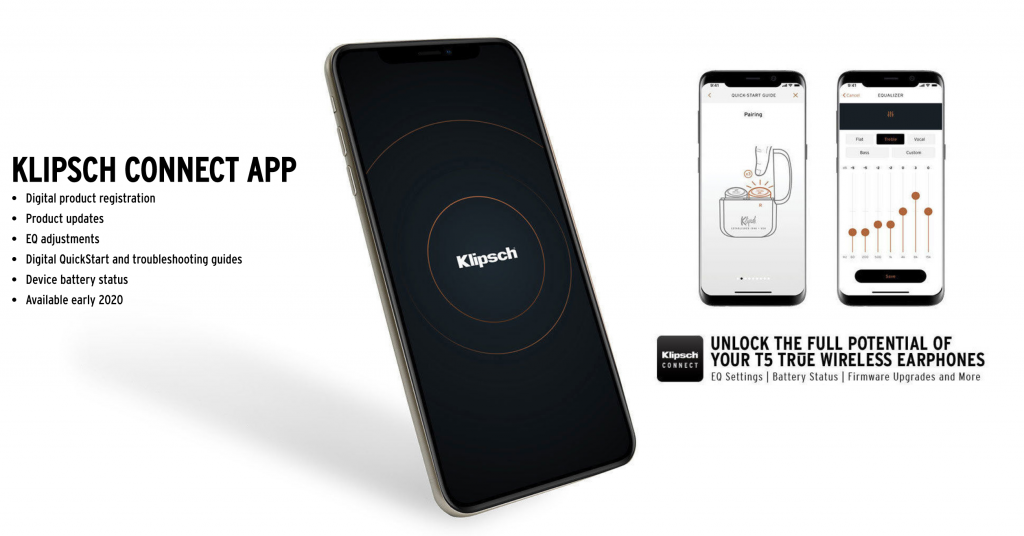
    Klipsch T5 Sound Quality

    They don’t take the top spot, however, and the Sennheiser Momentum in-ears are far better sounding (and also much more expensive). Nonetheless, the sound is excellent.

    The earbuds feature a gorgeous amount of fidelity in the lower tones. Bass-heavy music sounds fantastic on these earbuds, and they maintain a crisp thump rather than a rubbery bass response.

    You can hear each lower percussion instrument or bass sound occupying its own musical space.

    Sound is equally impressive in the midrange – whether its guitars, keyboards, and other rhythm instruments. They offer clarity much better than the AirPods, as well as the Jabra Elite Active 65t.

    These Klipsch T5 earbuds are formidable competitors to Apple’s AirPods and the PowerBeats Pro, although the PowerBeats Pro earbuds have slightly more definition in its sound.

    Bottom Line

    Klipsch’s T5 True Wireless earbuds are a compelling entry into the “truly wireless” earphone market. They offer excellent sound quality, and premium looks at an excellent price, and there are very few models on the market that match up.

  • How To Save Your Photos To SD Card On Your Android Phone

    How To Save Your Photos To SD Card On Your Android Phone

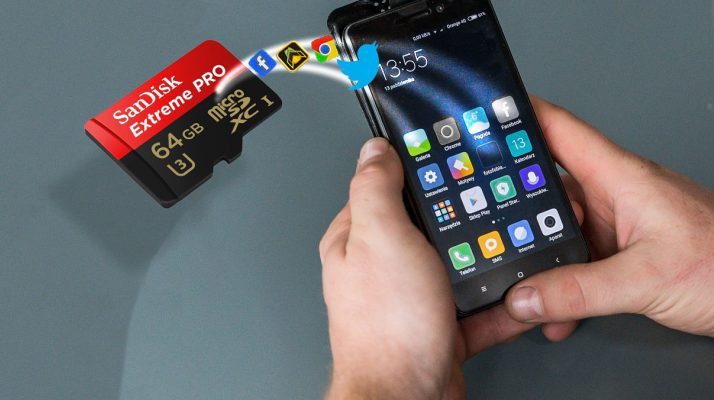
    You can configure your Android phone to save the photos you click directly to the SD card, instead of storing them on the phone’s internal memory. In this way, you can take as many pictures as you want without having to worry about running out of space on your internal storage.

    How To Save Your Photos To SD Card On Your Android Phone

    Regardless of if you own an older Android phone or a brand new phone, the steps you must take to set up your camera to store the photos right to the SD card are quite similar.

    The steps may be slightly different from phone to phone; however, digging around a little bit will help you find the right options.

    Keep in mind that some Android versions do not officially allow you to store your pictures on the SD card; however, there are workarounds for that too.

    Let’s begin.

    How to save pictures to SD card on Android phones:

    The process of setting up your Android Phone to save images directly to the SD card instead of using the phone’s internal storage is easy, and the steps below should apply to most phones with an SD card slot.

    Method #1: By Notification Pop-up

    In case you haven’t already, insert an SD card into the SD card slot of your phone. You may have to open the back cover of your phone for this if you have an older phone. For newer phones, use the SIM ejector tool to reveal the SD card slot, and insert your SD card.

    After you have inserted the SD card into the phone, a pop-up notification should appear, saying that an SD card has been inserted.

    On most Android phones, you will see a pop-up message asking you if you want to change your default storage location to the SD card. The pop-up makes it easy to make a decision right then, by just tapping on the ‘Save Photos to SD card’ option.

    In case you miss this message, or it does not appear, do not worry. You can configure this option manually by going into your camera apps’ settings menu.

    Method #2: Manual Setup

    Follow the steps below to manually set up your Android phone to save photos to the inserted SD card.

    1. Launch the Camera app on your phone by tapping on the camera icon.
    2. Tap on the gear-shaped Settings icon. You should find this on the upper-left corner of your screen.
    3. On the Camera Settings screen, scroll down until you find the ‘Storage location’ option. Tap on it.
    4. Next, tap on the ‘SD Card’ or ‘Memory Card’ option.

    From this point forward, all the photos that you click on your Android phone’s front or rear camera will be stored directly on the SD card.

    Please note that your screenshots are still saved on your phone’s internal storage in the ‘DCIM’ folder.

    On newer phones using Android Oreo and above, configuring the camera app to store pictures on the SD card is not directly possible. Downloading another camera application like MX Camera will enable you to save your photos on the SD card.

  • How To Use Instagram’s Latest Layout Feature In Your Stories

    How To Use Instagram’s Latest Layout Feature In Your Stories

    Instagram from Facebook now lets you post multiple photos in one Story. The feature is called ‘Layout.’ In this write-up, we will go over everything you need to know about the functionality and how you can use the feature to post a collage of pictures on your Insta Stories.

    How To Use Instagram's Latest Layout Feature In Your Stories

    The most recent Instagram update finally added a much-requested feature to the Instagram mobile app. Users can upload a collage of multiple pictures in a single Instagram Story using the new ‘Layout’ mode. The new mode helps create more engaging Instagram Stories.

    Instagram’s latest ‘Layout’ mode for Stories might be missing a few extra features and customization options that some social media platforms have, but using ‘Layout’ is super convenient and quick.

    Previously, if users wanted to make collages or add multiple pictures in one go to your Story, users would have to use a third-party app. The app would help create the collage separately, and then users would need to upload it to the Instagram Story from their smartphone’s photo gallery.

    Users have been asking Instagram to incorporate this feature for a while now. Instagram may have killed off a lot of third-party collage apps with this update!

    Users don’t have to install anything extra or juggle between multiple apps. There is no need to fiddle with lots of copy-and-pasting either –all the editing you would need can be done within the Instagram app.

    The mode has been rolled out globally, so, regardless of where you are in the world, you can make use of the new feature. Instagram users can now incorporate up to six photos into one Story. You can organize the pictures in different ways, too, using the selection of templates the app furnishes.

    Here’s how to do it.

    How to post multiple pictures in one Instagram Story using Layout:

    The process is super simple and straightforward. You can use the ‘Layout’ feature in six simple steps:

    1. Launch the Instagram app and tap the Camera icon in the upper-left corner of the app to start a new Story post.
    2. Swipe left across the bottom array of options until you find ‘Layout.’
    3. Take a few photos that you want to include in your Story (you can add up to six total).
    4. Choose whichever grid-like Layout you want to use for your collage Story post. There are several layout options available to choose from. Keep in mind that you will not be able to edit each photo in the Layout.
    5. Just like regular Instagram Stories, you can add other elements like tags, text, filters, drawings, emojis, GIFs, and more.
    6. When you’re satisfied with the collage, and are ready to share, tap ‘Send to Story.’ Easy!

    Summarizing It

    Given that users were already creating similar Story content with using third-party apps and applying a little creativity, it is likely that the ‘Layout’ feature is going to be immensely popular among Instagram’s fanbase.

  • Tweet From Poco Head Hints At Revival Of Brand

    Tweet From Poco Head Hints At Revival Of Brand

    It is common to see Xiaomi’s social media accounts flooded with inquiries about unreleased tech – mostly phones. Following the success of the Pocophone F1 in 2018, fans from across the globe have been anticipating the release of the Poco F2 Phone.

    Tweet From Poco

    Unfortunately, the device wasn’t released or even hinted at in 2019.

    Recently though, Alvin Tse, the global head of Pocophone, broke the silence in a now-deleted tweet. It is confirming that the brand may resurface with a new device in the coming year.

    You can see the screenshots of the tweet on various news outlets. Also, you can see the tweet using the Wayback Machine.

    The tweet from Mr.Tse does not confirm whether the device that we will see in 2020 will be the Poco F2.

    However, it is a reasonable assumption that the device is the Poco F2, given the Poco F1’s critical and commercial success. Then again, there is a possibility that fans will see a different Poco product altogether. However, it almost guarantees that it may disappoint the consumers.

    Poco F1 features; expectations for the Poco F2

    The Pocophone F1 (Poco F1 in India) is a very budget-friendly flagship-level device launched in 2018.

    It came with the powerful Snapdragon 845 SoC, which for about ~$300, delivered fantastic value for money.

    The device was available in 6GB and 8GB RAM variants, which featured between 64GB to 256GB of storage space.

    Other features of the device included a 12MP+5MP rear camera pairing, a 20MP front camera with IR face unlock capabilities, and a massive 4,000mAh battery.

    The Poco F1 redefined the concept of an affordable flagship. Hence, Xiaomi’s Redmi K20 Pro got a lot of flak for not being as aggressively priced as the Poco F1.

    Xiaomi India even issued a lengthy statement, outlining why the K20 Pro was more expensive. Citing the premium materials used, along with then uncommon triple camera setup and the OLED screen with the in-display fingerprint sensor.

    In a recent development brought to light by a Twitter user, Xiaomi has filed for a trademark application for a device called the Poco F2.

    The application makes perfect sense since the Pocophone F1 was branded as the Poco F1 in India.

    The Processor

    If the Poco F2 smartphone is in the pipeline for 2020, we will likely see it come with a Qualcomm Snapdragon 865 processor. As the Poco F1 came with the Snapdragon 845 in 2018.

    The Snapdragon 865 chipset comes with 5G built-in. It would make the Poco F2 significantly more expensive than the Poco F1.

    The Poco F2 could also be revealed to have a different chipset to keep the price as low as possible.

    Bottom Line

    Ultimately, we have very few details and have not heard any reliable rumors regarding the specs of the Pocophone F2. At this point, all we know is that the head of the Poco promised users that we will see something Poco-related in 2020 and that Xiaomi has filed to trademark the name.

  • OnePlus Announces Red Cable Club Rewards Program For Indian Users

    OnePlus Announces Red Cable Club Rewards Program For Indian Users

    OnePlus has just launched a new rewards program exclusively for Indian users. Called the ‘OnePlus Red Cable Club,’ the program brings a lot of benefits to every OnePlus user. It is including OnePlus Care extended warranty, free 50GB of cloud storage, and a chance to win the ‘Red Cable’ jackpot.

    OnePlus Red Cable Club Rewards Program

    The name of the rewards program is inspired by OnePlus’ unique red charging cables.

    Here are more details about the benefits the reward program offers:

    Benefits Of Red Cable Club

    As mentioned above, the Red Cable Club rewards program is designed exclusively to reward OnePlus smartphone users in India. OnePlus users registered in the club will get all OnePlus Care benefits. It will have a free one year extended warranty for the OnePlus 7T, OnePlus7, and 6T.

    OnePlus 6, 5T, 5, 3T and 3 series users will get 50% off battery replacements. Users that own a OnePlus smartphone will be eligible for upgrade offers regardless of generation.

    OnePlus notes that only one of the benefits mentioned above will be available per phone/IMEI.

    In addition to OnePlus Care benefits, Red Cable Club members will also stand a chance to participate in the ‘Red Cable Club Jackpot.’

    Jackpot participants can win curated gift boxes worth Rs 1 Lakh (~$1,400) each. Also, 50% discount vouchers for the OnePlus Bullets Wireless 2 earphones. This jackpot will be open until December 31, 2019.

    After you become a Red Cable Club member, you can take part in the Red Cable Club Jackpot once a day by going to Settings > Account > Community > Profile.

    Finally, all OnePlus Red Cable Club members will 50GB of free cloud storage for a year regardless of what series phones they own.

    How Does One Become A OnePlus Red Cable Club Member?

    OnePlus smartphone users in India can enroll in the Red Cable rewards club by signing up in their phone’s settings. Hence, you can enjoy free membership for a lifetime.

    If your OnePlus smartphone is running Android 10, you must first update your phone by heading to Settings > System > System update.

    After the phone is updated, go into Settings and login to your OnePlus Account and link your phone. Once your device is linked successfully, you will be registered to the Red Cable Club automatically.

    Those with OnePlus phones using older versions of Android will have to download/update the OnePlus Community app from the Google Play Store.

    Then, they must go to Community > Profile > Red Cable Club to link the phone and become a member.

    If you own a OnePlus 1, 2, or X, you must download OnePlus Care to verify your device and get the benefits.

    The OnePlus Red Cable Club program is turning out to be one of the best customer loyalty programs launched by a smartphone company.

    However, the users who have already claimed one of the benefits under the OnePlus Care program will be unable to claim any benefits from the Red Club.

  • Vivo Nex 3 Phone – Review 2019

    Vivo Nex 3 Phone – Review 2019

    Vivo NEX 3 has the most stunning display with the right set of cameras and that has caught the eyes of many buyers.

    Vivo Nex 3

    The release date of first Vivo Nex 3, is September 2019. It is compatible with GSM/CDMA/HSPA/EVDO/LTE/5G Technologies.

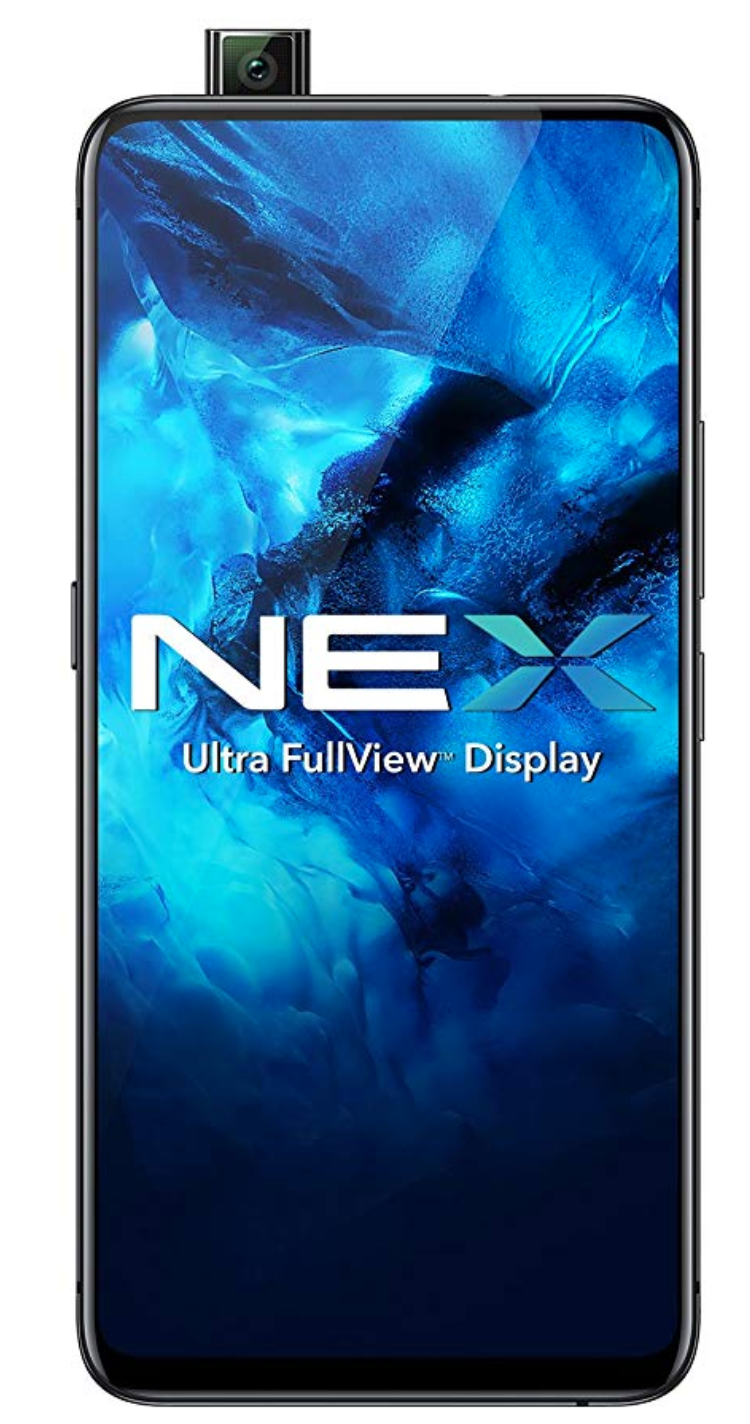
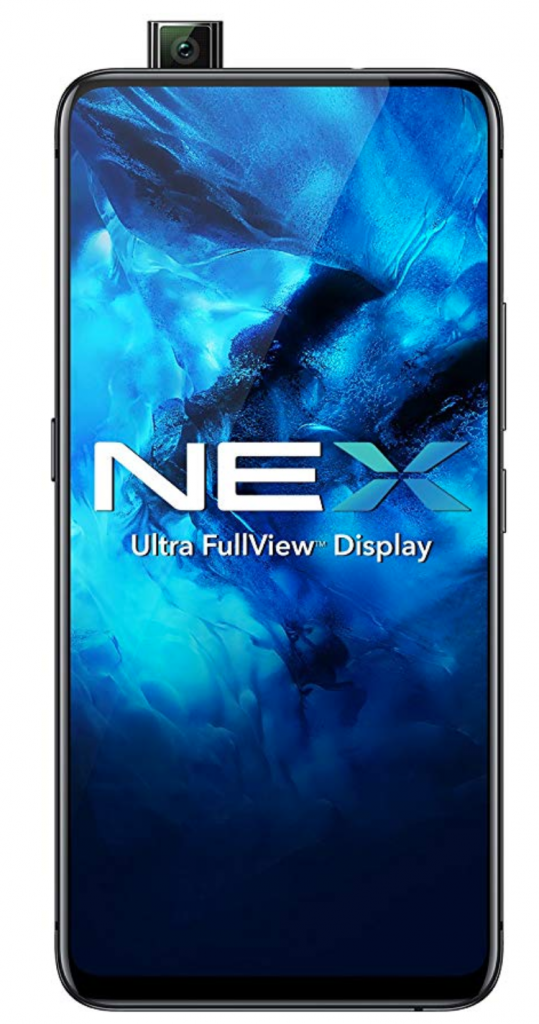
    This smartphone stands unrivaled in the world market with a massive 6.89-inch Super AMOLED touchscreen that curves on both sides at 90 degrees.

    Vivo Nex 3 Phone has no compartment for side buttons with no holes in it.

    Embedded with a 16MP selfie camera that pops up on the top of the smartphone. Also, with an LED flash, Vivo Nex 3 has enabled all its customers to remain glued to the quality of the picture that it produces.

    This elegantly designed smartphone can feature a video quality of 1080p.

    It has an outstanding feature of the triple camera of 64 MP primary camera, 13 MP wide-angle camera ad 13MP telescopic camera, that effortlessly captures all your memories with ease.

    The Vivo Nex 3 Phone Feels smooth and luxurious on the hands

    This smartphone has a gigantic dimension of 167.4 X 76.1 X 9.4 mm with a built-in glass front and back as well as an aluminum frame. The Vivo Nex 3 has been built with a Qualcomm snapdragon 855 plus chipset, with an octa-core processor and Adreno 640 GPU that promises power beyond imagination.

    This allows the user to play games without worrying too much about the power or charge of the phone.

    This smartphone runs on the Android v9.0 (Pie) operating system that efficiently runs all its programs in the background.

    Unfortunately, Vivo Nex 3 Phone has some disadvantages that we noticed.

    This exquisitely designed smartphone has got some water-resistant properties but still has to be carefully handled. Though this smartphone comes with a fingerprint sensor, it has got no face-unlocking features.

    Price of this smartphone heftily, which may downside for a lot of people. Also, the phone is bulky and feels uncomfortable on hands. It has got no stereo speakers.

    Overall, In our opinion,  This phone can be termed as a next-generation smartphone with all its premium qualities and features.

    The phone has unique software that provides multiple sensor algorithms. It allows multi-tasking, and this is possible only because of Vivo’s intelligent turbo wires and technologies.

    Battery

    This Phone has a capacity of 4500 mAH battery that allows long working hours without any hindrance to the work-life balance. Also, this smartphone also comes with a fast charger that guarantees quick charging during an emergency.

    It does not allow heat to hold for a long time as it is embedded with a vapor chamber that promises to distribute the heat all over the phone as we all know cooled-down is smooth. Nex 3 will never cease to amaze you with all its features.

    The Vivo Nex 3 comes with all the features which you will want in any modern smartphone and has been well designed. It is one of those smartphones which is true to its flagship and promises an 8GB RAM and 256GB internal memory.

  • Samsung Galaxy Watch Review: Everything You Need To Know

    Samsung Galaxy Watch Review: Everything You Need To Know

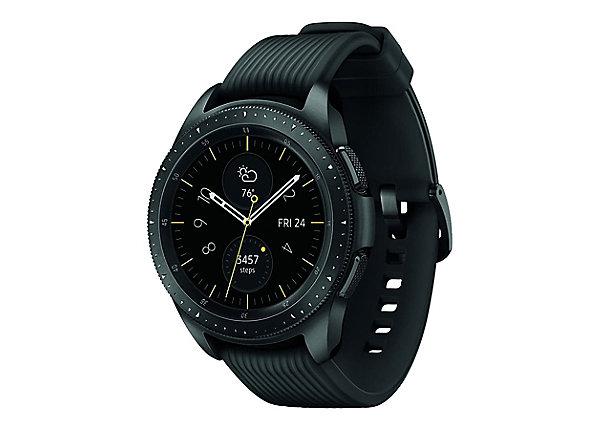
    Quickly recognized as one of the best smartwatches for Android users, the Samsung galaxy watch review gives you all the right reasons to invest in it. A killer design, power-packed features, and a robust battery are how we can describe this new-age wearable device.

    Smart Watch Samsung

    Samsung is known for its most up-to-date and fresh launches for years now. The Samsung Smart Watch is no exception to this, and it is a perfect blend of premium features and a smart and sleek outlook.

    Features

    Talking about the design of the Samsung Smart Watch, the most striking feature is that it looks almost like a regular watch. With the tactile rotating bezel design of the circular metal face and two buttons on the edges, it is top-notch in the layout.

    The two buttons on the edges of this Samsung Smart Watch make way for excellently easy navigation of the user interface. Whether you want to cycle through the apps or check out the menu, it could not have been more precise.

    The fitness watch has a 1.2-inch display, which nicely sits on your wrist without being too huge on too tiny on it. However, the Samsung Smartwatch is also available in another larger size variant of 46mm. In terms of color, you can choose from silver, midnight black, and rose gold.

    Hardware

    Coming to the hardware, the Samsung Smart Watch is packed with a dual-core 1.15GHz chipset along with 4 GB internal storage availability. It has 1.5 GB of RAM. Also, it supports both Bluetooth and LTE/4G connectivity.

    With a fast and intuitive user interface, the Samsung SmartWatch is compatible with all Android versions above Android 5.0, and it also works with iOS 9.0 and above.

    Although the Samsung Smart Watch supports only Samsung apps, it does have features that make it better than the other rival products. The health application on the Samsung Smartwatch is having new features, including breathing and stress management aspects. It allows you to track and monitor over 21 indoor exercises and up to 39 tracked workouts. Also, it has a sleep tracking feature.

    You can quickly switch the feature or mode on the Samsung Smart Watch by turning the bezel on the edge. Also, Samsung has introduced its new voice assistant, Bixby, replacing the older S Voice function.

    Bottom Line

    For everyone looking for the perfect fitness tracking wearable device, the Samsung Smartwatch has got all the specifications and power to do justice to it. From new fitness-tracking abilities to the easy-to-use voice assistant, it raises the bar higher for the competitor products.


  • Realme XT – Review 2019

    Realme XT – Review 2019

    Realme is emerging to be a significant brand in the industry of new-age gadgets like smartphones, fitness bands, bags, ear-pods, and many more. The Chinese manufacturing giant brings out new and advanced devices almost frequently. Realme XT Review is quite good and this phone is being rated as one of the big competitors in the market.

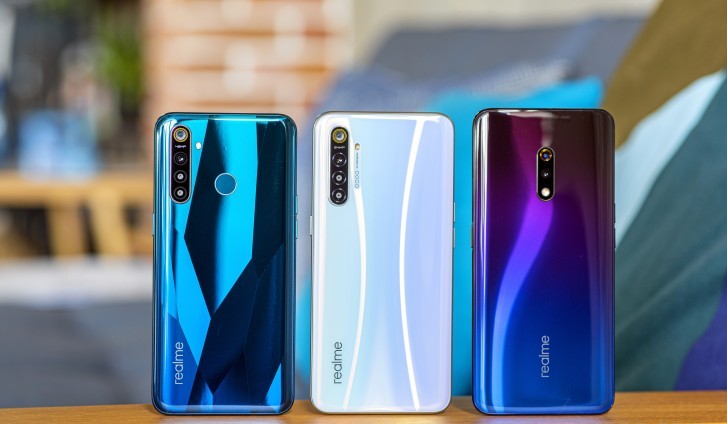
    Realme Xt Review

    Recently, it has got all the right attention with the new Realme XT smartphone. This article is all about Realme XT review. This phone is being rated as one of the big competitors in the market today with all the features that a user craves for and at an affordable price is unbeatable.

    In terms of design, the Realme XT is incomparable with the multi-colored streaks on the back and a sleek size and shape. Instead of the mainstream poly-carbonate back panel, it comes with Corning Gorilla Glass 5, which has a glass finish and is fingerprint-resistant.

    Design and Display

    In between the slim bezels, sits a whopping 6.4-inch super AMOLED full HD+ display, which features an in-screen fingerprint sensor for quick identification and authentication of the user. The front camera notch on the top further allows for a fast face unlock feature which does not have an infrared use. So, it does not work if you have shades or sunglasses on.

    Camera

    Coming to the camera, the XT Phone ditches the 48-megapixel camera as in the previous versions and offers a stunning 64-megapixel primary camera on the rear side of the phone and a 16-megapixel secondary or selfie camera on the front. There are also various built-in picture modes for a wider and more dynamic view of images and portraits.

    The distortion correction feature is another winning aspect of the Realme XT camera that allows a wide-angle view while correction any distortion in the backdrop.

    Performance

    When speaking of the performance, the Realme XT comes with a Snapdragon 712 chipset and Adreno 616 GPU offering optimum power for effortless usage. It comes in three RAM variants of 4 GB, 6 GB, and 8 GB.

    Whether you would like to run the latest new-age games or any heavy application for work, the Realme XT eases it out for you with a robust specification and backing. Again, the smartphone comes with the most upgraded Android Pie 9.0 for a consistent and refreshed interface.

    The smartphone also boasts of a premium audio output with the Dolby Atmos ables speakers. The sound quality is high-end, but it can be a little distorted at the highest volume.

    Packed with a 4000Mah battery, the Realme XT holds the battery for up to 20 hours in a single charge. Furthermore, the speed charge feature allows users to quickly charge their devices up to 50 percent in a matter of about 30 minutes.

    Wrapping Up

    The Realme XT has an ergonomic design that lets the user reach the key buttons with use. It offers a triple SIM-card slot wherein you can use two nano-SIM cards along with a micro SD card. It supports USB Type-C charging and also wired headphone jacks.

    All in all, the Realme XT is an excellent option for people looking for a fetching design at a budget price.

  • Everything You Need to Know about the Amazon Echo Dot

    Everything You Need to Know about the Amazon Echo Dot

    Priced affordably and designed in a sleek and compact shape, the Amazon Echo Dot is the one to go for if you are looking for a smart speaker at a low cost. With better specifications and sound output, the Amazon Echo Dot has quickly been recognized as one of the best smart speakers that are also budget-friendly.

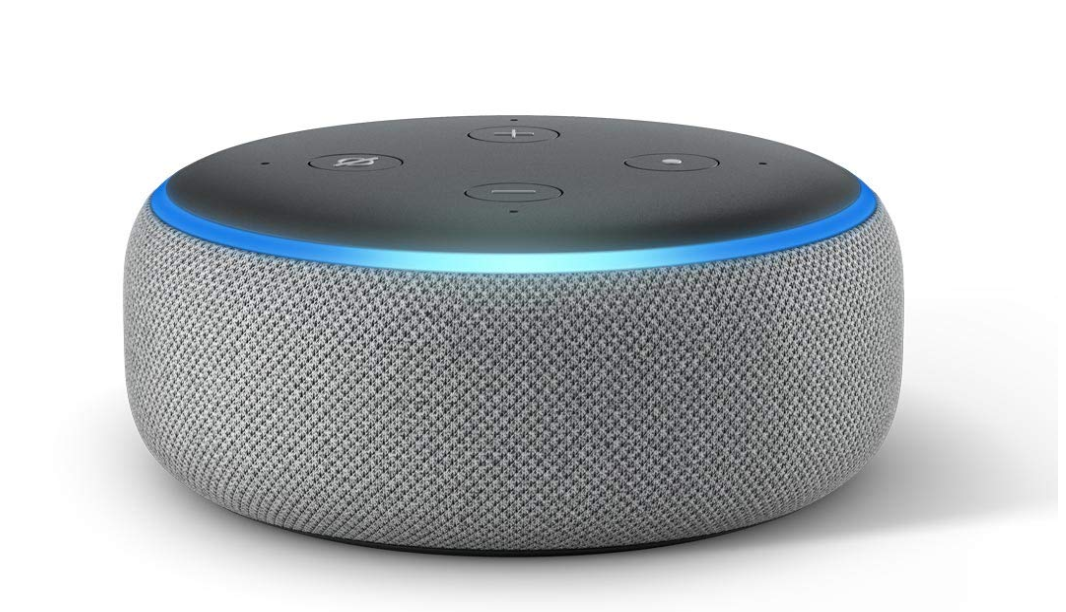
    Amazon Echo Dot

    Having everything good in a small compact Amazon Echo Dot and at half the price cannot go wrong, can it? From Alexa voice to the premium aesthetics, this smart speaker is packed with extensive features that remain to be one of the best in the market.

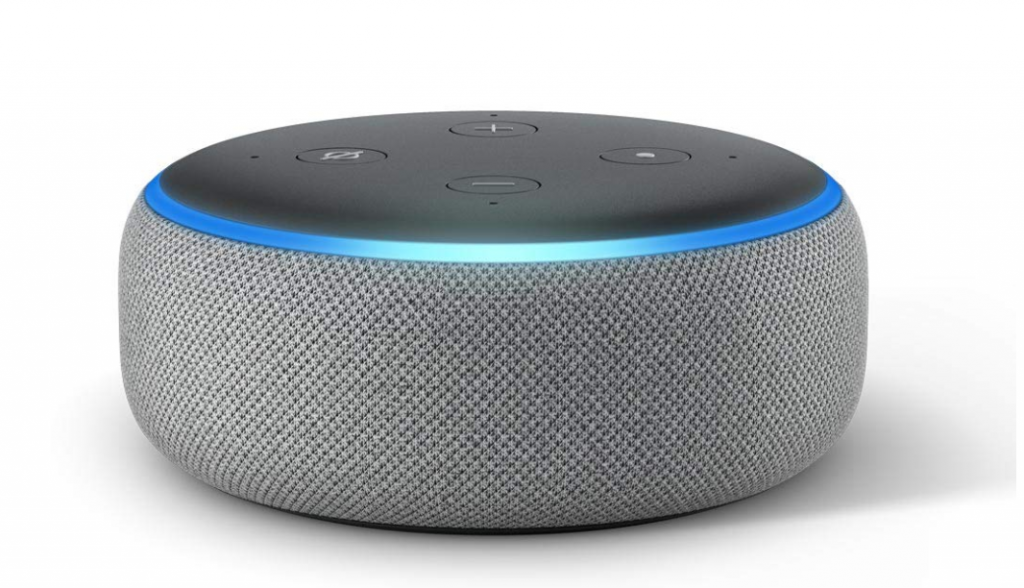
    Coming to the design, the Amazon Echo Dot is a puck-sized smart speaker. It has been intelligently designed for maximum output with the most minimalistic built. It has rounded edges with fabric sides, which measures up to 99 mm in diameter and 43 mm in height.

    The blue light ring on the border adds to the overall high-end design. Further, it comes with a circular pocket socket and a standard analog socket that connects to the stereo.

    For further ease of use, on the top of the speaker, there are volume buttons, action buttons, and the mute microphone button. 

    One of the unique features of the Amazon Echo Dot is that you can stream music from the Dot to other speakers. You can use it via Bluetooth and from any other device to the Amazon Echo Dot.

    Speaking of the sound quality, the Dot speaker does not disappoint you a bit. An improved sound quality that punches out of the sides instead of the plastic top makes it a pretty good pick given the price.

    Perfectly built as a small speaker, the Echo Dot delivers crisp highs and medium lows, which somewhat justifies the compactness of the product. But, do not go for the size alone as it a thunderous output at the maximum volume.

    Besides a good sound output, the main feature of any smart speaker is the voice assistant that comes along. In this case, Alexa.

    Alexa can easily hear you through even in obstructions with the four-microphone array feature. Whether it the cooker hood going off or any heavy music, Alexa will listen to you.

    Alexa, the Amazon voice assistant, will help you do things quickly and swiftly. Everything from smart home control, playing radio, music playback, or even timers or alarms, Alexa has got your back. The wake word for Alexa is ‘Alexa’ as default, but you can also change it if you would like.

    Also, Alexa can finally recognize different voice profiles in the same space. Unlike the large Echo speakers, the price is almost double, the Amazon Echo Dot is definitely a no-brainer for a low cost.

  • Best Adventure Games For Android 2019

    Best Adventure Games For Android 2019

    The most popular genre for games on Android is an adventure. The youngsters today like to test their skills, solve mysteries, and engage in popular characters and stories in their gaming sessions. Always keen and upfront for any adventure do, the younger generations today find it in the very Android smartphones.

    best adventure games for Android

    From the galley of games that are available on the Android Play Store, it is somewhat challenging to pick a few. But we have reviewed a few of the best adventure games for Android as rated by users and gamers.

    Let’s jump right in-

    #1 Crashlands

    Extremely popular among youngsters, Crashlands has been rated as one of the best adventure games for Android in 2016. It is one of the great adventure games, which can be played both on PC and mobile. With tons of elements in it, the main character crashes into an alien planet. And here it begins.

    #2 Evoland 2

    Evoland 2 is not just an adventure game but a mix of several genres. The game throws new eras and challenges to the player for a thrilling and enjoyable experience. From 2D RPG, trading cards to 3D fighters, this game has it all.

    #3 Another Eden

    Another Eden is a popular Japanese role-playing game that is free for play on the app store. Unlike other games, it does not have a progressing story kind of elements but has multiple crucial adventurous entry points for the gamers. It indeed takes you back to the 1990s and 2000s of the JRPG.

    #4 Grand Mountain Adventure

    One of the newest addition to the lot, the Grand Mountain Adventure game is a skiing game that comes with racing and exploration elements in it. Whether you want to ski and check out the sights around or beat the timer, it’s all up to you.

    #5 Monument Valley 1 and 2

    The Mountain Valley adventure game offers more of a puzzle adventure gaming experience. With optical illusions and fun stories, the game progresses toward more difficult missions. It has both free and paid versions.

    #6 Old School RuneScape

    The Old School RuneScape is a massively popular role-playing game. Just like most old school games, this too gets you to complete missions, run around, trade, and master skills over time. It allows for both solo and team gaming experiences. It comes in three versions of which one is free.

    #7 Pokemon Go

    Who does not like Pokemon? Taking you back to the golden days, the Pokemon Go is indeed an ambitious, adventurous game. Players are open in a world to wander and catch Pokemon, collect items, trade them, and battle. It is an expanding genre with lots of adventure in it.

    Almost all of the above games are rated the best adventure game for Android at some point. Be it arcade, puzzles, action, or horror, and adventure games never disappoint the gamers