Category: Android Apps

Android Apps for download, apk

  • Best Social Multiplayer Games To Play At A Party During The Holidays

    Best Social Multiplayer Games To Play At A Party During The Holidays

    If you have ever been to a party where you have been bored, join the club!  Games are a great way to keep people engaged in a party – especially during the holidays. You really want to relieve stress from work or school, then this is the right place for you. Most of us own a smartphone in today’s world, making it easier to entertain ourselves. Here is a list of Social Multiplayer Games handpicked for you. You will be able to play these at any party. Most of these games will require an Android phone but you can also try your luck searching for the iOS version.

    Escape Team

    If you have ever played the escape room in real life and have been fascinated with it, then this game is for you. The main aim of the game is to solve escape room-style puzzles. Ensure that you have a pen and paper handy so that you can note down all the clues. You will also be able to download and print the missions from the Escape Team website and then find out the corresponding puzzle in the app and solve it. A minimum of 2 players are required to start the game. It can be played by up to 4 players. The game is available on the Play Store for free. However, it will require about $5 to unlock all the missions once you are in the game.

    Social Multiplayer Games - Escape Team
    Social Multiplayer Games – Escape Team

    The Jackbox Party Pack

    This is one of the most innovative multiplayer game that is available on the App Store. Though you will have to shell out close to $25 on this one, it is worth the price. The main aim of the game is to get people talking and laughing in a party. The game can be played by 1 – 100 players. There are many versions available on the Play Store. The only difference between the versions is the games that are included in each version. That is why it is a good idea to check the description before buying the version. The best part of this game is that you will not need any special controllers. The smartphones, tablets, or laptops will work as your controllers.

    Selfie Games

    If you are after a session of laughter, then you must try this game. The app “Selfie Games” is available on the Play Store for no charge. However, one person (the host) will need to make an In-App Purchase ($7) in order to create a game. Do note that you will need a Chromecast / Fire TV / Computer / Smart TV to play. The game needs a minimum of 3 players and can accommodate up to 10 players. All player will need to download the app and connect with the host. Random selfies are taken, and everyone will need to come up with a fake caption for each of the selfies. More the number of times your caption gets chosen, the more the points you make. The aim is to ensure that you have a catchy caption with a silly selfie!
    Psych
    Psych

    Psych

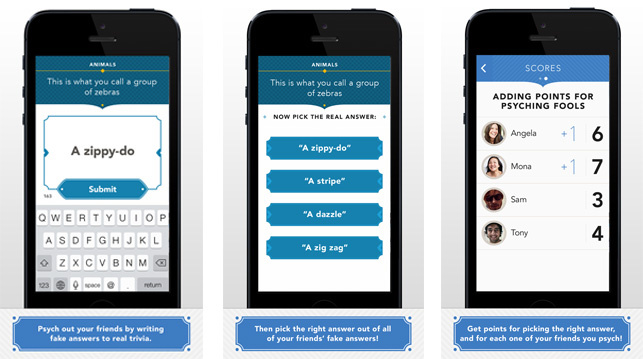
    This game will test how good you are at bluffing with answers. Do you have what it takes to bluff? Psych is a game where all the players will have to come up with a fake answer to a question that pops up in the app. The same question is then presented to all other participants with 4 options which consist of one real answer, one fake answer, and two other wrong answers. You will get points if participants pick your fake answer. Though the app is free to download on Google Play Store, there are loads of In-App Purchases available. All players will need a good internet connection to play this game comfortably.

    Triple Agent!

    Triple Agent! is an extremely fun party game that revolves around espionage. Each player is given a secret identity, such as a VIRUS double agent or a Service agent. Only the VIRUS agents know the identity of the members in each team. The goal of the game is for the Service agents to find and remove the VIRUS agents while the latter tries to confuse the Service agents. The game can be played on a single phone and it can accommodate about 5 to 7 players. The paid version allows for 9 players along with several more features.

    Who Can’t Draw

    Need to find out who is the worst artist of the party group? – This game is a must-try then! The app is available in Google Play Store for free. The Android game is very simple where the first person gets a word and has to depict the word using a picture. The phone is then passed on to the other participants and they draw what they think the previous person drew. You have 15 seconds. When the phone reaches the last person, they have to find out the word which was shown to the first person. The more the number of people, the more the chance that the last person will not find the word. It is interesting to see how the interpretation of the word changes when the phone travels from one person to another.
    "<yoastmark

    Out of the Loop

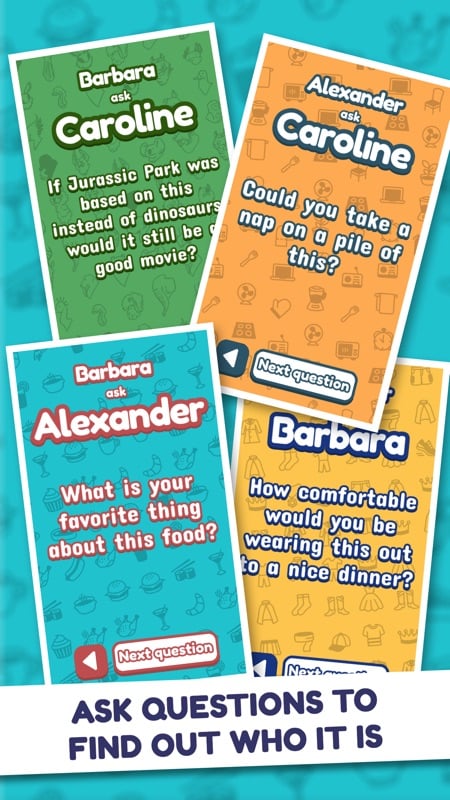
    This is a great option if you don’t want to play something strenuous. It is specifically designed to be played on one phone. With nine players, the phone is passed around the group. You will first need to choose a category and pass the phone around so that everyone can take a look at the word, that is, everyone except the one who is out of the loop. Once this is done, players can ask each other questions and try to judge by the answer who was not in the loop. Once the round is over, everyone can vote on who they think was out of loop.

    Quick Mentions

    While the above-mentioned games are sure to bring fun and cheers to your social event, there are so many more fun games out there. Some honourable mentions include Spaceteam, Ticket to Ride, and Chwazi Finger CHOOSER.
  • How To Delete Data From Your Lost Or Stolen Device

    How To Delete Data From Your Lost Or Stolen Device

    There is hardly anything materialistic in the world that we cannot live without, barring, of course, our smartphones. If you do lose your phone or it gets stolen, we can help you. Simply follow the steps below. You will be able to protect your data. If this doesn’t work, you may have to delete the data on your device so that others cannot access it. I know, it hurts me deeply too.

    Find My Device

    One of the first things you need to do is to install the Find My Device app. Once done, make your way to the Settings menu, head to Security, and click on Find My Device. Enable the app and allow your device’s location to be accessed by the app. The beauty of this app is that it works just as well for tablets as well. One thing you should note is that stuff stored on microSD cards cannot be removed by remote wiping. If you have truly sensitive information, you may want to have apps like AirDroid or Lookout. These are designed to remotely wipe your device along with offering you the ability to transfer data before doing it.

    Delete Data
    Delete Data

    Finding your Android phone

    The very first thing to do after you realize that you no longer have your device on you is to try and find it. You can use the Find My Device app for this. If the phone is on, it will get a signal and you will be shown a location on the app. You will then have to choose from one of the three options – ring it, lock it or remotely wipe it. A fancy option is to go with the second one where you can change the lock screen. Once this happens, the next time your phone is on, they will see a message from you. You can always offer a reward or something and get your phone back.

    Deleting Data from Stolen or Lost Phone

    The final option: erasing all the data on your smartphone. Again, do note that SD cards will not be deleted in most options. However, if you have chosen a service that does it for you, great! If you do go ahead with this step and later, come across your phone again, fear not. It is an easy enough job to set it up again. All you will need is your Google Password.

    Remotely Wipe Data
    Remotely Wipe Data

    Most apps give you the option of remotely wiping your device. This is essentially the same as a full factory reset. This means all your data including your music, photos, apps, and other data will be wiped out. Naturally, if your phone is off at that moment, you will find that the data wipe will occur when the phone is on the next time. There are plenty of free and paid services that you can use to help you find and track your device and perform remote wiping. Of course, paid services do offer little more features, such as transferring data, clearing SD cards, and so on. Lastly, if you save your passwords to your device, we recommend using an online service for the same.

  • Amazon Music vs. Apple Music: Which non-Google service is better for Android users?

    Amazon Music vs. Apple Music: Which non-Google service is better for Android users?

    A Quick Overview

    Where collecting cassettes and CDs were once fashionable, it is the era of streaming. True to that, there are plenty of music streaming services out there including Amazon Music and Apple Music, allowing us to listen to any type of track and audio whenever we want, regardless of where we are. With easy search options, filters, sorting, and the ability to make playlists, convenience like this has never been known before. With dozens of music streaming services, it is a big question which one to choose.

    The top options are Amazon Music, Apple Music, Spotify, and Google Play. In this post, we will do our best to compare and give you the facts and features of Amazon Music and Apple Music. Hopefully, we will be able to help you narrow it down. For comparison’s sake, we will be looking at Amazon Music Unlimited’s single-user plan and Apple Music’s single-user plan. Both of them offer family plans, but the former has other plans like HD plans, single-device plans, and even student plans!

    Pricewise, there is not much to choose since both of them are priced competitively. However, Amazon Prime users will get some discounts for Amazon Music. Let’s look at them both to see which one is better.

    Amazon Music
    Amazon Music

    Amazon Music Unlimited

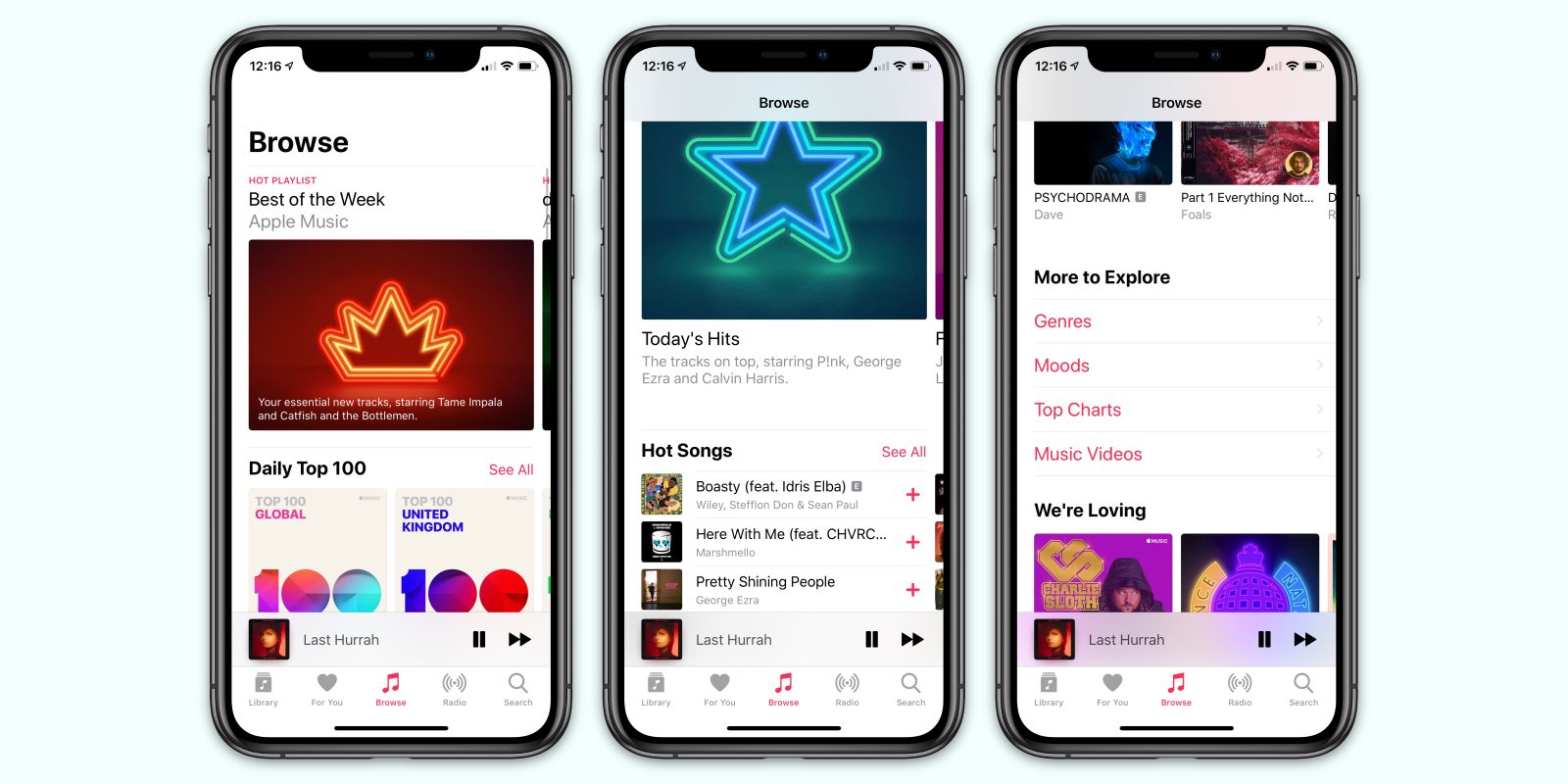
    Users who are already Amazon Prime members don’t need to pay separately for its Music service. It has more than 50 million songs to satisfy you. With different tier options to meet different needs, Amazon Music has free plans called Prime Music, student plans, family plans, single-device plans, and even HD plans. While Amazon’s  Music service is not known for expertly-curated music or personalized playlists, it is gradually getting better in those areas. Recently, the streaming service introduced playlists like My Soundtrack and My Discovery Mix. In addition to this, it has come up with features like the Side by Side playlist series that has artist commentary.

    Amazon is working to promote Amazon Music via all its area, including its website, on the web, via Echo smart speakers, and more. In the real world, you might see huge banners, posters, and so on. Besides advertising in this manner, Amazon even had Dua Lipa, Taylor Swift, and other celebrities perform for Prime Day concert. It was promoted and shown on its media platform, including its Fire TV. The best part of using it is that it comes for free with Amazon Subscription. It is really a great deal. Because, in addition to the use of its streaming service, you will be able to enjoy Amazon Prime Video, two-day shipping, and so much more. Don’t confuse yourself between Amazon Music and Amazon Music Unlimited. While the former has only about 1 million songs, the latter can provide you with about 50 million tracks.

    Amazon Music Unlimited
    Amazon Music Unlimited
    Pricing

    The very fact that Amazon Music allows for seamless integration with its smart speaker Echo makes it a better experience. Price-wise, it costs about $9.99 a month. However, it comes for free with Amazon Prime subscription and we just cannot stress it enough. Another discount is if you own an Amazon Echo. If so, you will be able to enjoy Amazon Music for just $3.99 a month. The platform allows users to create their own library as well.

    Apple Music

    Although Apple has already dipped its toes into the music industry with its iconic iPod and iTunes, it entered the music streaming quite late. However, when it did arrive, there was no way anyone was able to complete it for a while. Apple acquired Beats in 2014, mostly for Dr Dre’s streaming music service under the same name and of course, for its content. Since Beats was already an app on Android, it was an easy enough job to transition Apple Music to this existing platform and user base. Overall, it was a great move and we are grateful since it gave us the opportunity to give it a try.

    Features

    Apple Music on Android has plenty of features, most of which are similar to that of the ones present on Apple devices. This includes features like AI-powered personalization and customization, expert music curation, and more. The suggestions offered by Apple Music is so much better and right on the spot when compared to other streaming services. It is true that Amazon Music offers suggestions as well, but it just cannot compare to Apple Music at this time. While Apple Music on Android is pretty unbeatable, it does have a few issues.

    Apple Music
    Apple Music

    For instance, there is no free or ad-supported music tier. This is a very basic thing that most streaming services offer. In addition to that, Apple Music does not offer any discounted tiers excepting student plan and family plans. This is different from Amazon Music which is offered for free if you are already subscribing to Amazon Prime.

    The issues apart, Apple Music could seem to be an obvious choice if you won a Mac or any iOS device. Since the streaming service is naturally integrated with iTunes, which in turn is a default addition of every Apple device, you can be sure this will offer you a seamless experience. With the latest macOS Catalina, iTunes will be replaced with the actual Apple Music app, along with the Apple TV and Apple Podcasts. Apple Music offers a three-month free trial for new users. Price-wise, Apple Music is slightly more expensive as well.

    Verdict

    Both Amazon Music and Apple Music have an excellent selection of tracks. However, if we have to go with one, we tilt slightly towards Amazon Music Unlimited over Apple Music. While Amazon gives its users many choices of pricing plans along with a ton of music. Amazon Music Unlimited is available at higher quality bitrates, which is an important aspect for audiophiles. On the other hand, Apple Music has amazing playlists with a great suggestion algorithm. At the end of the day, it is up to each user to see which service would suit their needs the best.

  • Whatsapp Android Update Finally Brings Long-Needed New Feature For Android Users

    Whatsapp Android Update Finally Brings Long-Needed New Feature For Android Users

    WhatsApp is one of the world’s most popular messaging app. While it has a ton of useful features, there is always space for improvement. The latest update Whatsapp Android Update is something that could save many of us some grief. Currently, it is not very easy to see and confirm who you are sending images or pictures to. Where users only see the icon of the receiver’s profile picture, now users would be able to see the contact name right below the picture. The previous system allowed users to make mistakes by sending pictures to the wrong person since no validation or confirmation was asked before you hit the send button.

    The latest update is here to help us all out. Now, when you send a picture to the receiver, you will see their contact name clearly right under the profile picture icon. This is intended to work as a confirmation measure that you are sending it to the person you think you are. This WhatsApp update is only for users using the app on their devices. Huawei, Samsung, and Sony smartphone owners will all receive the update shortly. iPhone users already have the feature on their version of WhatsApp. This came as part of their latest iOS version update.

    Whatsapp Update
    Whatsapp Update

    Whatsapp Android Update

    Besides this update, did you know there are many more things you can do with your WhatsApp than simply changing profile pictures and chatting with friends and family? WhatsApp is working on releasing two other major updates real soon. The first feature basically allows users to merger WhatsApp with other messaging services. This means that you can merge WhatsApp with other Facebook-owned services, such as Facebook Messenger and Instagram. You would be able to have continuous conversations with people regardless of the platform they are using. Naturally, this will allow users to text each other on a single platform, creating better messaging experiences.

    Another update which many are waiting for with bated breath includes Facebook’s cryptocurrency Libra. This is expected to be introduced for WhatsApp sometime in 2020. With this, users would be able to make and receive payments through the app. It has been designed specifically to ensure that it is highly user-friendly and secure. While the company mentioned it would be released in 2020, the actual date for the same is yet to be released.

    Whatsapp update self destructing messages
    Whatsapp update self-destructing messages

    WABetaInfo and Self-Destructing Messages

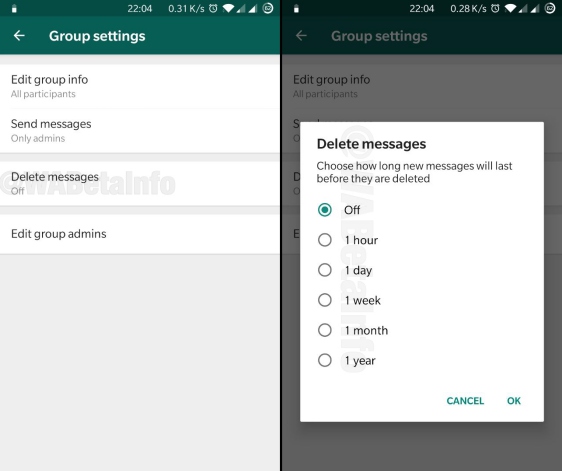
    WhatsApp is planning to bring another new feature – self-destructing messages. While platforms like Telegram and Snapchat have had this for a while, WhatsApp is releasing it just now. Good news is that this feature will work smoothly with the app’s upcoming dark mode. WABetaInfo is a publication that focuses solely on WhatsApp. It goes through the beta versions and identifies any possible upcoming features and it is considered to be pretty reliable. According to WABetaInfo, this would be available under Group Settings called ‘Delete Messages’. It will show the users the number of timeframes in which a message will be viewable.


  • Typewise Keyboard Is Here With Odd Layout & Big Claims

    Typewise Keyboard Is Here With Odd Layout & Big Claims

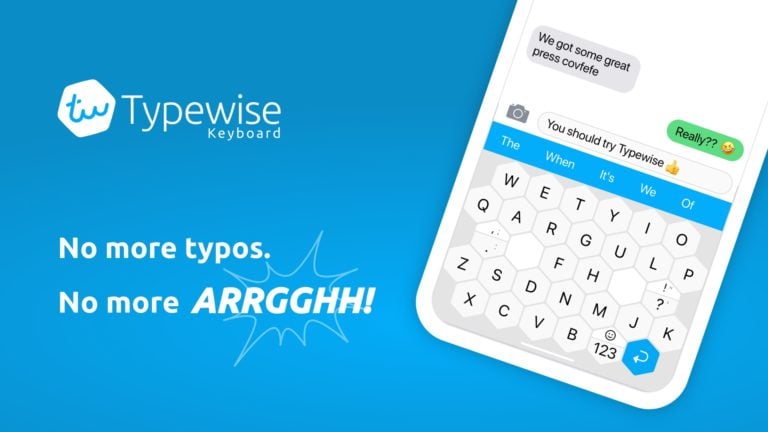
    Typewise Keyboard is one of the most popular keyboard apps available on the Google Play Store. While most keyboards have brought to the market new ways of typing, no one has come up with a new layout. Typewise introduces the users to a new approach of typing compared to our traditional keyboard apps. The keyboard has a new layout featuring larger keys. While it may be useful, it does take some getting used to. Another thing is that the keyboard also depends on the usage of gestures. However, don’t fear. It comes with a tutorial which will take you through the app. It generally pops up when you first launch the Typewise Keyboard app. First launched in Switzerland, it was soon released globally.

    Features

    The company devoted itself to creating an excellent keyboard app. According to research by the Cambridge University and ETH Zurich says that every fifth word written on a smartphone is misspelled. The company’s latest app can help its users reduce types by as much as 80% when compared to other popular apps like Swiftkey and Google Keyboard. However, the only trouble is that it has a vastly different layout and interface.

    Typewise Keyboard
    Typewise Keyboard

    The best part of the application is that it can be used offline, making sure it is accessible and offers a higher level of privacy. In its beta phase, more than 20,000 users used it. Now, it has been made available for all users – both Android and iOS. The keyboard features a patented ‘hexagon layout’. Since this helps make the keys wider, users will have less chance to make a mistake hitting the wrong key. This is the major idea behind reducing typos and other errors.

    Since a Cambridge study claims that 74-per cent of users who type using two hands and two thumbs will generally have the highest typing speed. This is why Typewise keyboard creators have optimized it for typing in this manner. As of now, the app supports more than 40 languages with AI speaking English, German, Italian, Spanish, and French. The developers said that they are working on adding new languages.

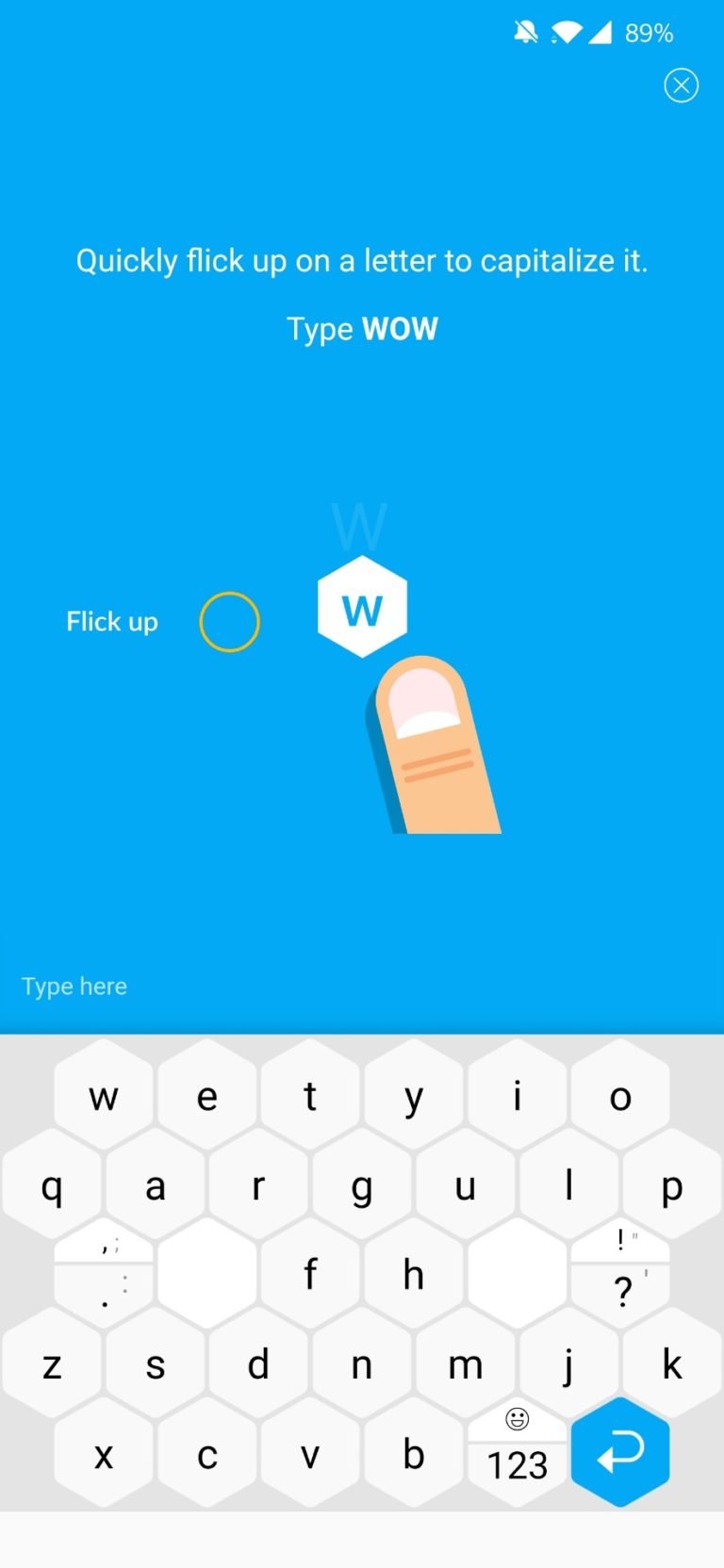
    Typewise Keyboard uses swipe gestures for word capitalization and deletion. This helps in reducing typos. Swiping certain letters on the keyboard will capitalize it. Swiping left will delete the last letter and long swipes will delete more. You can stop by raising your finger. While its basic version is free for all users, there is also a paid version with more features.

    Typewise Keyboard Layout
    Typewise Keyboard Layout


    Premium Version 

    Typewise Keyboard’s premium version boasts of a great many features. Haptic feedback is not available in the free version. However, users will be able to use it in the premium version. Other features include as follows. Users will be able to enjoy 13 additional themes, personalized word predictions, enable vibration, and create own text replacements. If you want to try out Typewise premium, you can go with monthly or annual subscriptions. You could also try the lifetime subscription. The app offers a 30-day free trial as well.

  • Must-have Android/iOS Apps for Daily Use In India

    Must-have Android/iOS Apps for Daily Use In India

    Both the Google Play Store and the Apple App Store are host to some excellent mobile applications. These apps help you stay connected to your family and friends, stay in the loop, and updated with the latest news, avail various services over the internet and watch a host of different movies and shows.

    Regardless of if you use an iPhone or an Android phone, only a handful of these apps are well developed and worth installing on your device.

    To help you find the right applications fast, here’s a list of ten must-have apps for daily use in India.

    #1 WhatsApp

    WhatsApp is one of the most commonly used messaging applications in the world. However, it is particularly prominent in India. As of 2017, WhatsApp recorded 200 million monthly active WhatsApp users in India alone.

    WhatsApp

    The free messaging application comes with great features such as high-quality video calling and quick file-sharing.

    WhatsApp also recently introduced a funds transfer feature that uses India’s unique UPI platform, which facilitates the transfer of funds between different banks over the internet.

    These features make WhatsApp a definite must-have in India.

    #2 Twitter

    An estimated 34.4 million people regularly use Twitter in India. India also happens to be one of the most active countries on Twitter. Hence this app became one of the best apps for daily use in India.

    Twitter

    Indian politicians and celebrities are especially active on Twitter, and users find the idea of interacting with them in just a few taps appealing.

    Twitter is also a great source of news, and the apps affinity to spread the word makes it easy to get notified instantly in the event something significant happens.

    #3 Uber

    India is one of the biggest markets for Uber cabs. In 2017, Uber recorded over five million weekly active riders in India alone.

    Uber

    Users can avail everything from SUVs right down to Autos and Bikes to get from point A to B. Getting an Uber is a quick and straightforward way of getting around.

    Uber controls a large chunk (about 40%!) of the online-taxi market in India.

    Also, Uber Eats, a subsidiary of Uber, enables users to order food online and have it delivered at their doorstep.

    #4 Zomato

    Zomato is the second-biggest food-delivery platform in India, holding a 26% market share.

    Zomato Android/iOS Apps for Daily Use

    It operates in over 200 cities and has well over 100,000 restaurant listings. As of March 2019, Zomato has registered more than 30 million deliveries.

    According to their 2019 report, the company logged an annual run-rate GMV of over $1.5 billion!

    Best known for its simple interface and great offers on food, Zomato is another must-have app in India.

    #5 Swiggy

    Swiggy is the biggest food-delivery platform in India and holds over 50% of the market share.

    Swiggy

    Valuated at $3.3 billion, Swiggy is easily one of the most recognized brands in India thanks to its bubbly interface and the striking orange logo.

    In 2019, Swiggy has begun operating in 500 cities and plans to add another 100 to the list in the coming year.

    With 140,000 restaurants registered with Swiggy across India, it is difficult to find a cuisine they don’t serve on this app.

    #6 Ola

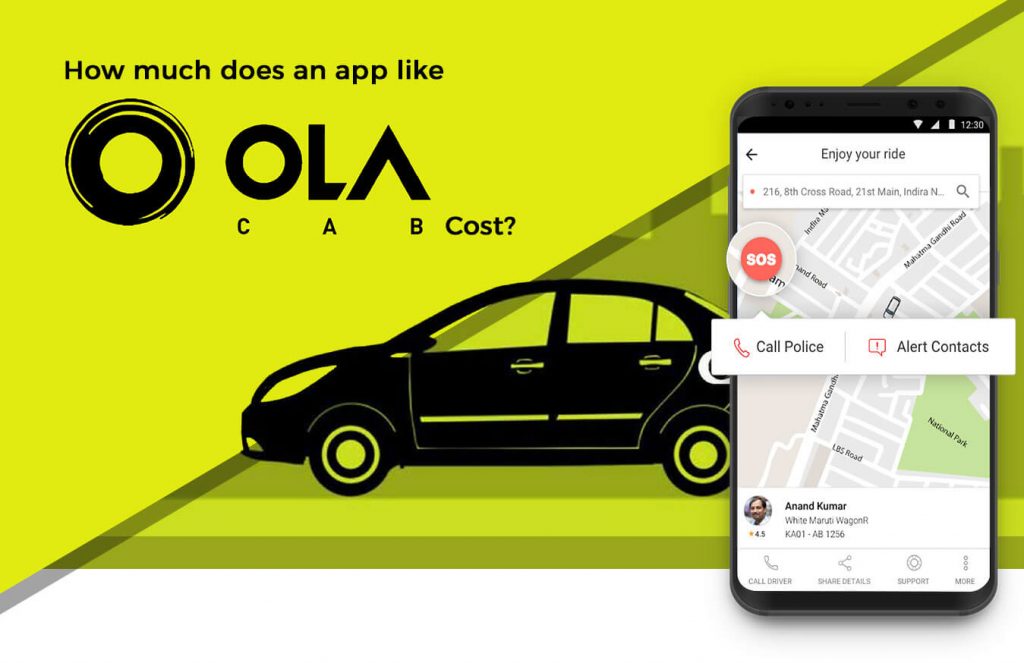
    Ola Cabs is a transportation network company that offers ridesharing, taxi-hailing, and food delivery services across India. It currently controls over 56% of the Indian market.

    Ola Android/iOS Apps for Daily Use

    The company is based in Bengaluru, and as of October 2019 is valued at $10 billion.

    As of 2018, Ola has expanded its operations into the overseas market and is available for use in countries like Australia, New Zealand, and the U.K.

    Recognizable by the striking combination of colors in the logo and a simplistic user interface, Ola makes hailing both car and bike rides easy.

    #7 JioSaavn

    Formerly known as Saavn, JioSaavn is an online music streaming app. It has acquired rights to over 50 million songs in 15 different languages.

    Jio Saavn Android/iOS Apps for Daily Use

    JioSaavn controls over 37% of India’s music streaming market. Reliance Jio bought Saavn for a little over $1 Billion in March 2019.

    As of 2019, over the app records over 25 million active users. The application provides access to its extensive library of music at a very reasonable Rs.89 a month (roughly $1.25).

    It can also be used free of cost. However, the tradeoff is the users must listen to full-length ads midst streaming – which is similar to how Spotify operates.

    #8 Netflix

    With over 10 million users, Netflix is one of the biggest Subscription Video-On-Demand (SVOD) service providers in India.

    Netflix Android/iOS Apps for Daily Use

    According to a report on Statista, Netflix will generate approximately $328.3 million in India by 2020.

    However, achieving this goal can prove to be more difficult than expected after the arrival of competing companies like JioTV and HotStar, offering SVOD services for cheap.

    In an attempt to make its services more accessible to the Indian public, Netflix recently introduced a mobile-phone only plan for Rs.199.

    #9 Amazon

    India is the biggest market for Amazon Prime, with over 10 million subscribers, which represents about 10% of Amazon’s total subscriber count. Therefore, when it comes to counting the best daily uses apps, Amazon is also one of the best apps for daily use.

    Amazon Prime Android/iOS Apps for Daily Use

    An Amazon Prime subscription comes with many benefits, including access to exclusive ‘Prime deals’ and unlimited access to their video on demand and music streaming services.

    As of June 2019, Amazon reports having doubled its subscriber base in India in a short time frame of 18 months.

    Amazon also enables secure payments over UPI, which gives users an added advantage.

    #10 InShorts

    InShorts is a unique news app that features a new board-like interface. The application summarizes and supplies news stories from national and international sources in 60 words or less.

    inShorts

    The company is based in Delhi and generates revenue primarily through advertising.

  • Offline Android Apps: 5 Best Android Apps That You Can Use Offline

    Offline Android Apps: 5 Best Android Apps That You Can Use Offline

    Most of us take the internet for granted. Even those living in urban areas may sometimes have to take on life without a proper internet connection. For instance, during a power blackout or on a train, we may not get an internet signal. During this time, having apps that function without the internet would be a godsend! There are plenty of apps that support offline usage as well. Streaming services like Netflix, Amazon Prime, Spotify, YouTube, and others all offer offline use. You can easily choose certain content and download them. Once done, you would be able to access them offline. In this article, we will take a look at the top Offline Android Apps.

    We hardly realize how much of our time goes on the internet every day until we lose access to it. From browsing social media to watching movies, we are one with our phones. However, the catch is that most things that we indulge in require an internet connection. If you are travelling, you will get stuck. This is why we have put together this list of the best android apps that you can use without internet.

    Amazon Kindle
    Amazon Kindle

    Amazon Kindle: Offline Android Apps

    Both Amazon Kindle and Google Play Books are popular apps. They both work online. You can collect tons of eBooks online and access them all offline. Both the apps offer many features including a night mode, customization features, and other basics things. It allows users to download books for free. There is no limit to the books you can download. The apps are free to download, and they offer hundreds of free books as well. However, there is a large section of paid books that you can pay and receive it.

    Google Maps

    We all rely a lot on our digital maps. When we are travelling, one of the most common issues faced is the loss of internet signals. This quickly translates into losing out navigation functionality on our map. With Google Maps, you no longer have to worry about it. Even if you are travelling to remote areas, you will never get lost. Google Maps allows users to save a section of the map by downloading it beforehand. Once done, you can use it when you don’t have an internet signal. Users will still be able to use the map as it guides you through the lanes and turns.

    In order to save a map offline, tab on the sidebar menu of the Google Map app. Click on Offline Maps. Once done, you will be asked to select the region. Do it and proceed with the download. In addition to basic navigation, users would be able to receive walking and driving directions for hotels, restaurants, and other local businesses in the area. You can easily search for these in the usual manner. If you travel frequently, Google Maps is an absolute must.

    Spotify
    Spotify

    Spotify: Enjoy music without internet

    Spotify is one of the most popular music streaming apps out there. The reason behind that is that it has tracks from a wide range of albums, artists, and genres. It is also very intuitive and user-friendly to use. If you are a premium subscriber, Spotify lets users save their favourite tracks and even your library for listening offline. You can also save your personal albums and playlist and access them offline later.

    To save a track, open your saved album or playlist. You will notice a download icon at the top. Tap on that to start the download. Once done, you will be able to listen to it offline. If you want to check, head to your settings menu. Enable Offline Mode. Now, check out all the music you can access online.

    Google Drive

    Google Drive is an obvious choice for this list. It allows users to sync an unlimited number of files to your smartphone or any other device from the cloud. Google allows free use until 15GB of storage, after which you will have to get a paid subscription to continue. Google Suite consists of different apps, such as Google Sheets, Slides, and Docs. Each document will correspondingly open up in the app, making it extremely easy to use.

    Google Drive is known for making our lives easier. It will increase your productivity and give you access to all your documents in an instant, regardless of whether you have an internet connection or not. This cloud service accepts all kinds of files, including APK files, PDF, ZIP files, audio, video, and more.

    Pocket App - Offline Android Apps
    Pocket App – Offline Android Apps

    Pocket

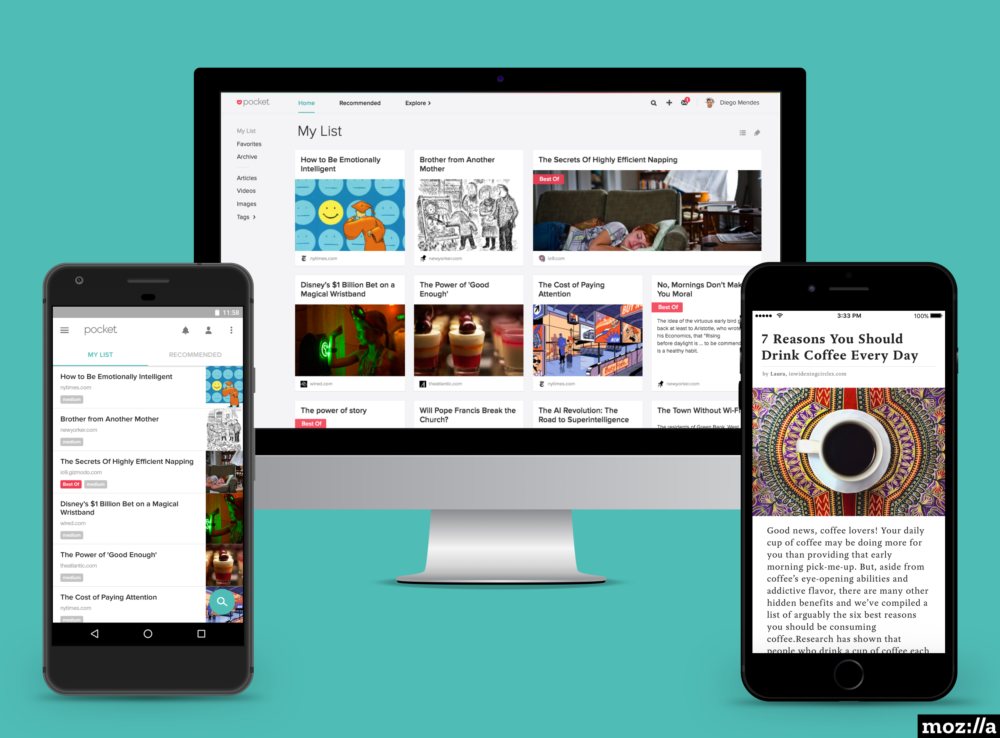
    Pocket is a great app for offline use. It allows users to save notes and other things and bring them up later whenever they want. You would be able to save literally anything ranging from news stories, Reddit threats, forum chats, images, memes, and so much more. Since it offers offline support, it is literally priceless. Although the free version of the app comes with some limitations, it is still good enough for most users. Even the paid version is very reasonably priced.

    Bonus: Pocket Casts

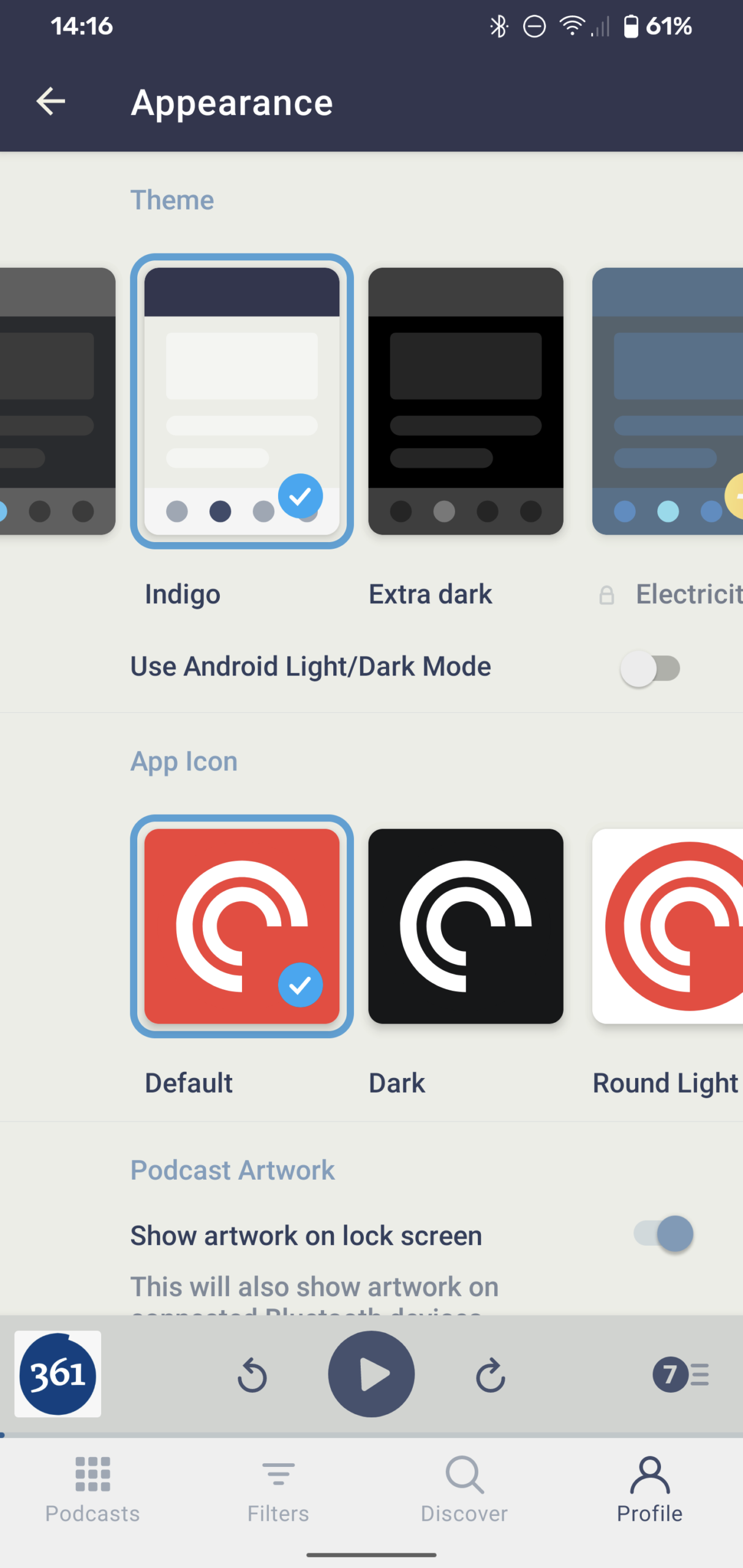
    It is highly likely that you have come across Pocket Casts or at least heard of it. It is one of the most popular podcast apps available in the market. They have thousands of interesting podcasts ranging across a wide range of subjects. The best part about it is that you can download the one that you want to listen to later. Once downloaded, you would be able to listen to it offline as well. It has a cross-device syncing which ensures you can listen to it on any of your devices. It is inexpensive and highly entertaining. Even newbies would be able to make their way about easily since it has a clean interface. The app developers recently released a new update which introduced a darker Indigo theme.

    Wrapping Up – Offline Android Apps

    While there are plenty of other apps out there that can be used offline, this list covers pretty much most important ones. You know where to go if you need offline navigation, some podcast entertainment, and how to look up stuff offline. Go on!

  • Pocket Casts 7.6 makes it easier to check show notes and edit your episode queue

    Pocket Casts 7.6 makes it easier to check show notes and edit your episode queue

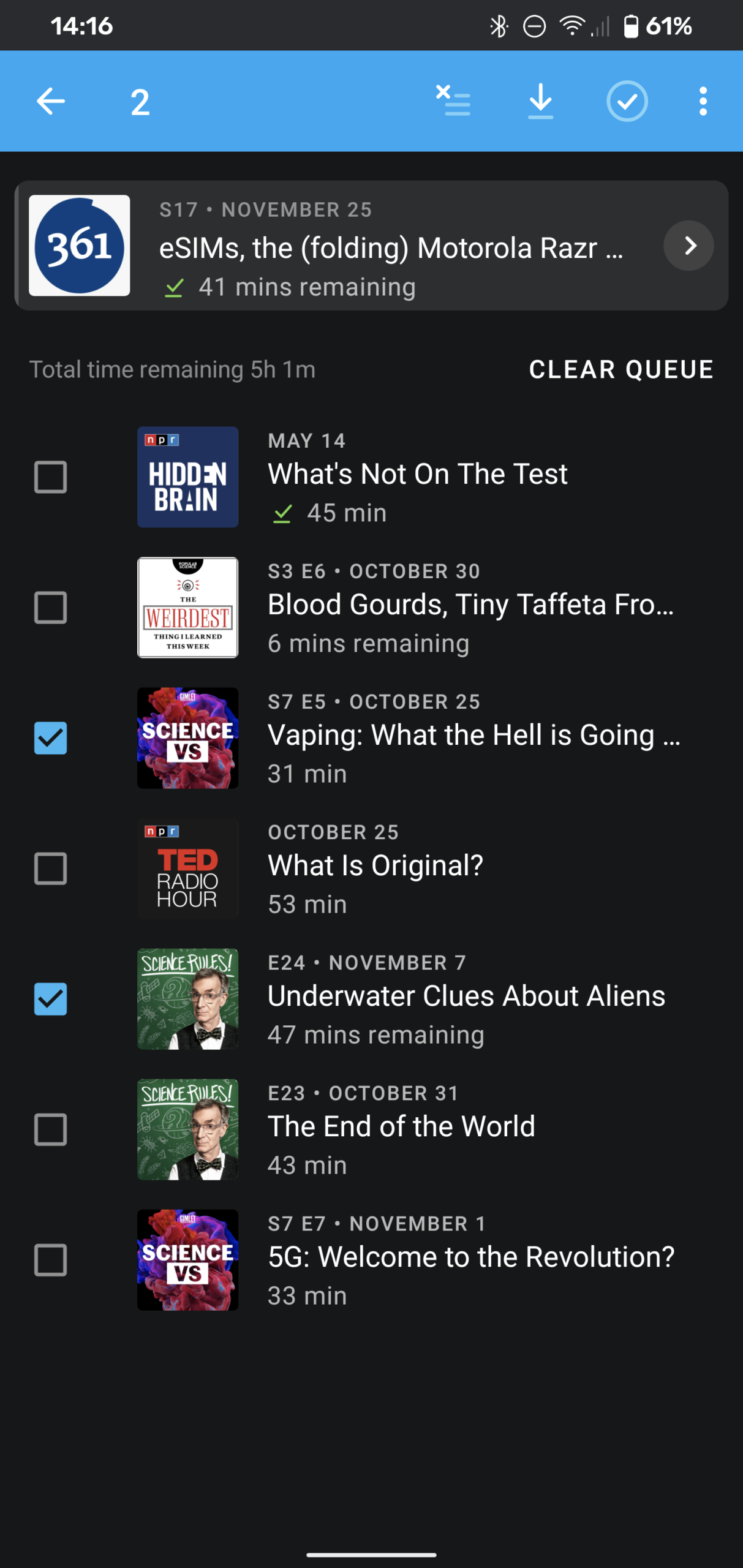
    Pocket Casts is one of the most popular podcast-listening platforms out there. The developers have released the latest update for this Android app. Pocket Casts 7.6 has brought forward a new tab format. This allows the users to swipe between various tabs, such as Now Playing screen and show’s notes and chapters. The updated version of the app lets the user customize the toolbar for a more personalized experience. Thanks to this, users can now select the four actions they tend to use the most. This gives them easier and faster access. Actions could be chosen from sleep timer, playback effects, mark as played, or archive episode.

    Pocket Casts 7.6 Version Update
    Pocket Casts 7.6 Version Update

    In the update to v7. Version 7.6, a lot of features were removed. Pocket Casts is now working to slowly add them back one by one. The app is now in beta with more of these improvements. One of the more prominent changes includes the return of the swipe to see show notes. It will also make it easier to edit the Up Next queue. Users will also be able to enjoy free themes and customizable quick actions in the ‘Now Playing’ screen.

    Pocket Casts is now free for use. So, if you want to check it out, go right ahead. The iOS version of the app is all set to receive the same features as well.

    Pocket Casts 7.6 Updates

    Indigo theme

    The app has got a free new theme, called the Indigo theme. It uses off-white backgrounds and dark indigo elements.

    Tab Layout

    ‘Show Notes’ is sometimes very important to the audio. The new update allows users to swipe between the tabs. This will allow users to switch the view between Now Playing screen to the show notes. You can also swipe back to check out the chapters.

    Custom Toolbar

    Since all of us like listening to different podcasts and have different likes and needs, Pocket Casts has allowed us to personalize our app as we wish. Now, you can decide which options should be part of your player. You would be able to select any four actions of your choice which would then show up on the toolbar, allowing easier access.

    Pocket Casts 7.6
    Pocket Casts 7.6
    Up Next

    The Up Next list is now no longer a part of the Now Playing screen. It has been moved to a separate page. You can access it by simply tapping the queue counter or swiping up. It will also give you the time it would take to finish all the remaining episodes. The “Clear Queue” button allows users to clear everything in the queue and start from the beginning again. The queue has some additional features, such as multi-select using which users can take action on multiple episodes simultaneously.

    The Big Revamp

    Pocket Casts is already a great podcast app. With its big version 7.6 release, we can expect a ton of great features – some returning ones and some brand-new ones! The ability to customize and the presence of new themes all play a part in making this app one of the best in the market.

  • YouTube Music Is Adding Three Spotify-like Personalised Playlists

    YouTube Music Is Adding Three Spotify-like Personalised Playlists

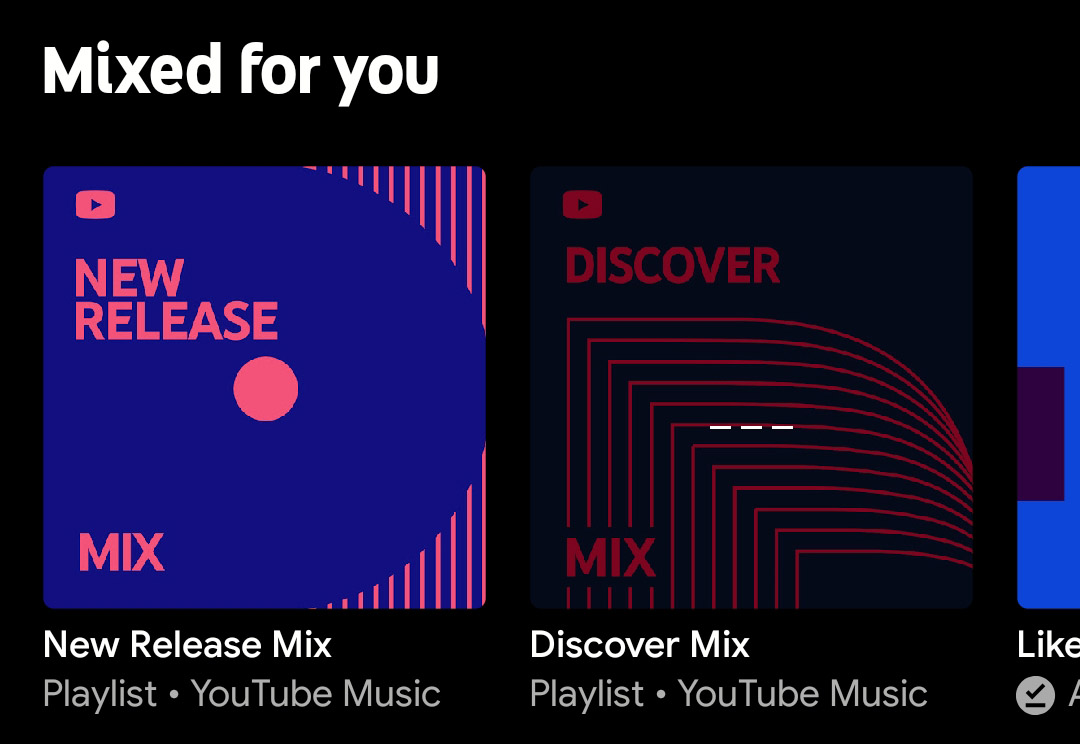
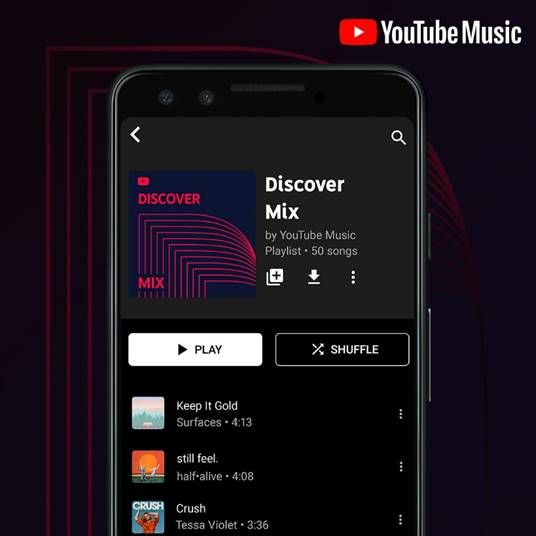
    YouTube Music is now adding three personalized playlists, named Discover Mix, New Release Mix, and Your Mix. Although Apple Music, Spotify, and other music streaming apps already had similar programs, YouTube is the latest to join them. Spotify’s Discover Weekly became a huge hit among the users. Discover Mix by YouTube Mix was tested fully. Now, they are being made available for YouTube Music users around the world.

    At the TechCrunch Disrupt SF 2019, the company talked about its plans to introduce these three mixes. Neal Mohan, YouTube Chief Product Officer, talked about this plan where they have used a combination of human curation and machine learning to offer better offerings to their users. The Discover Mix works in a manner quite similar to Spotify’s Discover Weekly. It will help users discover new music and artists. Users will receive suggestions on tracks that they have never listened to before and lesser-known tracks from artists that they already know and like. What is new here is that this playlist would be able to leverage historical listening data on YouTube and YouTube Music, unlike other music streaming services.

    YouTube Music Discover Mix
    YouTube Music Discover Mix

    Discover Mix

    The Discover mix offers the users 50 tracks to listen every week. It automatically updates every Wednesday. The New Release Mix, as the name suggests, will consist of the recent release by top artists of your choice and other that YouTube feels you will like based on your history. This mix updates every Friday. However, it adds other tracks as and when needed, even in the middle of the week.

    Your Mix is the third playlist introduced. This will have the kind of music you like with songs that you have not listened to yet. If YouTube thinks you will like it depending on your history, it will add those tracks to this playlist. It does not update once a week. Instead, it updates regularly so that you can always stay updated with new tracks.

    YouTube Music
    YouTube Music

    How does it work?

    Naturally, the more you use the service, the better your mixes will become. This is because the engine gets a chance to understand more about your taste in music. However, YouTube claims that it can get started by offering personalized mixes as soon as a user gets started. All one has to do is to select some of their favourite artists. YouTube uses this as a base and creates mixes. As you continue listening to songs, it will update your mixes to reflect your choices.

    These mixes are a result of Google’s investment in its music streaming service. Google recently made YouTube Music the default music app that comes with new Android devices. So, Google Play Music is no longer be the default music app. According to reports, YouTube Music has taken over Spotify and JioSaavn in India. This is a huge blow for Spotify since India was a major market for them in spite of entering pretty late. The new mixes are available now the music streaming service on Android, iOS, and even on the web version.

  • 5 Best Selfie Camera Apps for Android

    5 Best Selfie Camera Apps for Android

    Clicking that perfect selfie is no mean task. You will have to do a lot in those few seconds from striking a great pose to holding your phone just right. Of course, we could always do with some help. The Google Play Store has tons of apps that could come to our rescue. We have weeded the mass out and have listed the 5 best selfie camera apps for Android in this post. Each of these has been designed with different settings and features that can help you get you the selfie of your dreams.

    Sweet Camera

    This is one of the most popular selfie camera apps for Android users. Besides offering the users a ton of features to click and edit their images, it is also known to be highly secure. The app features real-time beautify selfie effects so that you can look amazing. The app eve has a makeup camera that you can use to experiment with different looks and colours until you are satisfied with the one that makes you look gorgeous. Coming to editing, you will be pleased to know that this app has dozens of features at your disposal. You can also make use of their photo collage maker to create selfies and groupies.

    Sweet Camera
    Sweet Camera

    For those boring days, you can always check out their collection of stickers and filters. While it offers a lot of flexibility to the users, you will have to put up with their ads. Sweet Camera has a Beauty Editor that can shape your face and change your complexion as you wish. It is a pretty intuitive app, and most can use it easily. You will have the option of changing your hair colour, apply makeup, and even change your hairdo. Users could even smoothen their facial lines. The app is completely free for use. However, if you would like an ad-free experience, you can pay for the premium version. If you want to know how to remove you personal details from the image, check this out.

    YouCam Perfect

    YouCam Perfect is a free selfie camera editor for Android users. It has some really good editing tools spanning over six beautification levels. The editing software not only offers the usual changes to hair, face, and colour but also supports full-body photos. Now, you would be able to make changes and enhance your full appearance. The app offers multi-face detection technology which comes in very handy when you are clicking a group selfie. They also have a ‘Smile’ feature for auto-clicking photos.

    The best part about YouCam Perfect is that users would be able to edit all the faces in the photo at once. The app features a sophisticated beauty tool that can be used to smoothen out any imperfections. The only drawback of the app is that it comes with too many ads. The app offers the users real-time face and skin-beautifying effects allowing them to easily use the in-built photo editor. The app even has a cut-out and object removal tool, allowing users to create frames, collages, and more.

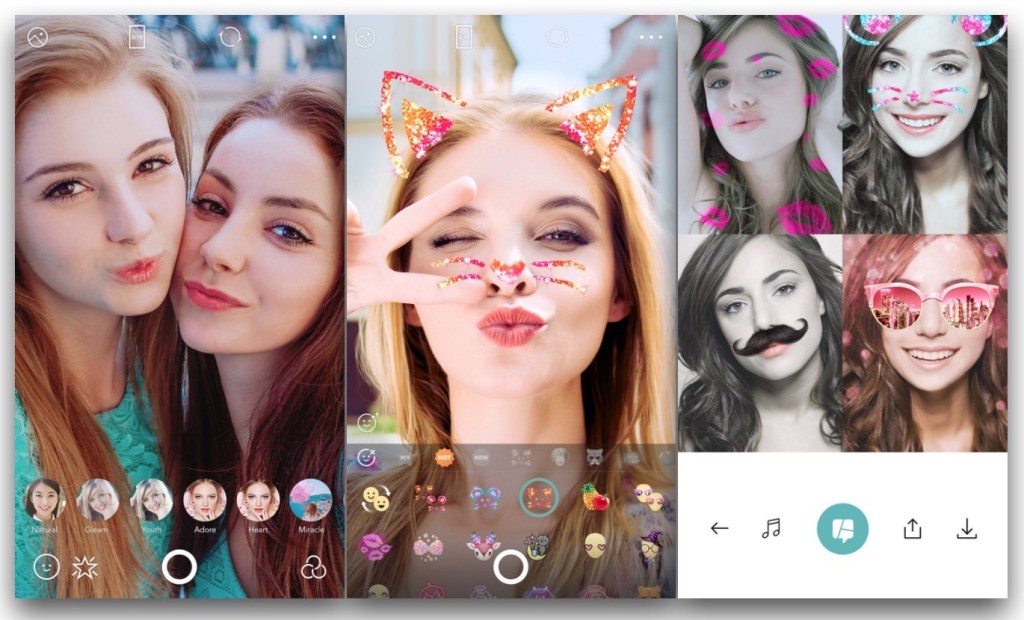
    B612 Camera: Selfie Camera Apps

    B612 is probably the most well-known Selfie Camera Apps in the list. No wonder, since it offers the users a brilliant camera, a wide range of filters, and some really awesome features. With more than 300 billion users around the world, there is no doubt that B612 Camera is a great selfie camera app. The nicest thing about it is that it is extremely easy to use, and you can edit pics with minimum efforts. Besides traditional selfies and editing of the same, you will find that you can create boomerangs and even selfie video clips with music or other video recordings.

    B612 Camera - Selfie Camera Apps
    B612 Camera – Selfie Camera Apps

    If you are a fan of stickers, you will be glad to know that the app has over 1500 augmented reality stickers. If you use them constantly, the app will automatically select the one you tend to use the most and show you a preview. It does not have a shutter sound, so you can take quiet selfies anywhere without disturbing others around you. It has an advanced filter set, offering over 40 different types of filter.

    Sweet Selfie

    Sweet Selfie has not been around for a long time, but it has managed to make a name for itself in a remarkably short time. The camera is designed to automatically beautify your photograph so that you look picture perfect. Sweet Selfie comes with dozens of makeup functions that let the users experiment with different looks and choose the one they like the best. If you want to give life to your pictures, you can always add quirky animal stickers. The app features a smart auto-beautiful feature so that much of the work is automatically done and you can add your touches later.

    The Sweet Selfie app can highlight your picture similar to a flash so that you always look bright and charming. There are tons of photo effects to choose from, including retro, blur, and vignette. The app is compatible with selfie sticks as well. While the app is highly functional, new users might find the user interface a tad tough to use. Some users have complained about receiving spam alerts. However, this can easily be blocked and will not harm your phone.

    BestMe Selfie Camera
    BestMe Selfie Camera

    BestMe Selfie Camera

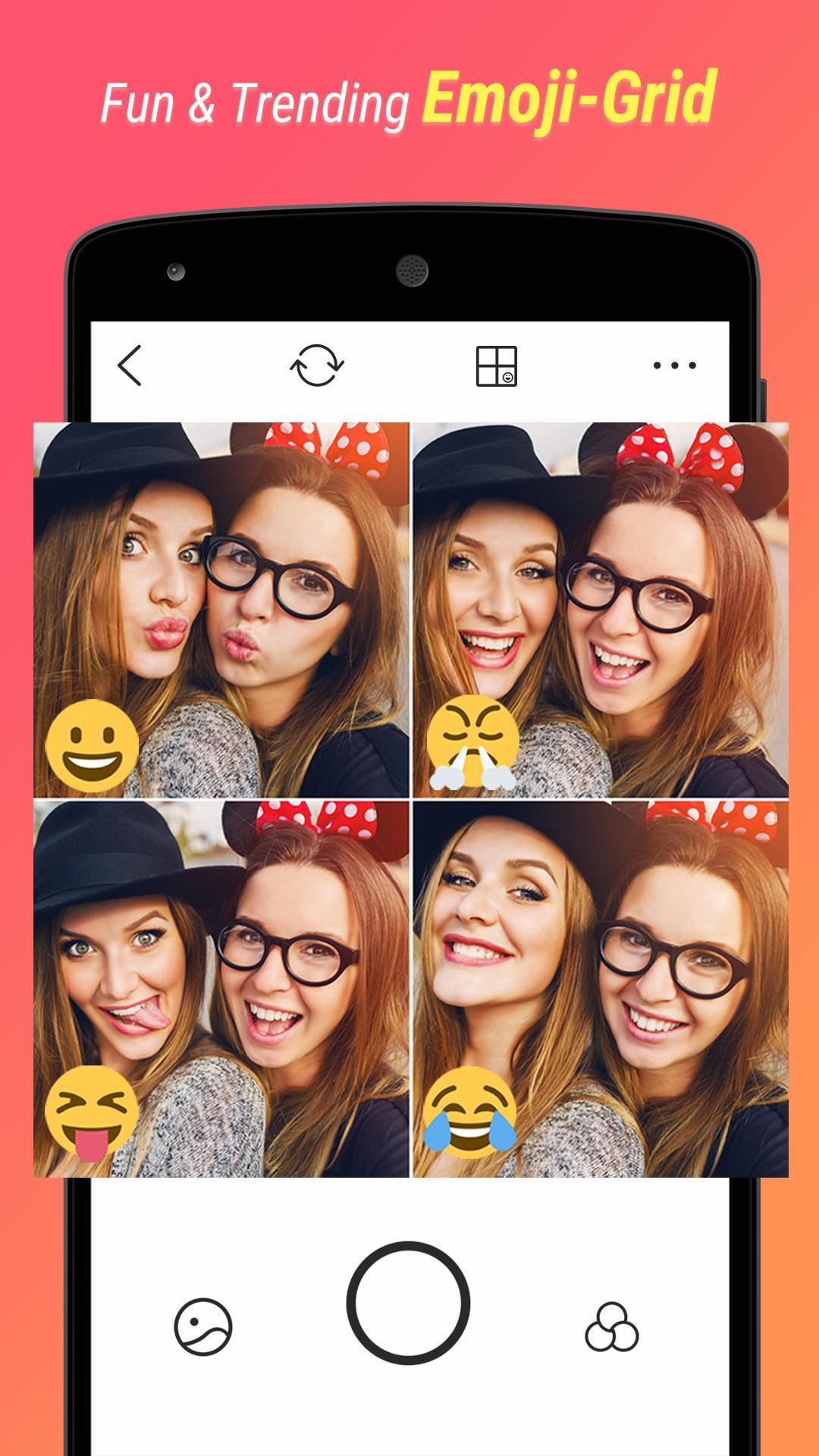
    This selfie camera comes with over 125 filters so that you can edit your picture just the way you like. There are plenty of emoji stickers and other filters to use and play around with. BestMe Selfie Camera is compatible with selfie sticks. The app makes sharing your latest picture on social media platforms like Facebook and Instagram much easier. Users would be able to create and share real-time collage easily and instantly. One drawback of BestMe is that the font size is quite small which makes the experience a little bit annoying. There is no way to change it as of now.

    Wrapping Up

    Now that we have seen the top selfie apps for Android, check them out to see which one would suit you the best. They are all great! Most of them receive regular updates and bug fixes, so you can be sure you will be dealing with the latest in the market.