Author: Jessica Robinson

  • Realme Launches Phone With 48MP quad-camera setup; 5000mAh battery

    Realme Launches Phone With 48MP quad-camera setup; 5000mAh battery

    Smartphone manufacturers in the budget smartphone space constantly refresh older models to include the latest features and also regularly push out unique new models to try and dominate the market.

    They need to stay relevant – and launching better devices that boast the latest hardware is the only way to go.

    Realme introduced the Realme 5 back in August this year. The entry-level device sold well, however, other manufacturers like Xiaomi and Vivo responded by launching devices like the Note 8 and the U10 respectively.

    Realme now wants to make a comeback and has recently launched the Realme 5s

    It is a refresh of the Realme 5 but comes with some significant hardware improvements in the camera department.

    Unlike the Realme 5, the Realme 5s is available with a minimum storage capacity of 64GB and a minimum of 4GB of RAM.

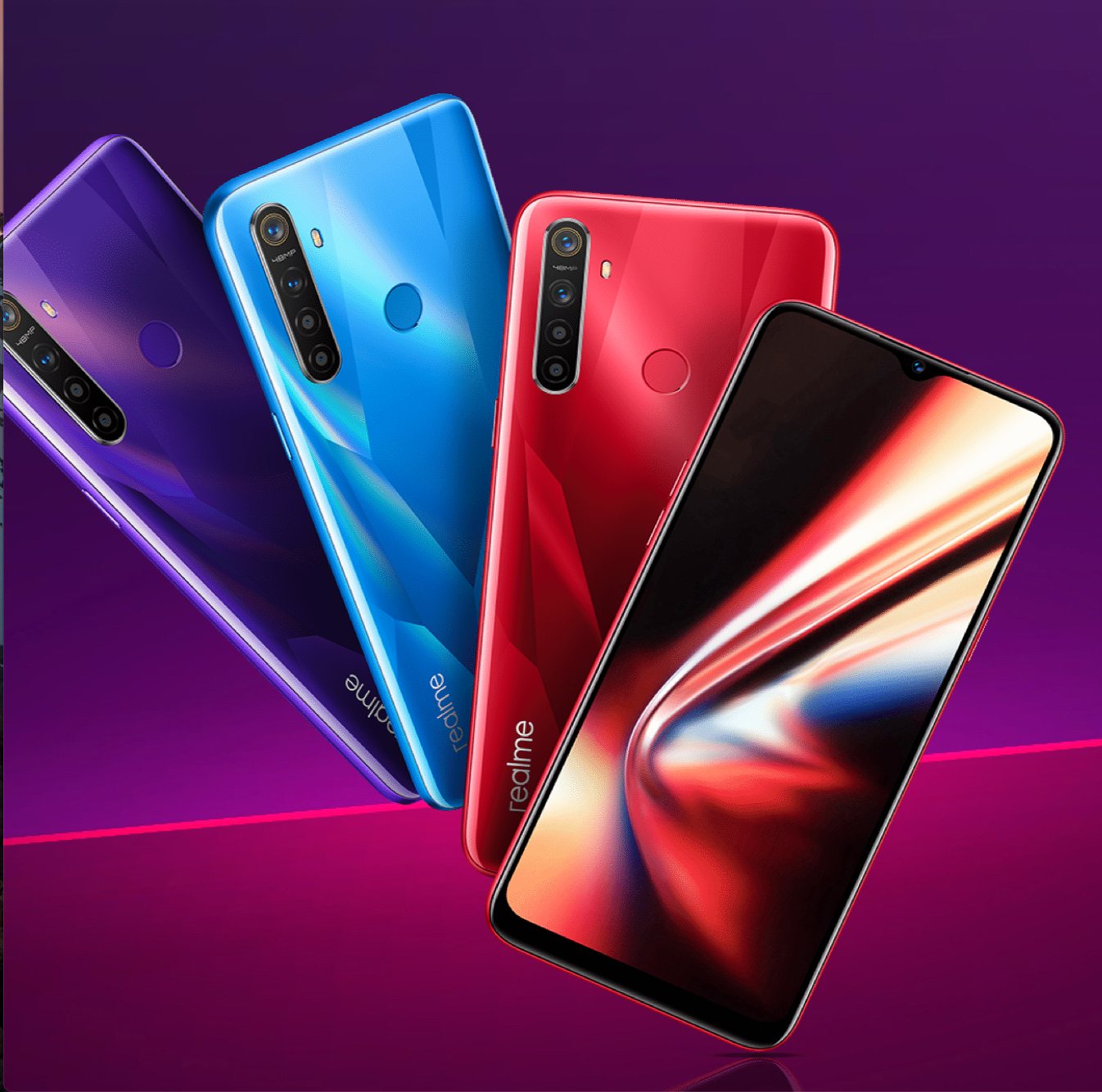
    The 5s is also available in a new color – ‘Crystal Red.’

    The device is competitively priced; however, comparing it with other equally priced devices will help us learn if it is worth buying.

    Specifications and Comparison

    As mentioned, the Realme 5s comes with a minimum storage capacity of 64GB. A 128GB model is also available; however, the RAM capacity stays the same at 4GB in both variants.

    The 6.5-inch HD LCD screen includes a small waterdrop notch.

    The notch is a common characteristic of smartphones in the current market. However, phones like the Redmi Note 8 feature a Full HD screen at about the same price.

    The screen is enforced by Gorilla Glass 3, making it significantly more durable.

    It comes with a Snapdragon 655 processor, which is typical of a phone at this price. Both the Vivo U10 and the Redmi Note 8 have the same chipset.

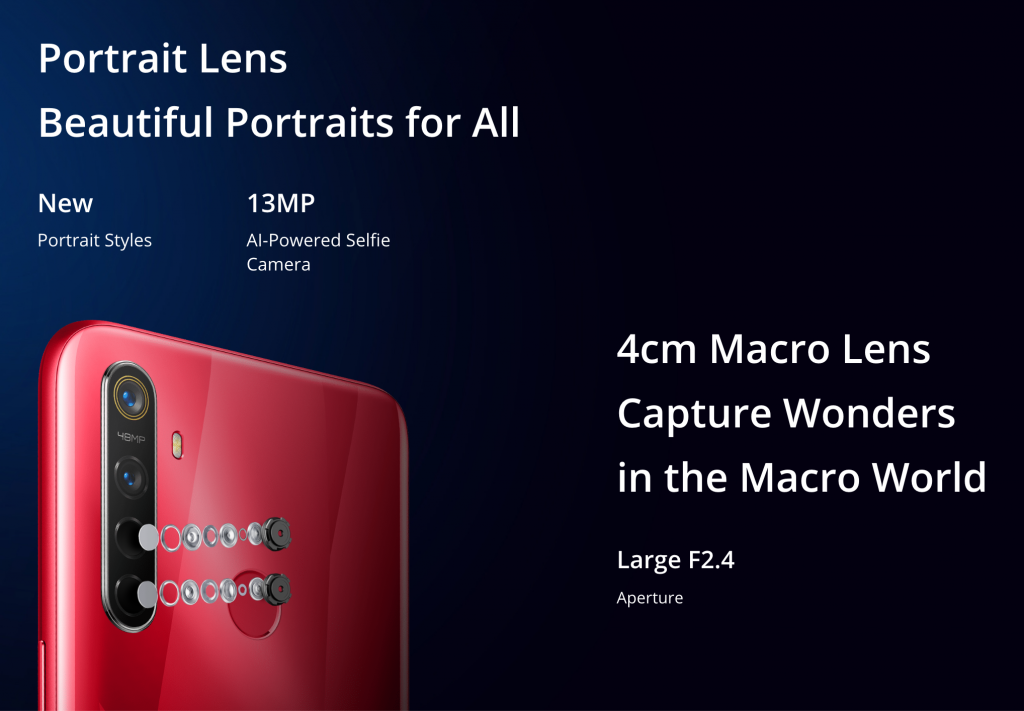
    Realme 5S Macro lense

    The chipset is robust and supplies the user with enough power to play demanding games at low settings.

    Multitasking on the 5s feels excellent, and slowdowns and lags are a rare occurrence.

    The phone houses a high-capacity 5000mAh battery that will last the average user two days on a single charge.

    The box includes a 10W fast charger, which makes charging the large battery slightly faster.

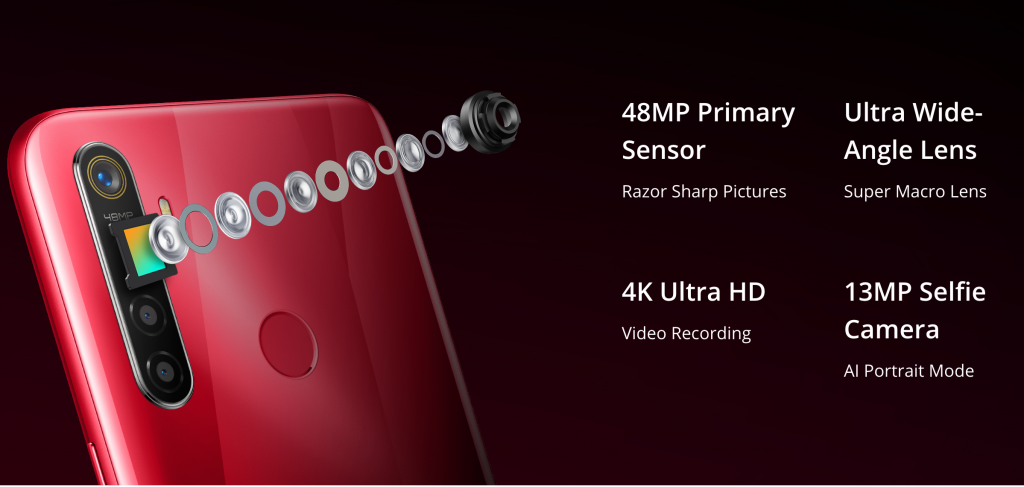
    The cameras are where the Realme 5s shines. The phone boasts a quad-camera setup, which is a huge selling point considering the price.

    The 48MP+8MP+2MP+2MP cameras do a great job of capturing stunning shots even in low light conditions.

    Realme 5s Camera

    It is the best camera setup offered at this price. The device completely blows most competitors out of the water when it comes to supplying a value for money.

    The 13MP front camera captures stunningly vivid selfies.

    The phone is big – one of the biggest in the budget smartphone space. The large size, coupled with the larger battery, the fantastic software based on the latest iteration of Android, and the excellent cameras make it a great buy.

    Although the Redmi Note 8 offers identical features, the 5s is better priced and has a larger blueprint.

    The Realme 5s is perfect for anyone looking for a bang for the buck device.

  • Huawei Sales in India Strong Despite Uncertain Future

    Huawei Sales in India Strong Despite Uncertain Future

    Shortly along with the heels of United States President Donald Trump blocking the Chinese smartphone manufacturer, Huawei from doing business with any American firm, sales in the European markets too have faced a steep fall. With many carriers and retailers in Europe re-evaluating their association with the smartphone maker, the future of Huawei may well be uncertain.

    Huawei Sales in India Strong Despite Uncertain Future

    Rolled out about six months back, this trade ban from Washington bars Huawei from buying key U.S. components and software without licenses. Word is, the world’s largest smartphone maker after Samsung, Huawei is looking at relying on its massive home market and in-house software to drive its sales until a resolution of this ban is insight.

    Despite the tech giant from China putting up a brave front and launching new smartphones all over the world, one cannot deny that Huawei is feeling the pinch from this big ban.

    According to reports, notwithstanding the rollout of the trade ban by Washington, the sales of Huawei smartphones in India are undeterred, although there is no certainty whether it will continue to remain so in the near future.

    Croma, one of the largest gadget retailers in India has stated that Huawei users are not particularly concerned about upcoming updates and have displayed confidence that new software and security updates would certainly be coming their way.

    Ritesh Ghosal, the Chief Marketing Officer at Croma, said that “with its innovative and differentiated technology offerings, Huawei will continue to be one of the sought-after brands” in the Indian smartphone market.

    In the same press release, Croma also announced that owners of the Huawei smartphone P30 Pro will receive a dual view video and AR measure very soon, along with the usual security updates.

    Croma has partnered with Huawei through the years for the sale of its smartphone in India, helping the Chinese smartphone manufacturer establish a strong foothold in the Indian smartphone ecosystem.

    However, Croma chose to skip any announcements on the future plans of Huawei or the launch of any upcoming devices by Huawei in India. They also did not comment on the Honor 20 Pro that was recently announced in London earlier this month without any clarity on the launch date.

    Despite its precarious situation, Huawei has managed to put up rather enviable growth figures in the third quarter. With roughly half of its revenue coming from smartphone sales, Huawei expanded its smartphone shipments by a whopping 29% in quarter three of 2019.

    Huawei is also all set to roll out its range of latest smartwatches under the Huawei Watch G2 label in India on the 5th of December, 2019.

    It would be interesting to see how this ban from the United States President Donald Trump on the Chinese tech giant will influence its sales and market share in the mighty Indian smartphone market. This ban may also impact its sub-brand Honor, which has a big market share in India and globally for its range of budget smartphones.

  • How to Export WhatsApp Chat as a PDF

    How to Export WhatsApp Chat as a PDF

    As reported by Statista, over 1.5 Billion people use WhatsApp every day. While some use the messaging app to stay connected with friends, colleagues, and family, others use WhatsApp for business purposes.

    In many cases, it becomes necessary to save a WhatsApp conversation as a PDF.

    While WhatsApp automatically makes a backup of your chats every night, it can be quite tricky to get a copy of a specific conversation using these backups.

    However, it is super easy to export individual chats on WhatsApp as PDFs. You can export your chats as PDFs in 13 easy steps!

    Let’s begin.

    Export WhatsApp Chat as a PDF

    People typically take screenshots of WhatsApp conversations; however, screenshots are only useful when needing to save specific parts of a chat.

    The large size and variable quality make using screenshots super inefficient when it comes to saving a whole chat.

    Here’s how you can export your WhatsApp conversations as PDFs:

    Step #1:

    Launch WhatsApp and open the chat you want to export.

    Step #2:

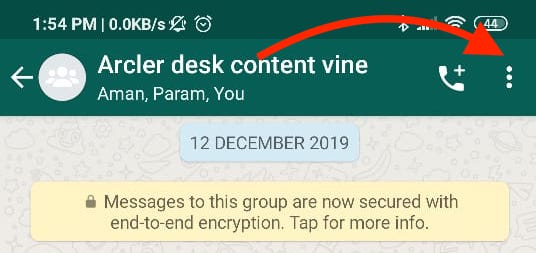
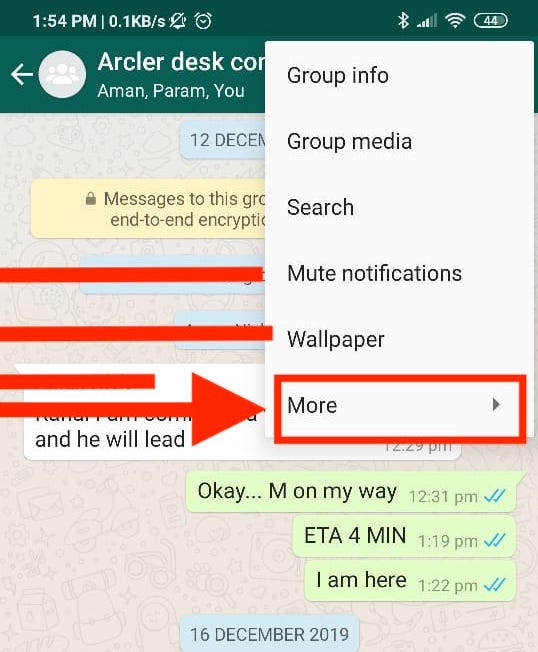
    Tap on the options button, which is the three-dotted menu icon located at the top-right corner of the chat.

    How to Export Whatsapp Chat

    Step #3:

    Tap on ‘More.’

    Tap on export chat option -whatsapp

     Step #4:

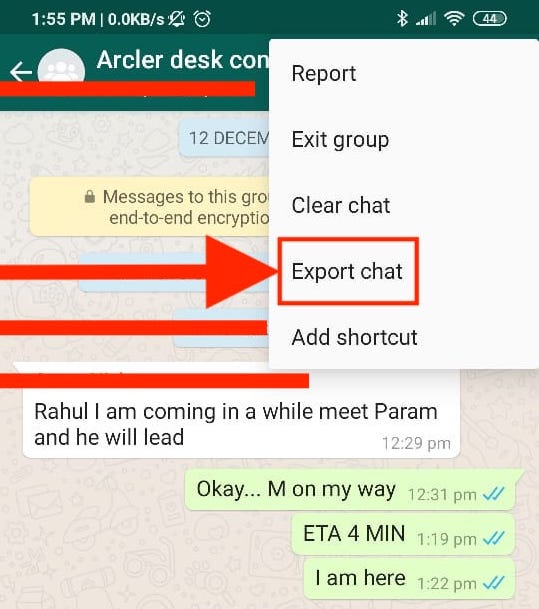
    Tap on the ‘Export chat’ option.

    Tap on more- Whats app chat export

    Step #5:

    Next, WhatsApp will prompt you if you’d like to include the media in the chats in the file you’re about to export.

    Including media in your exported file will significantly increase its size. Therefore, it is recommended that you export the chat without including the media.

    Step #6:

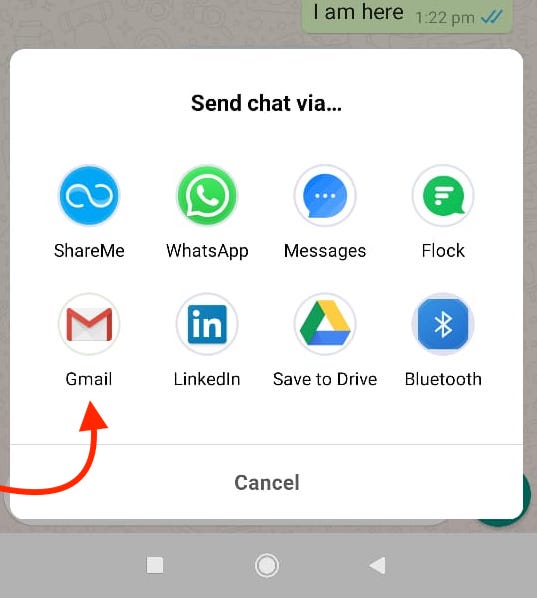
    A pop-up card appears on the bottom of the screen. Select Gmail or any other email client you usually use.

    Export to Gmail - Whats app chat

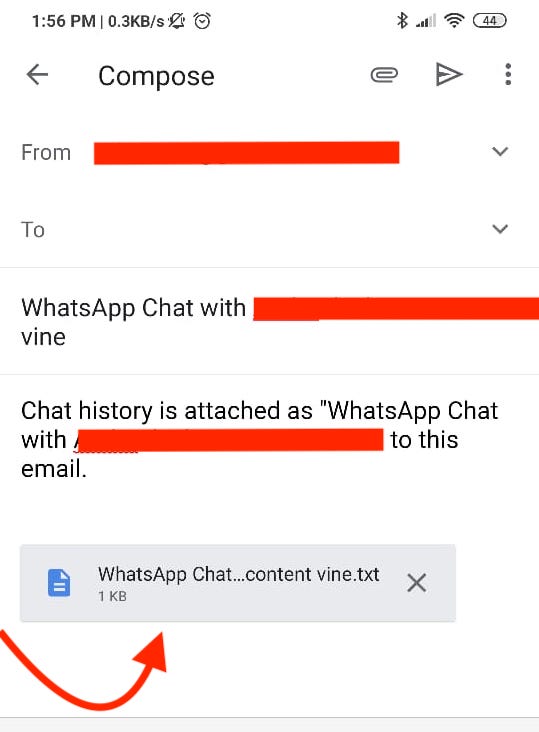
    When you do this, the chat will be attached to the email as a text file. Additionally, a copy of all the contact numbers that you have shared in the conversation will also be attached.

    Step #7:

    Gmail does not allow users to open the attached files directly. Save the mail as a draft by going back to the main menu (in Gmail).

    Step #8:

    Go to the drafts section on Gmail, and tap on the mail you just drafted. This way, you will be able to open the attached files.

    Step #9:

    Download the .txt file by tapping on the arrow button.

    Download the Text file by tapping on the arrow button.


    Step #10:

    Open the .txt file using a PDF maker app such as WPS Office. Alternatively, you can open the draft on your computer and use a PDF maker app there.

    Step #11:

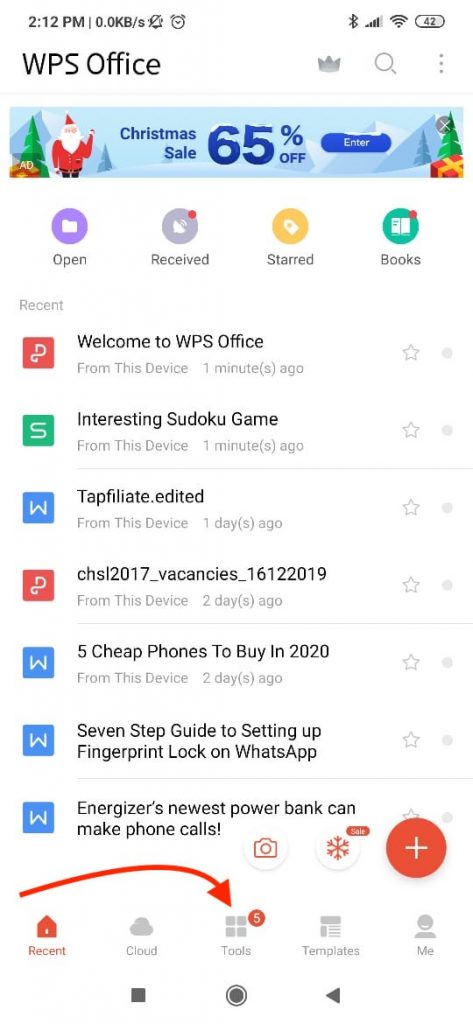
    Tap the ‘Tools’ icon on the bottom of the screen in the WPS Office app.

    What app chat Export- WPS Tools


    Step #12:

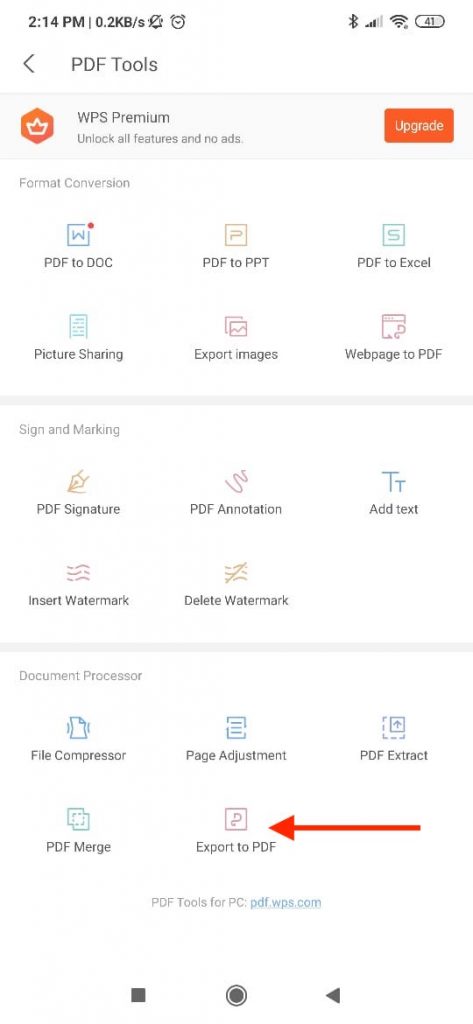
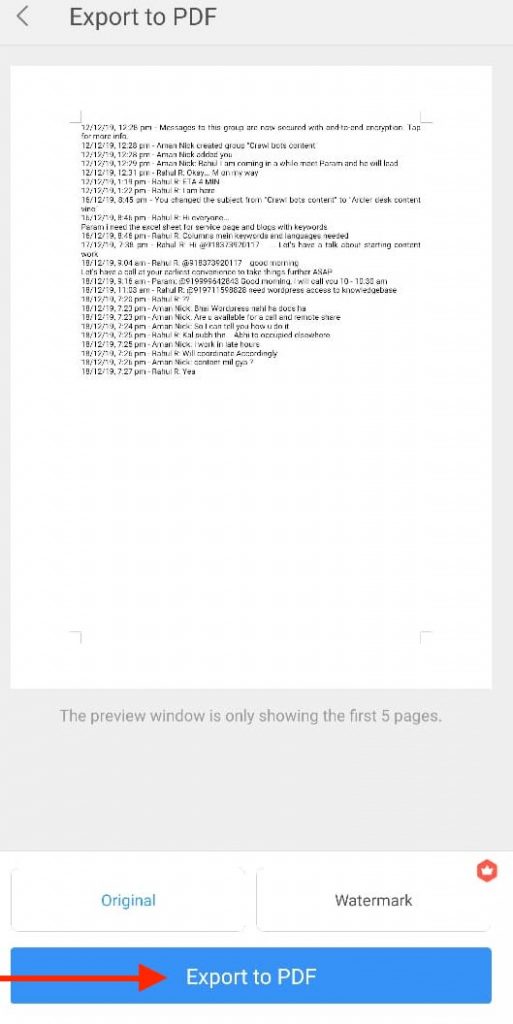
    Tap on the ‘Export as PDF’ option. A preview of the document will appear. Tap on the ‘Export as PDF’ button once again.

    Whats app chat Export as PDF option

    Step #13:

    A prompt will ask you where you want to save the exported PDF. Pick the appropriate location and hit ‘Save.’

    Whats App chat save as the exported PDF


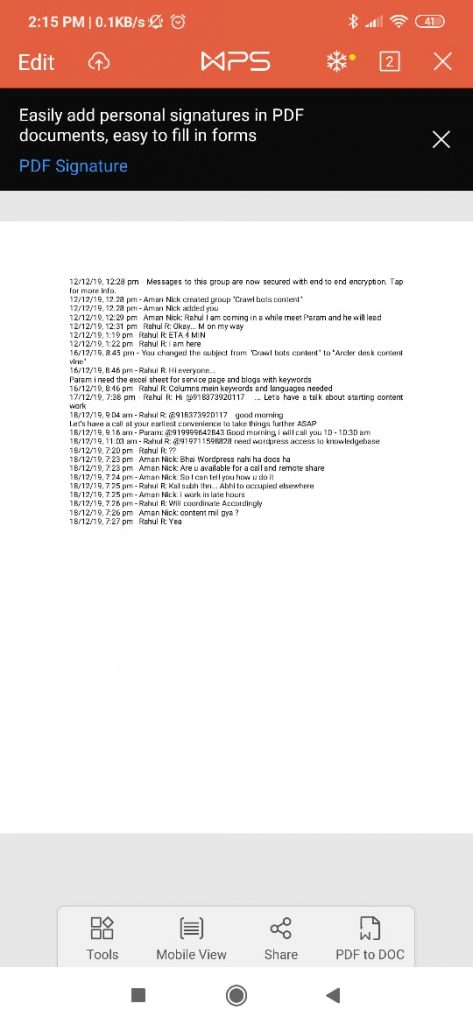
    You now have exported your chat as a PDF.

    Whatsapp chat WPS Exported to PDF

    PDF files are considered universal, and almost every machine can view them. They are difficult to alter and easy to transfer.

    Using this 13-step guide will help you quickly convert your chats into PDFs.

  • How iOS 13’s New Bluetooth Alerts Help Protect Your Privacy

    How iOS 13’s New Bluetooth Alerts Help Protect Your Privacy

    With every iteration of iOS, Apple’s focus on providing better security and privacy for its users becomes more and more evident.

    How iOS 13’s New Bluetooth Alerts Help Protect Your Privacy

    The newest iteration of the iPhone’s operating system, iOS 13, gives users more control over what an application can and cannot do. Users can now control individual applications’ permissions and choose what services an application can and cannot utilize.

    iOS 13 gives users an option to disable Bluetooth access for different apps via a new permission setting.

    The setting presents itself in the form of alerts that read, “App would like to use Bluetooth.”

    This particular setting deals with Bluetooth connectivity outside of audio streaming, meaning, if you disable Bluetooth access for an app, it should still be able to stream audio to your Bluetooth headphones and speakers.

    By forbidding an application from access to Bluetooth services, one can protect themselves from the collection of private Bluetooth LE Beacon data.

    Although Bluetooth services can be used by apps to exploit a user’s privacy, one cannot conclude that every application that asks for permission to use Bluetooth for purposes other than streaming audio intends to breach your privacy.

    For example, Spotify needs access to Bluetooth services to learn if the iPhone is using a car stereo. If yes, it automatically switches to the “Car View” mode.

    Another great example is Google Maps needing access to Bluetooth services. Bluetooth helps Google Maps determine your car’s parking location with higher accuracy.

    Nonetheless, some developers out there do intend to violate your privacy by stealing sensitive data.

    The new permissions settings help prevent such breaches.

    iOs 13 Apple New Bluetooth Settings

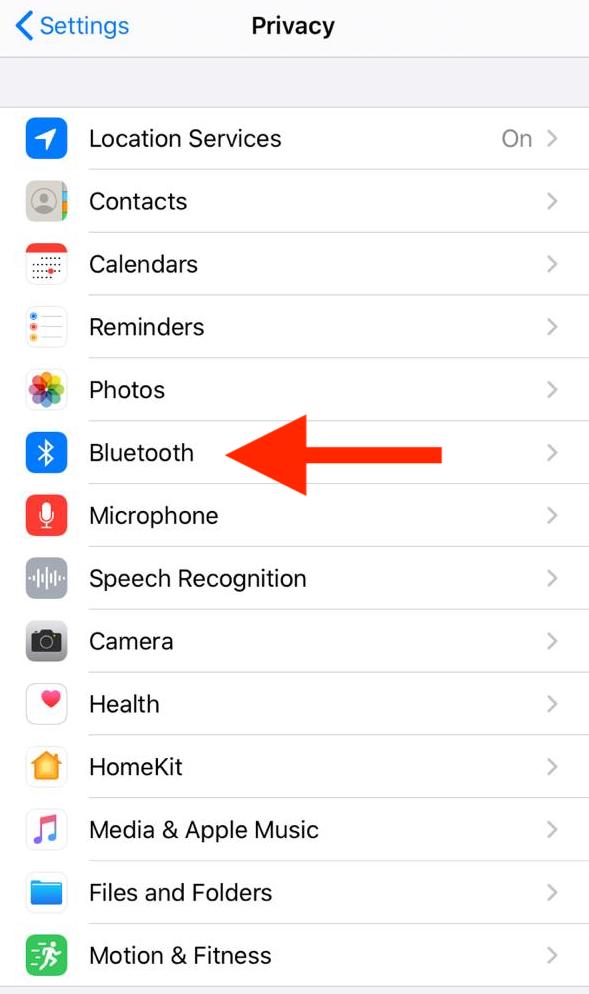
    With the details of this new feature out of the way, here’s a quick guide to disabling access to Bluetooth services for apps in iOS 13:

    • Go to Settings
    • Navigate to the Privacy section
    • Tap on the ‘Bluetooth’ option

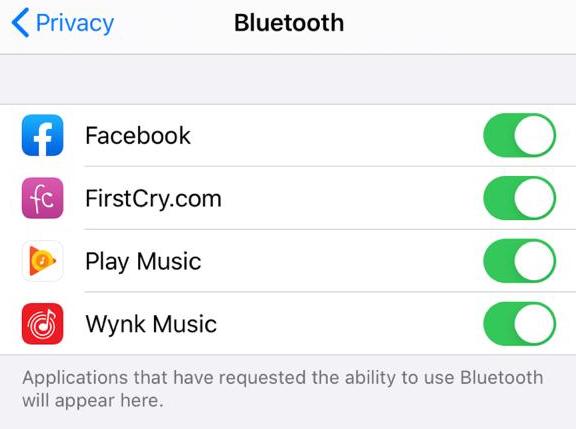
    Next, a list of applications appears with a toggle next to each app. Here, you can flip the toggle on or off as you like to enable or disable specific apps’ access to Bluetooth services.

    iOS 13Privacy Bluetooth Settings Apple

    Whenever you open an application for which you have disabled Bluetooth access, a window will pop-up stating that the app wants to use Bluetooth.

    If you think the application requires Bluetooth to work, you can grant permission to it right from that window. If you believe otherwise, you can choose to ignore the pop-up.

    However, if you’re unsure about the application’s need for Bluetooth access, you can deny access for the first time and see if the app works regularly.

    If it refuses to work correctly and breaks or crashes, you can go back and grant the app access to Bluetooth following the steps as mentioned earlier.

    Just remember that disabling an application’s access to Bluetooth services does not restrict it from connecting and playing media on Bluetooth devices like speakers or headphones.

    Every app can stream audio without asking for permission– it is the usage of Bluetooth for purposes other than streaming that Apple now provides better control over.

  • How Huawei Lost the Support of The Chinese Public

    How Huawei Lost the Support of The Chinese Public

    Meng Wanzhou, the deputy chairwoman of the board and chief financial officer of Huawei, was arrested in December 2018 while transferring planes in Vancouver as she was en route to Mexico from Hong Kong.

    How Huawei Lost the Support of The Chinese Public

    Meng was charged with “conspiracy to defraud multiple international institutions.” She has since been under house arrest in her multi-million dollar home in Vancouver.

    On December 1, 2019, the first anniversary of her arrest in Canada, Meng issued an open letter describing how the arrest affected her lifestyle and how she experienced pain, fear, disappointment, and helplessness in the one year she was detained in Canada.

    Her letter was not received well by the Chinese public. In the letter, she wrote at length about how she has accepted her current circumstances and that she no longer fears the unknown.

    Numerous users posted the numbers 996, 985, 251, and 404 in the comments below her letter on Weibo, a social media platform that resembles Twitter about how Huawei lost the support.

    The numbers refer to a former Huawei employee, who graduated from one of China’s 985 top universities. The employee worked 12 hours a day, six days a week, and was jailed for over seven months after he demanded his severance pay when his contract hadn’t been renewed.

    His story went viral on the Chinese internet and generated angry responses online, which were later censored by the Chinese government.

    The man, Li Hongyuan was later released from prison with no charges and was compensated by the government for wrongful imprisonment. Li shared his story online around the same time Meng issued her letter, and this was when things started to heat up.

    A comment by Jiang Feng, a Chinese psychologist, perfectly captures the sentiments of the Chinese public.

    He writes, “One enjoyed a sunny Canadian mansion while the other enjoyed the cold and damp detention cell in Shenzhen.”

    The comment was made on Zhihu, which is a question-and-answer site similar to Quora.

    The Chinese public considers Huawei to be the crown jewel of the country’s tech industry. Many Chinese proudly splurge on Huawei phones and stray away from devices by other brands.

    The backlash due to the imprisonment of a longtime employee has made it clear that the Chinese are beginning to dislike Huawei.

    Users on Chinese social media sites are talking about boycotting Huawei products altogether. Images of a pair of handcuffs with Huawei’s branding have been circulating online, with the captions publicizing them as a new smart-fitness wristband.

    The depth of the sentiments of the Chinese people can be understood when we look at the company’s circumstances and their reaction from just a few months ago.

    Following Meng’s arrest, messages supporting Meng and Huawei flooded Chinese social media sites.

    As reported by research firm Canalys, Huawei’s smartphone sales went up by 66 percent from the previous year, and sales of competing brands like Apple and Samsung declined.

    Now, many Chinese middle-class professionals worry that what happened to Li Hongyuan could also happen to them. Articles about life in jail in the Longgang detention center are circulating on social media sites.

    The magnitude of censorship by the Chinese government has only added to the outrage.

    Winning back the hearts of the Chinese public will be a difficult challenge for Huawei.

  • New Samsung Galaxy A51

    New Samsung Galaxy A51

    Samsung Galaxy A series has always been a catch owing to its high-quality design and customer-oriented features. The new launch of Samsung Galaxy A51 is expected to enhance the sales of this Korean company further.

    Samsung Galaxy A51

    Alleged features of the device are now available on the internet. The Galaxy A51 is believed to have thin bezels and a Galaxy Note10-like display.

    The bezels offer a sleek yet sharp appearance to the model. With an advanced processor of Exynos 9630, it features an octa-core processor and is available in two versions – the base version with 4GB RAM and 64GB storage and the 6GB RAM model with 128GB storage.

    It supports additional expandable memory up to 1TB, thereby ensuring the room of a multitude of files, pictures, and music.

    The device is said to feature a 6.5-inch super AMOLED display. It is equipped with a punch-hole notch, which is placed at the center of the phone.

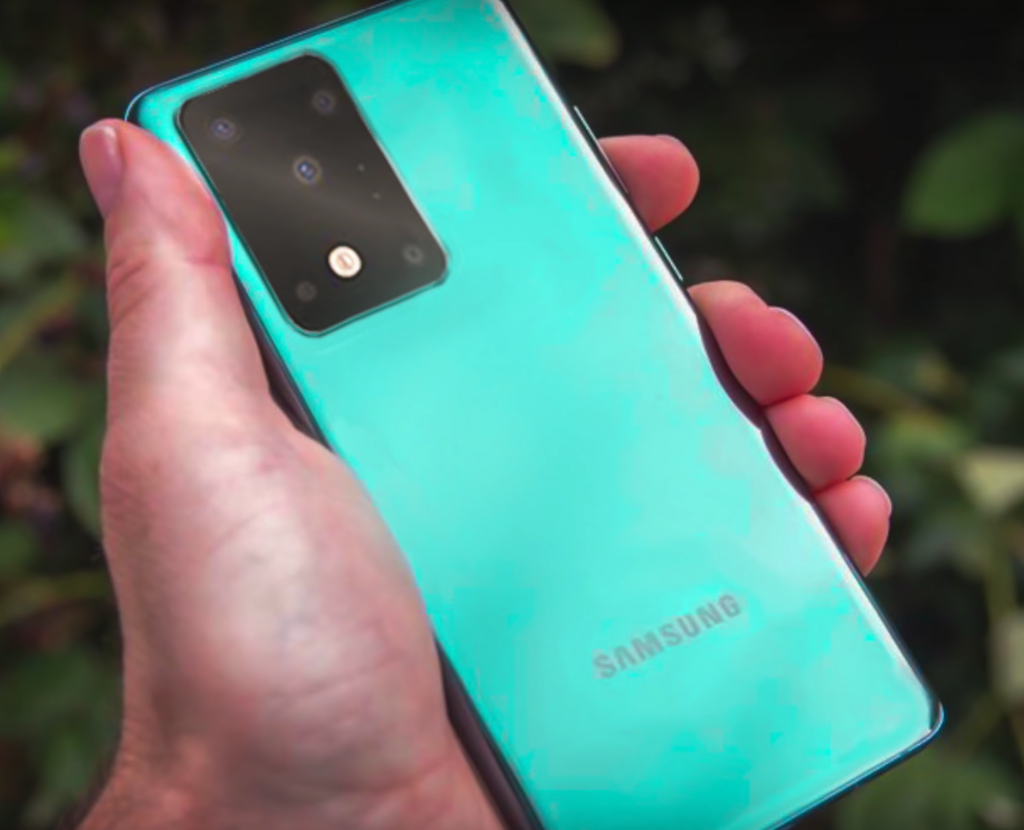
    The Galaxy A51 is estimated to make a launch around New Year in 2020. A quad-camera setup, which was previously the norm, has been replaced by an L shaped structure, which contains a myriad of the advanced lens giving this model a unique finish.

    Samsung-Galaxy-A51-Camera

    It is said to contain an improved 48MP primary camera. Furthermore, the smartphone may support an ultra-wide-angle camera with a resolution of 12MP. Also, It could boast a 32MP selfie camera with beauty-enhancing features, and a 5MP depth sensor camera.

    CORE FEATURES

    • Can record up to 4K videos, at 30 frames per second
    • Powered with 10nm FinFet, SoC paired with Mali-G72 MP3 GPU
    • Runs on Android 10 with oNE UI 2.0
    • Battery backup at 4000mAh

    The phone supports a 20W fast charging via USB port and comes with a 3.5mm headphone jack. When multi-core tests were conducted on the device, it aced 1,185 points. As for single-core tests, it scored 323 points.

    The model is available in various attractive shades, including black, blue, and silver. It is customer demand-oriented, comes with the brand value and trust of Samsung, and is still budget-friendly.

    All these features make it a grab and are sure to enhance the market image of Samsung further.

  • Alexa Can Now Set Sleep Timers to Simulate

    Alexa Can Now Set Sleep Timers to Simulate

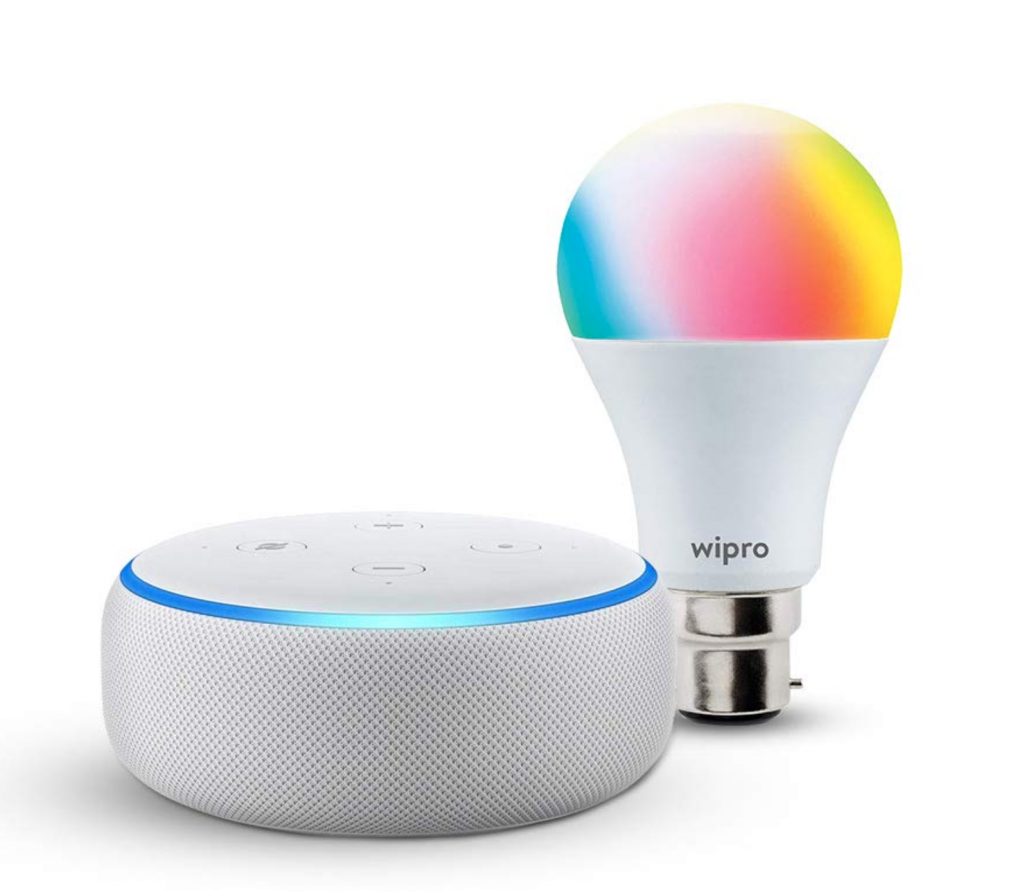
    Artificial intelligence is nowadays playing a significant role in all aspects of human life. Starting from our home to all the fields like medical, Bigdata, Roads, & safety, the list goes on. With the growth of technology, it is becoming intertwined in people’s lives. Alexa is one such artificial intelligence device that provides smart assistance to you at your fingertips. It has several advanced and intelligent features.

    Alexa Can Now Set Sleep Timers

    According to the latest update, now, Alexa can wake you up using smart lights by giving you the feel of sunrise.

    Alexa Takes Control Over Smart Lights

    Alexa registers your command and makes the smart light imitate a Sunrise. The brightness of the intelligent light gradually increases over time and gives you the feel of the sun slowly rising.

    Alexa Takes Control Over Smart Lights

    Example – You say: “Alexa, wake me up by 5.30 am tomorrow using lamp”.

    It will take care of the rest of the activity. It ensures the brightness of the smart light gradually increases from 5.20 am, giving you an effect of daylight and triggers you to wake up.


    “Digital Trends,” says, smart light Sunrise features can be activated for all the days of a week.

    You have to command Alexa to set the sleep timers like, Alexa, wake me up every morning by 5.30 am using lamp”. It follows the command daily without error.

    The same feature can be used for sleeping also.

    Just order it like this: “Alexa, set up sleep timer one-hour using lamp.” The smart device ensures the light dims gradually. You can plan that one hour to finish up your bedtime works and get ready to sleep.

    Using the app, you can even manage the required brightness of the smart light gradually over time.

    According to Amazon, below are few added features that come along with Alexa and smart lights.

    Nature Sounds & Music

    While the lights are gradually brightening over time, you can set Alexa to play nature sounds and music also. This function can be activated using the ‘Alexa app.’

    You have to select your favorite music or nature sound to start the device to play it for you while waking up.

    Multiple Alarm

    You can set more than one sleep timers using the app. If you need two or three alarms in a day. One alarm for you, one for your wife, and your kids can be managed using this additional feature.

    Wakes Up with FM Radio

    If you prefer to wake up using FM radio instead of natural sound and music, this feature helps Alexa to do that for you. You can preset up to 15 FM stations in the device.

    Conclusion

    Get into the world of artificial intelligence from your home and facilitate yourself with smart technology. Hence, the app does that for you before you get up from your bed.

  • November security patches rolling out

    November security patches rolling out

    In November 2019, the monthly security patches for Google’s Pixels are rolled out including the Pixel 4 XL and 4. This major monthly update will include both mobile phones with a few fixes. When compared with earlier features, Google’s Pixel 4 XL & 4 will get some Smooth Display improvements and also camera tweaks. They also published some biggest security bulletin for November month and posted the same under Google’s website for full OTA downloads and factory images.

    November security patches rolling out

    Full Functional security patches with the change-log for Google’s Pixel mobile phones are as follows:

      • Camera Quality and Smooth Display improvement for Pixel 4 XL & 4.
      • Controller mapping for Xbox BT with additional support for entire Google Pixel models (from Pixel 4 XL until Pixel 2).
      • Some models stuck while booting and additional fixes offered from Pixel 3a XL, Pixel 3a, Pixel 3 XL, & Pixel 3.
      • The audio quality for bottom speaker improvements for the Pixel 3 model.
      • Google Assistant Hotword improvements for Pixel 3 XL, Pixel 3, Pixel 2L, & Pixel 2.

    Security Patches for OTA Files

    Pixel devices include the factory images and OTA files for assistance. You can download the Android security files to your respective devices that can be downloaded from Google’s website.

    Within this process, your mobile device can boost up to Android version 10. Users can follow the below-provided instructions to flash their mobile phones without any data loss manually. The Android security update with OTA files for your essential mobile phones is already started to roll out.

    Sideloading OTA for Android 10

    OTA File Download – It is important to download the OTA file beta version from the full OTA Google’s Image hosting website. It includes various updates for the Nexus device, Google Pixel devices, and also Android 10.

    Sideloading OTA for Android 10

    Boot your device in Recovery Mode – You need to boot your Google’s Pixel device in Recovery mode. Make use of the Bootloader page by press & hold the Volume down & power buttons simultaneously for a few seconds. With the help of volume buttons, you can scroll up & down to choose the Recovery mode. After selecting, press the Power button. Volume Up button control the Recovery mode.

    ADB Sideloading Navigation – You can apply the required ADB update with the help of the Volume button and use the Power button to select.

    Installation of ADB Tools: Connecting your mobile phone to a PC – You should have Fastboot & ADB tools to transfer the OTA files to your mobile phone from the PC. Also, you can download ADB the tools Within the Android official Developers site.

    Inputting Sideload Command – Once the OTA file is ready for Sideloading, you can utilize the Command Prompt application on your Windows PC. Access the command prompt and input the keyword ADB and press the enter key.

    If you are using Linux or Mac OS then input as ./adb sideload and hit the enter key. Now, choose the appropriate.Zip file to use the ADB file to start the process. After a successful setup, you can view the Installation and as well as the Sideloading process dialog box.

    Restart your mobile phone – After installing the OTA file, you can return to the Recovery mode. Also, the new update can be applied on your mobile phone by restarting it by using the Power button.

  • Vivo V15 Pro review

    Vivo V15 Pro review

    The Vivo V15 Pro review can step up higher when it comes to smartphone innovation. This device is like the Vivo nex and Vivo nex dual display edition. This is offering with best of features being Chinese smartphone makers managing to be the latest launch in India. This is meant for bringing aspirational and useful features making it a more affordable segment and offers with a pop–up selfie camera as well as an in-display fingerprint sensor with triple rear cameras.

    Its launched at a price of Rs 28,990 with the Vivo V15 pro setting a lot in its favor including attractive design, stacked hardware, impressive cameras and the latest version of android. This can justify its price tag, especially when it’s the 2018 values flagships like that of Asus Zen fone 57 and the Poco F1.
    Vivo V15 Pro review

    The design

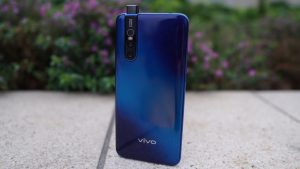
    This is the Vivo V15 Pro which is a real looker and is going to draw some attractive glances. But not in the same way as like other smartphones out there right now. This has eye-catching designs and colors. This has gone for a more tasteful and elegant finish.

    The rear panel is topaz blue in color with the review unit that has an electric blue diagonal streak in the middle that gradually fades into deeper shades of blue in the corner. There is even a microdot pattern in the center that morphs into a wave-like pattern near the edges and that makes the look called the spectrum ripple design.

    It’s the color shift that looks beautiful when the light falls on in it at different angles. This phone is available in a completely different ruby to finish a red color that has a red gradient with a crosshatch pattern across the back.

    Best of features to review

    This is of the latest smartphones with the handset coming with an FHD and an ultra full view super AMOLED display and is backed by a 3,700 mAh battery. This is available with a notch-free screen offering with a 6.39-inch screen with a display of 19.5.9 aspect ratio and 91.64 % screen to body ration.

    The complete handset is powered by the Qualcomm snapdragon 675 AIE with the 6GB RAM and 128 GB ROM that is expandable up to 256 GB. This runs off the Android 9 Pie-based on fun touch 9 operating system.
    Vivo V15 Pro features to review

    Apart from that, the device offers an in-display fingerprint scanner for the purpose of security. This bears a dual sim with weighing 186 grams. In the front, you have the camera that features a pop-up selfie camera at the front. This includes a 32-megapixel lens featuring like the AI face beauty.

    The AI portrait composition, bokeh mode, AI body shaping, portrait light effect, AR sticker, video face beauty, and gender detection. The handset boasts with a triple rear camera setup at the back consisting of 48 MP primary sensors and an 8 MP secondary sensor with a 5MP ultra-wide lens.

    Size

    This bears a glossy rear panel curves around the edges. This provides the impression of the device being thinner than its actual size. The sore point is the rear camera module that creates a considerable bump on the back. It bears a metallic rim that runs around the edges of the V15 Pro.

    Also, the absence of sharp edges makes it hold perfect. On the right sits the power button and volume buttons. But on the left is present the Google assistant button and micro SD card tray. This button provides good tactile feedback but they are with a little to reach especially with the volume up button.

    Specificities are features to review

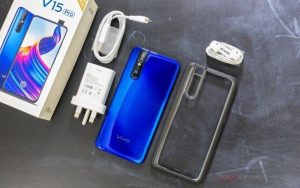
    The V15 Pro bears unique and excelling features to review. These are like:

    This is powered with the octa-core Qualcomm snapdragon 675 Processor paired with 6 GB of LPDDR4 RAM and a 128 GB of the internal storage which is expandable using micro SD card. There are three different slots for the housing of the micro SD card and two Nano-SIM cards. This means that the users won’t have to sacrifice the dual Sim Functionality for more storage space.

    Connectivity is handled by 4G VoLTE, Bluetooth 5, Wi-Fi 802.11 a/b /g/n, GPS/A-GPS, a micro- USB port, and a 3.5 mm headphone Jack, onboard sensors that include an accelerometer, ambient light sensor, digital compass, gyroscope and proximity sensor.

    On the side of software, the Vivo V15 Pro runs fun touch OS 9 Based on Android 9 pie and the android security patch running on the review unit. Fun touch OS is a heavily skinned version of android and will require some time to get accustomed to.

    The deviation from the stock android is truly evident from the get-go, starting with the absence of the app drawer. Swiping left on the home screen opens the smart launcher that is populated by cards for tasks including events, the weather, a to-do list, and the news headlines. The cards on the smart launcher and their order can now be customized.
    Vivo V15 Pro Specificities


    This comes with a loads of pre-installed app that include in-house software like the V- app store, iMusic, iTheme, Albums, and Vivo Cloud among others, as well as third-party apps that include Paytm, PhonePe, Ganna, UCBrowser, and WPS office. Above all the bloatware is never a desired trait.

    You might find the UI of the fun touch OS slightly Garish and overall it looks like a less refined take on iOS. This is not very easy as well to find specific things in the settings app. The users will now have to live with it or resort to using it with the third-party launcher from the Google play store.

    These features with the smart split for controlling the split-screen multitasking, app clone for running second instances of certain apps, smart lock for assigning tasks to the volume down button and the smart mirroring for displaying the media files on another display while you continue to use the phone.

    There is a split-screen included in the messaging feature which is particularly into use. Like the message will appear on screen as a floating bubble. Tapping on it instantly opens with the split-screen interface without having to close the app that currently using.

    The fun touch OS is also offering GameCube featuring tailoring to make the game best. This lets users mute notifications, automatically reject calls, minimize interruptions due to any kind of accidental touch gestures and stop all the background apps while gaming to maximize the performance.

    Battery Life

    Coming to the battery performance it depletes quite rapidly during sessions and serves with an average battery deterioration of 13 to 15 % just after 30 minutes of gaming.

    Summary

    Overall, the Vivo V15 Pro is a fantastic mobile with a lot of excelling features to manage great services. It is a worth buying product with lots of features compared to other big budget smartphones.
  • 6 ways to get more likes in Death Stranding

    6 ways to get more likes in Death Stranding

    For getting like in the death stranding is just not the online validation. There are likes contributing to the overall porter grade and that upgrades everything from the connections that you make to the most of cargo that you can carry. The death stranding is obsessed with helping others and there are good deeds breed likes. So when you are doing something to help self you can think about how to help others.

    6 ways to get more likes in Death Stranding

    Six ways to get more likes

    For the best of likes in death stranding, there are some best ways. These are like,

    Forge chain contracts

    Making friends in death stranding does not require any other person to like you. This is very easy. Once you have updated the bridges link statistics sufficiently by delivering and connecting the new preparers to the UCA network.

    You can also form strand contracts. For doing this you must get to the start menu, then press left to open the sidebar and then select bridge link.


    Next touch R1 and you are surely going to see a list of people with whom you have connected so far in the trip, mainly by pleasing the structures of others. Once you have a solid candidate for friendship, then press the triangle to form a strand contract.

    Now when you come in contact with the structures, you will get more likes and vice versa. Then keep the limit to a maximum at all times and get the best results.

    Improving structures and build roads

    The materials included in the death stranding are abundant right from the beginning and you are never in danger of running out of anything, especially if you are improving the star rating of preppers in the eastern region.

    The best structures equal more likes and then you are going to share it to the owners for likes when your structure is used if this helps in level up. Once you reach the central region, you can start building the roads through automatic paving systems.

    Kill BTs and please your BB

    The baby is tied to your chest which gives you a window beyond. This is going to help you develop your reach to social networks. Every time you are going to meet with the BT if you are able to manage to escape the situation you are going to receive “likes” from the BB for keeping him safe and the same results are achieved if you really kill the BT.

     Kill BTs and please your BB

    Read your emails

    It is very simple throughout you are going to prepare and deliver tons of cargo and they will start sending you emails thanking you and becoming philosophical.

    You can open the menu in the game and navigate to the Data tab and then can read your emails to pick up the number of likes that you have left at the end of the email as a small reward for your efforts.

    Fill the garage

    This is one of the simplest strategies to receive more that you like to fill the garage at the delivery stations. This is a useful way to help other players and is also quite an easy way to get likes together.

    Since the players are going to use a single vehicle for a long time if you drive and leave vehicles that you have manufactured or found in the blue circle that you use to descend to the private room. You can make them available to other players to use.

    Maximize your chiral bandwidth

    This is another easy way that guarantees that you like it to make a habit of maximizing the chiral bandwidth. This means that placing as many structures as possible in useful locations on the map so that you can win many likes when you are not playing.

    This seems that you can drop as many structures as possible. But you are not going to know where a group of players will really take you to a specific building.