Category: How to

WordPress is a favorite blogging tool of mine and I share tips and tricks for using WordPress here.

  • The Best Nintendo Switch Exclusives

    The Best Nintendo Switch Exclusives

    The Nintendo Switch has been a great success, all thanks to the number of features that it comes with. While most players discuss the merits of Xbox One and PlayStation 4 and the exclusives that they offer, Nintendo Switch has tons of them too. It is true that Nintendo Switch games generally are priced higher, but it is well worth it since they are of higher quality with a lower number of issues.

    The Nintendo Switch was launched about two years ago. When it was first released, it didn’t have a lot to its name. However, in the past two short years, the console features tons of games featuring even third-party titles to pacify western players. Of course, how can they miss out Nintendo franchises?! In this post, we will look at some of the best Nintendo Switch exclusives. For more, check out our article on The Best NES Games Of All Time.


    1. Super Mario Maker 2

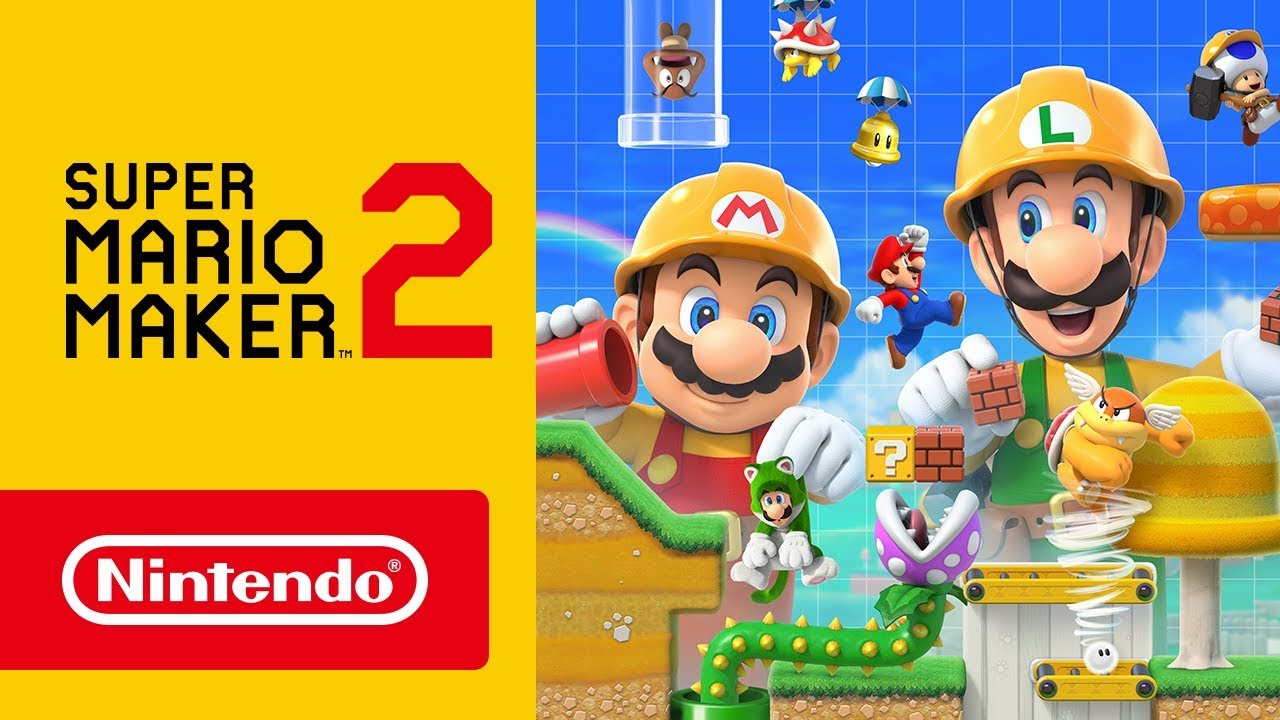
    Super Mario Maker 2 is a worthy upgrade of the Super Mario Maker. The game, of course, is set around the building and levels. Players would be able to play other players’ creations which is quite fun, to be honest. While it is not available on Nintendo 3DS like its predecessor, this version has a longer single-player campaign. It has also been designed better with more features to keep the players engaged, such as the custom clear conditions and slopes. The Story Mode has more than 100 stages, making certain that players are in for a long treat. The drag-and-drop system introduced here is easy to use, both with a controller or using a touchscreen.
    Super Mario Maker 2
    Super Mario Maker 2


    2. Pokémon Sword And Shield

    Pokémon Sword and Shield was released soon after the launch of the Nintendo Switch Lite. It is believed to be one of the most detailed and excellently designed Pokémon games till now. It can be plated in docked modes or in handheld. Users can trade and play with each other. While it is highly detailed, it is not as tough as the previous games, making certain that players stay entertained but still are able to have fun. The story was also different from the older games, making it more exciting for the players.

    3. Super Mario Odyssey

    This list would be incomplete without a mention of this iconic game, Super Mario Odyssey. With more level designs, boss fights, and non-linear gameplay, the developers have certainly revamped the game. New Donk City and other levels are now spacious and attractive than ever before. The design does it best to keep the players captivated throughout. A new character seen here is Cappy. Cappy can easily turn Mario into almost any object or enemy, move through narrow areas, and even make way through lava pits. In addition to the gameplay, the engaging audio and the cheerful graphics make it a must-play game.

    4. Luigi’s Mansion 3

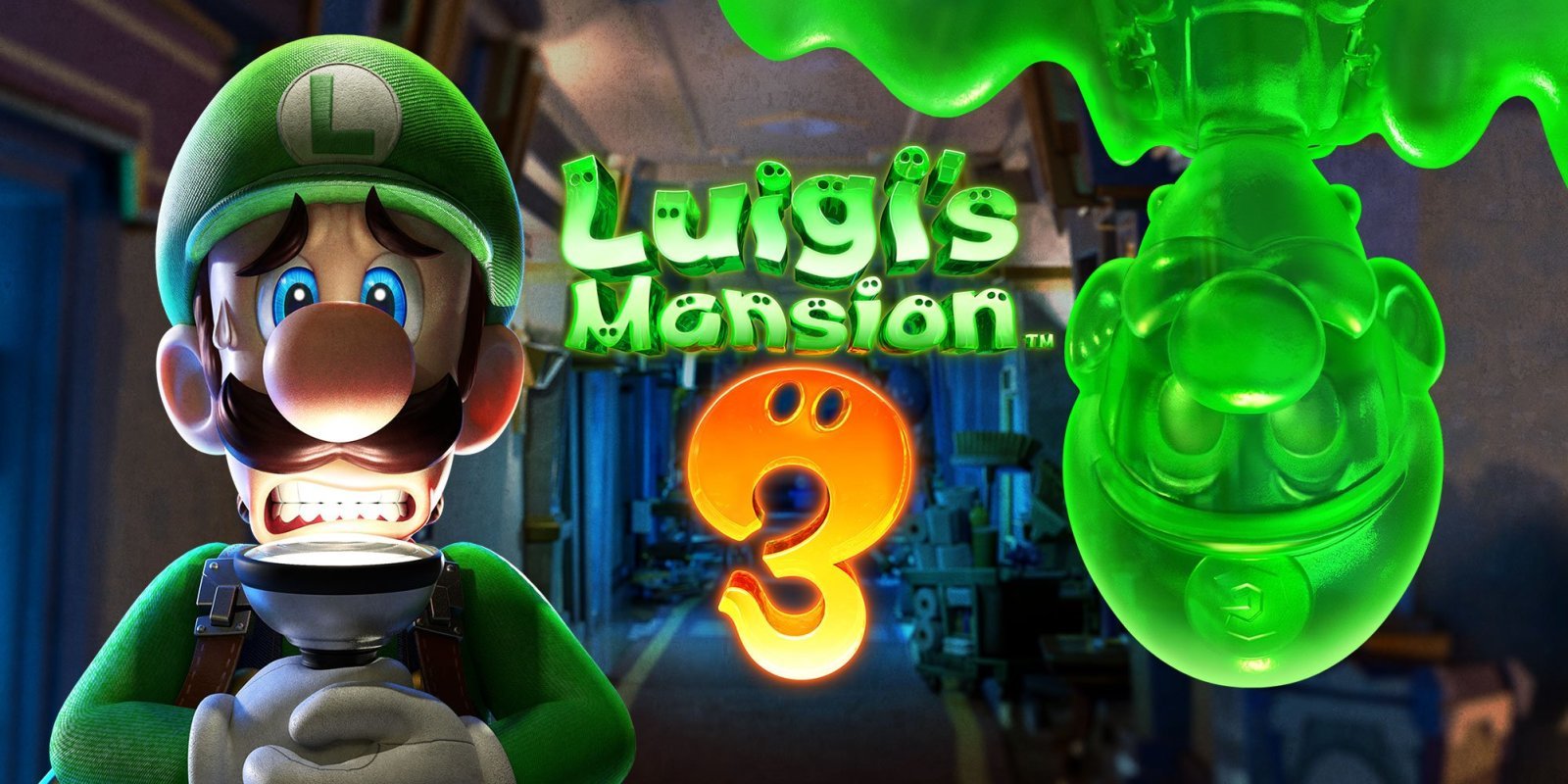
    Luigi’s Mansion 3 has an engaging storyline with the classic ghost-vacuuming gameplay. It also features Professor Elvin Gadd. Luigi goes to a hotel in the game to rescue his friends who are trapped in the paintings. If you don’t want to play alone, you can always try the ScreamPark and ScareScraper modes. It is one of the classic horror games that you just cannot miss. With regards to graphics, it is very beautifully designed with attention to detail and rich visuals. 
    Nintendo Switch Exclusives- Luigi’s Mansion 3
    Nintendo Switch Exclusives- Luigi’s Mansion 3

    5. Kirby Star Allies

    This is a kid-friendly game where Kirby floats through the air while copying enemies’ abilities. Although the 2D structure remains the same, Kirby’s abilities have improved. Where Kirby was once only able to steal power, now he would also be able to recruit enemies to add to his team. He would also be able to combine powers to hold fort better and launch more powerful attacks. If the game gets too tough for you, you can play it with your friends as well. This is a great game to play on a gaming console


    6. Snipperclips: Cut it out, together!

    The game basically puts two players together to complete paper puzzles. How they do this together is what is ingenious. Players would have to literally cut segments out of their bodies using scissors. Although it is based heavily on trial-and-error gameplay, it is a big part of the entertainment factor. The users don’t seem to mind it either. If you are playing with friends, you can use the Party mode where up to 4 friends can be added.

    7. The Legend Of Zelda: Link’s Awakening

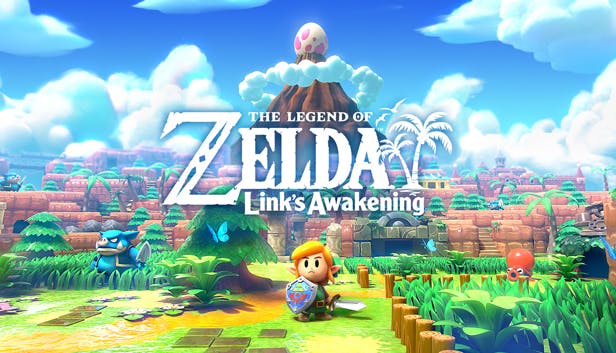
    This game is a 3D remade of Game Boy, a 1993 hit. The game is set on Koholint Island and features much of the traditional elements that we are used to. Players can even win a Yoshi doll by playing the trade quest claw game. Although it is a remake, the graphics have improved in leaps and bounds. The game also has nice characters with a stable storyline. With the remake, Inventory management has become better than ever. Now, users can equip more than two items simultaneously.
    The Legend Of Zelda Link’s Awakening
    The Legend Of Zelda Link’s Awakening

    8. Octopath Traveler

    Octopath Traveler is a turn-based role-playing game. This has a unique combat system that involves eight travellers who get into eight thrilling adventures. Since it features turn-based combat, it is already different than most others in the market. With plenty of stories, engaging characters, and a flawless storyline, you can be sure that you will stay entertained.

    9. Tetris 99

    How can we come to the end of this list without talking about Tetris 99? While it doesn’t fit into the concept of traditional video games, no one can deny its gameplay is captivating. Basically, the game pits 99 players against each other. The game is online and the last person to be standing is the winner. The twist here is that besides completing your board, players can also attack others by sending additional lines of tiles to their boards.

    10. Golf Story

    While there is a little bit of Golf in the game, as the name suggests, but it has a more in-depth game to it. It is a story-focused RPG that old-school players are likely to fall in love with. With the game set across different environments, a variety of activities, and of course, golf, you are likely to keep engaged.

    This list of the best Nintendo Switch Exclusives should be a great trip down the memory lane.
  • How to Know When Someone Unfollows You on Instagram?

    How to Know When Someone Unfollows You on Instagram?

    Instagram is already one of the most widely used social media networks globally. There are many reasons to fall for this social media app but it still lacks some features that are most awaited. The ability to know who unfollows us is one of these features.

    How to Know When Someone Unfollows You on Instagram?

    There are different reasons when a person unfollows someone and it is very personal. If you are here reading this article, we request you to respect the decisions of someone who unfollowed you and don’t use it to confront them to know the reason. To attract the number of followers, it is even better to focus on making your account so appealing that no one wants to go away.


    It seems that Facebook respects the decision of users who follow and unfollow accounts and they want to keep it private. Hence, it is not so easy to find out who has unfollowed you and it takes a lot of time and hard work to manually check the list of followers. Luckily, you can keep track of the people who unfollow you and your followers on Instagram.

    In this guide, we are going to discuss the same. There are a few apps you can try on both iOS and android and figure out who unfollowed you.

    Find out Who Unfollows You On Instagram

    Before installing any of the third-party apps, keep in mind that they will want you to access some of your data related to Instagram. Hence, you need to take some precautions before allowing any app to access your private data on Instagram. Also, remember that Instagram is capable to change API.

    There are also chances that some apps may not work together. In addition, don’t expect these apps to show you any data about who unfollowed or followed you earlier a day or in the past. They can track only those people who unfollowed you on the day you allow them to access your Instagram.

    By keeping these things in mind, you need to follow the steps given below to figure out who unfollowed your Instagram account.


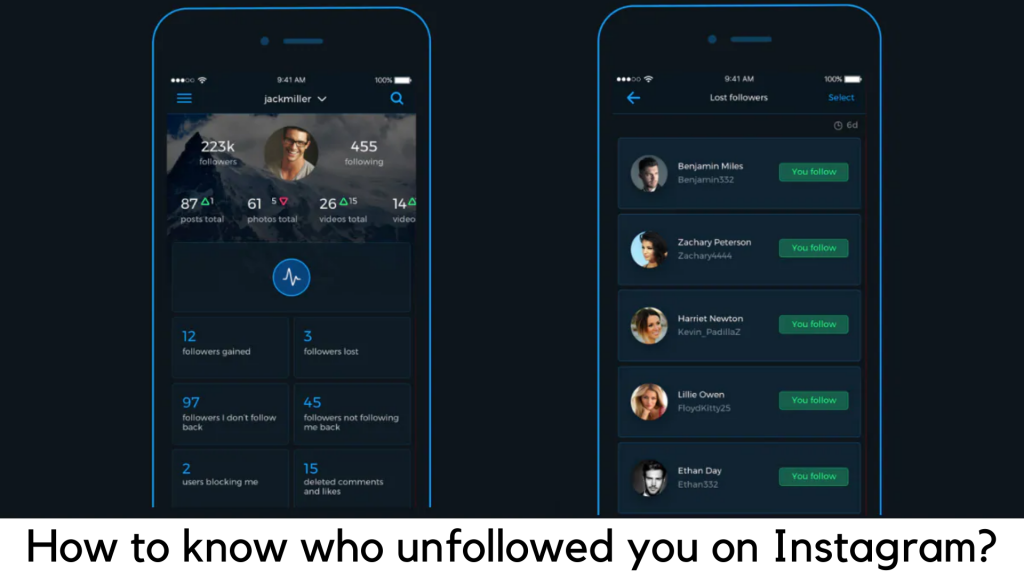
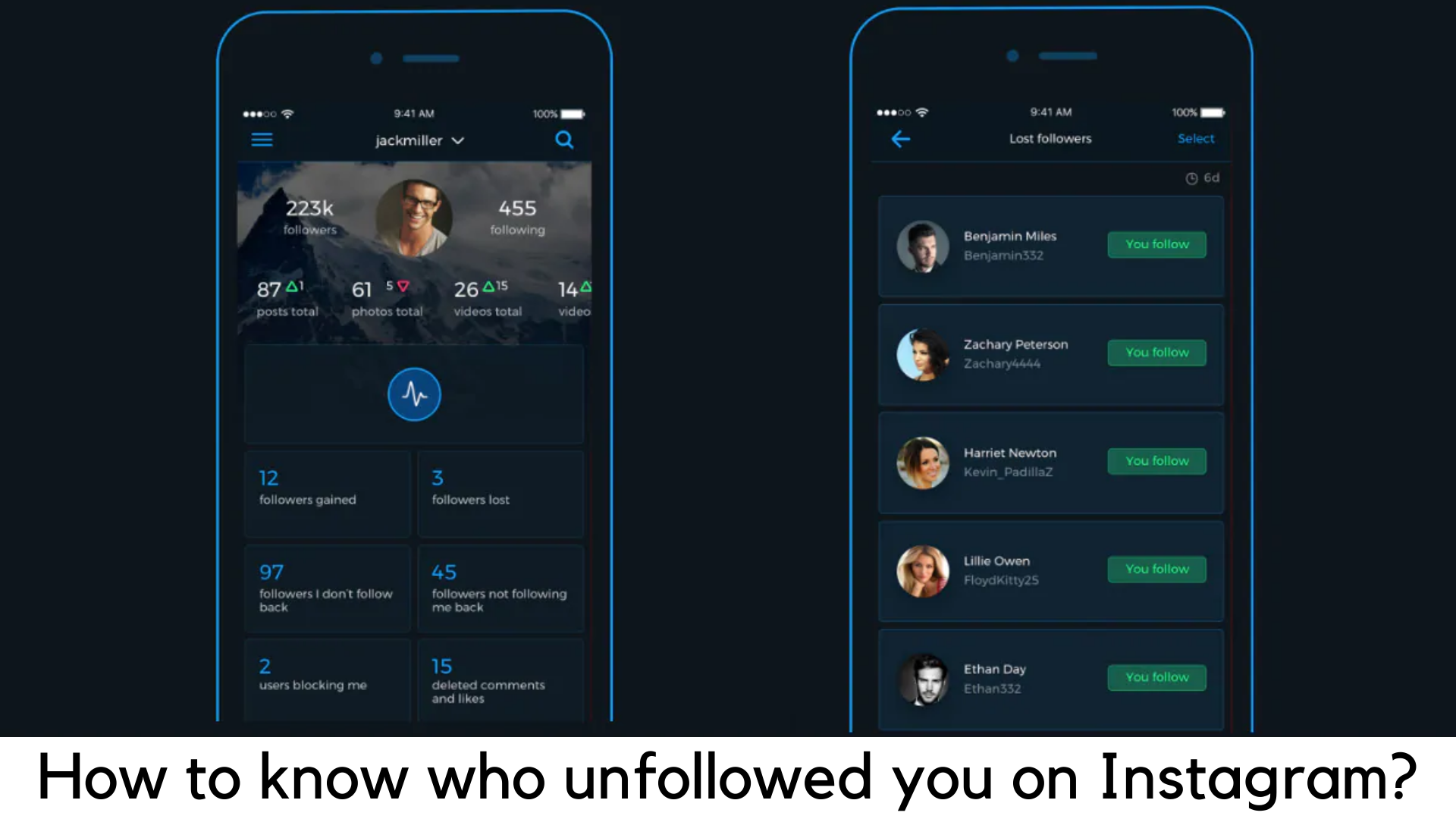
    To get it done, Reports+ is known to be the best option among several apps we have tested. Reports+ is available for free on Google Play for Android and App Store for iOS devices. Even better, this app features the same interface and features on both OS versions.

    Here are the steps to use Reports+ and know who unfollows you –

      • First of all, you need to install the app on your device and log in with our Instagram account details.
      • Pull down to refresh the app. This is all you need to do.
      • You will immediately know if the number of your followers increased. Simply click on the tap “followers gained”. You can simply tap on the “followers lost” tab to know if you lost your followers.
      • In addition, you can instantly check the tab “Followers I don’t follow back” to find out if you don’t want to unfollow other accounts.
      • To find out if you want to follow other accounts, tap on “Followers not following me back”.

    You can easily manage the people who unfollowed you and those who followed you.

  • How to Install Call of Duty Mobile on Your Smartphone?

    How to Install Call of Duty Mobile on Your Smartphone?

    In October 2019, Activision finally released the stable version of the most awaited FPS mobile shooter – Call of Duty Mobile for Android and iOS globally. COD fans had to wait a lot for its beta testing to complete and their patience really paid off.

    It comes out as a completely free FPS multiplayer game with in-app purchases and one can easily download it via app stores. The game features the same weapons, maps, and characters that are familiar in Call of Duty series. The overall gaming experience is quite good and satisfying on handheld devices.

    How to Install Call of Duty Mobile on Your Smartphone?

    Game modes

    This first-person shooter comes with five different multiplayer modes to play online, including Frontline, Free for All, Team Deathmatch, Domination, Hardpoint, and others. Along with it, you can also enter the arena of 100-player Battle Royale mode just like you would do on its archrival PUBG Mobile. The concept of the Battle Royale mode is simple. You have to survive and take down other 99 players in duo, solo or squad to win in a battleground.


    Maps for Multiplayer Mode

    The best thing is that Call of Duty Mobile has seven permanent maps in total and also adds other maps depending upon the occasion. Some of the most popular maps here are Crash, Nuketown, Crossfire, Hijacked, Standoff, Firing Range, and Killhouse.

    Pre-requisites

      • First of all, you should have strong 4G/LTE or stable Wi-Fi connection
      • Your device must have at least 2GB of free storage space
      • You will need a Facebook account to sign up and save your progress

    System Requirements

    For Android

      • Your device must have 3GB of RAM at least to play without any lags on Low settings
      • Your device should be running on Android 8.1 or higher version
      • You should also consider having the latest processor on your smartphone (Almost every mid-range device have it these days)

    For iOS

      • Your iOS device must be running iOS 10 or higher version.
      • Older devices like iPhone 6, iPhone 5S, iPhone 6 Plus, iPad Mini 2, iPad Air, iPad Touch and iPad Mini 3 may not support this game.


    Download Call of Duty: Mobile on Android

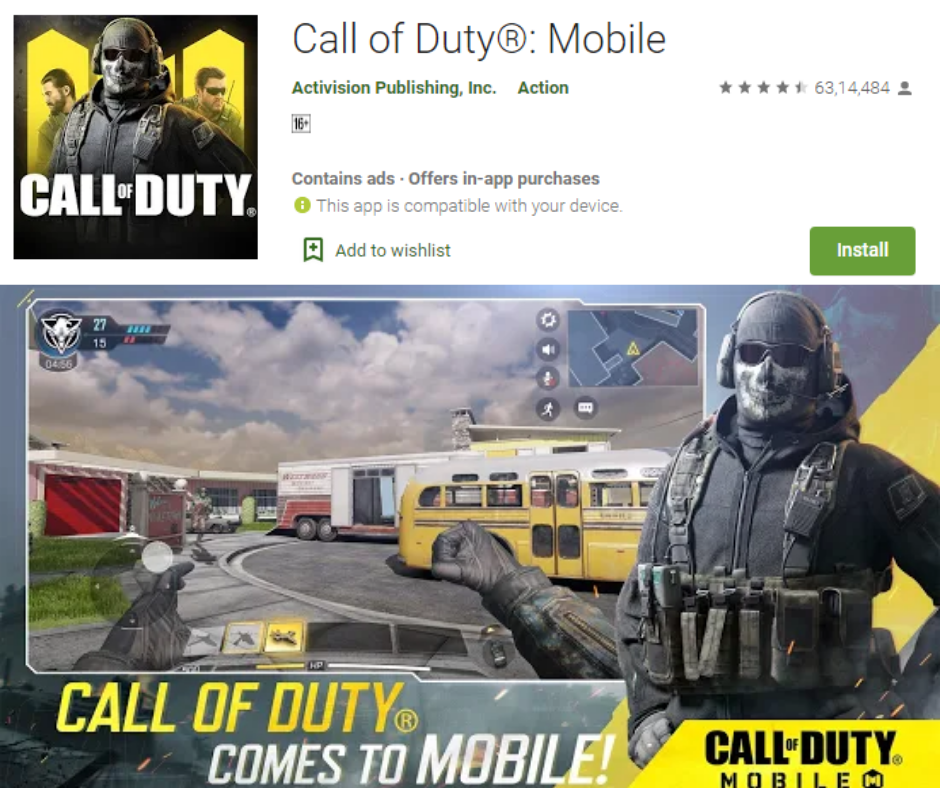
    You simply need to visit Google Play Store to download and install Call of Duty: Mobile or you can also visit the official website of Call of Duty: Mobile. It is easier to download it from the Google Play store as you can easily find it on featured apps. Choose the correct one. The original publisher is Activision and the icon image features a soldier with a mask of a skull face.

    Download Call of Duty: Mobile on iPhone

    You can simply visit the official iOS page of Call of Duty Mobile website or simply go to Apple App Store and search for the same title.

    Download Call of Duty

    However, the icon on iOS is different. The same soldier is shown in a different pose, having two characters behind. The size of the Call of Duty Mobile is 1.5GB. So, you should have enough storage to download the game.

  • Seven Step Guide to Setting up Fingerprint Lock on WhatsApp

    Seven Step Guide to Setting up Fingerprint Lock on WhatsApp

    WhatsApp is one of the most widely used messaging apps globally. Developed and maintained by Facebook, WhatsApp routinely keeps rolling out new features for its users.

    Seven Step Guide to Setting up Fingerprint Lock on WhatsApp.edited

    The newest feature implemented by WhatsApp is the ability to lock the app using a fingerprint.

    iPhone users have been able to use Touch ID and Face ID to secure their WhatsApp chats for a while now.

    Since the begging of the features’ testing phases in August, Android users have eagerly anticipated the rollout of the Fingerprint Lock feature.

    WhatsApp has finally officially extended this functionality to Android-based devices.

    Earlier, Android smartphone users had to rely on third-party apps to secure their data. Some manufacturers like Xiaomi and OnePlus introduced built-in applications that allow securing any app with a fingerprint.

    The rollout of an official fingerprint security feature from WhatsApp enables all users to secure their chats regardless of which smartphone they use.

    Here is a quick, seven-step guide to enabling fingerprint lock on WhatsApp

    • First, make sure you are using the latest version of WhatsApp.
    • Next, open WhatsApp on your Android phone.
    • Tap on the options (three dots) button on the top right corner of the screen.
    • Tap on the ‘Settings’ option.
    • Navigate to ‘Account’ from the menu.
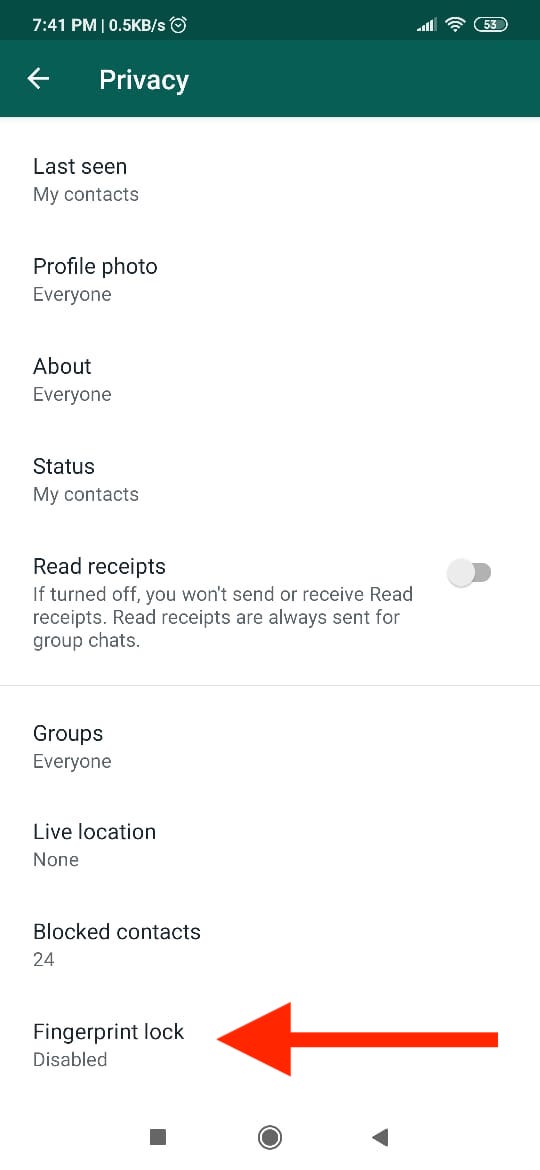
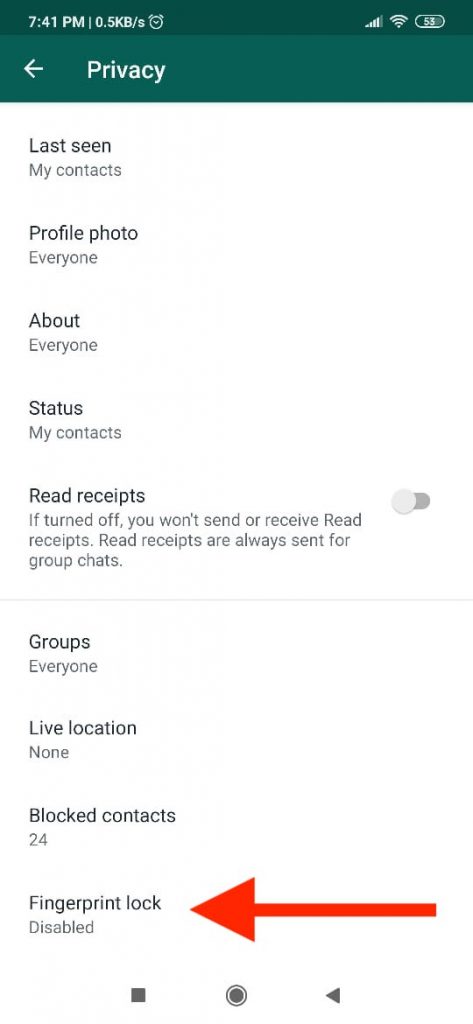
    • Tap on ‘Privacy’ and then tap on the ‘Fingerprint Lock’ option.
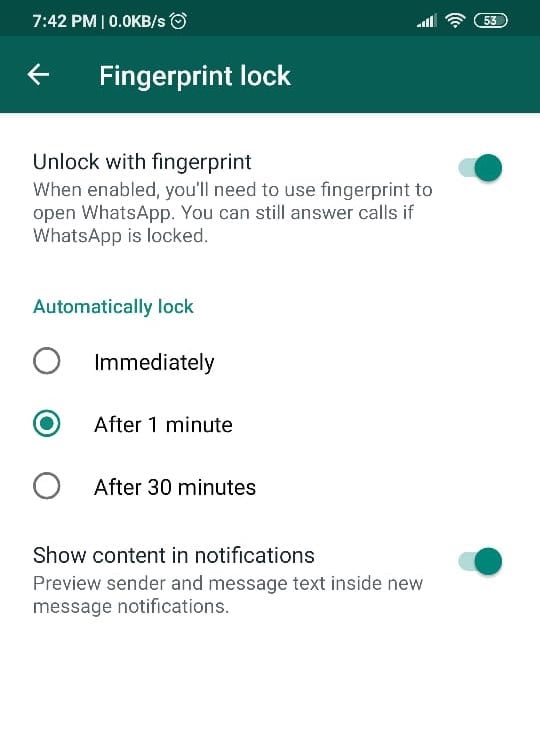
    • Toggle the ‘Unlock with fingerprint’ option.

    You have now enabled fingerprint lock on WhatsApp. Also, you can now set how long you want WhatsApp to stay unlocked once launched.

    You may choose between the ‘Immediately,’ ‘After 1 minute,’ and ‘After 30 minutes’ options.

    The WhatsApp fingerprint lock feature also gives you control over your notifications. You get to choose whether a new message notification will display the content of the message and the name of the sender when the app is locked.

    One can disable WhatsApp’s fingerprint locking feature just as easily by navigating to Settings > Account > Privacy > Fingerprint Lock and toggling the ‘Unlock with fingerprint’ off.

    Whatsapp Fingerprint Lock Enabled SettingsThe fingerprint lock feature works well even on newer devices with in-display fingerprint scanners.

    With the long-anticipated security feature finally rolling out, WhatsApp users can now enjoy better security on their messaging app without having to rely on third-party applications.

  • Jurassic World Evolution – A Complete Review

    Jurassic World Evolution – A Complete Review

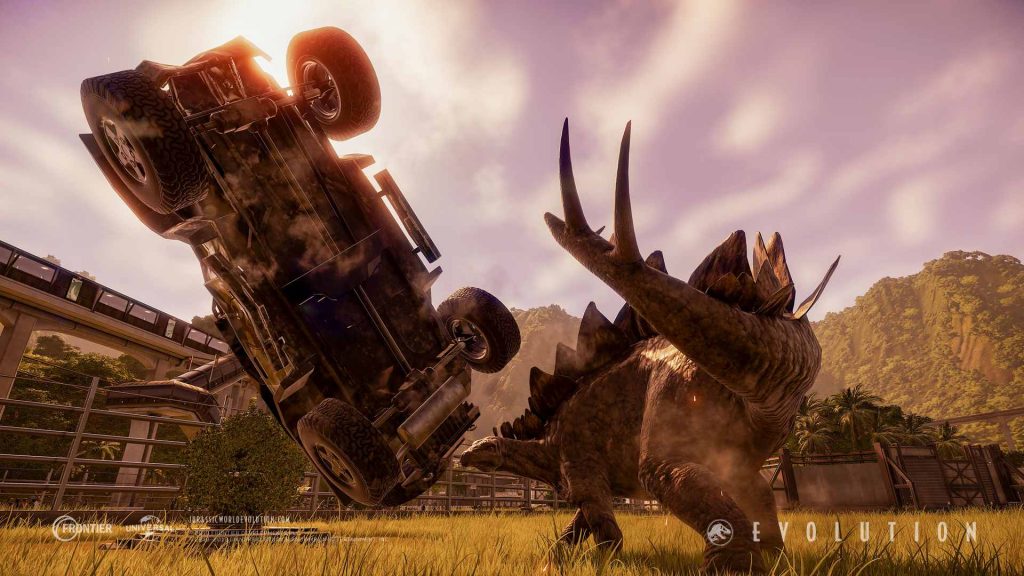
    Jurassic World Evolution is another great addition in the world of simulator games brought to you by Frontier Developments. It has become one of the top favorites for all gamers.

    Jurassic World Evolution – A Complete Review

    If there is anything you know about Frontier Developments, you would see that they are a pro when it comes to theme and roller coaster games. Jurassic World Evolution is nothing but a business simulation game that is developed and published by Frontier Developments. It released in June 2018.

    The creation of the game had approximately 100 people in the development team, with a high-end budget of £8 million.

    The game is based on the 2015 Jurassic World movie. The development team has examined various dinosaur models that were used in the films over the years.

    Within a matter of 7 months from the date of release, the game had sold more than two million copies, making it one of the most successful games ever launched by Frontier.

    So, Jurassic World Evolution is a business management game that needs you to build and maintain attractions that are full of lizards and turning out of them a beautiful, thriving enterprise.

     It is almost like a homage to the age-old series.

    Jurassic World like a homage

    The central theme of the game is mainly based on one question: ‘How exactly would you run a dinosaur theme park?’

    Frontier Developments has done an excellent job when it comes to creating something that is closet to a dinosaur park. Whether it is the park itself or the dialogues, it is a superb put-together of everything that relates to dinosaurs.

    The in-game menus also contain immense significance and references to the movies itself, making it one buff for the Jurassic Park nerds.

    It is compatible with Microsoft Windows, PlayStation 4, and Xbox One.

    Game Play

    This simulator game offers you with offers 40 dinosaurs that can be unlocked by completing the various missions. It is not as easy as it sounds.

    The difficulty level of the game is standard to high. For unlocking each of the dinosaurs, you will need to collect fossils and extract their genomes. You have to accumulate at 50 percent of a species genome to incubate it and then bring it to life in your game. Thus, into your dinosaur park.

    Extracting the genome for every one of the dinosaurs can be somewhat repetitive and slow.

    There are new islands with different kinds of bearings for each one. But again, you have to complete critical missions to unlock these islands. There are various drawbacks in each of the islands, like one may be tormented with storms while another has gone bankrupt.

    Jurassic World new islands

    The game needs you to identify these and work towards a safer or profitable island. You can quickly move between islands and keep an eye on the visitor experience often. This way, you can also revamp your older parks with new dinosaurs and other research.

    But, the main attraction of the game remains with the dinosaurs. They are also the only means to earn.

    For this reason, it is essential to cater to the needs of different kinds of dinosaurs. Like, the type of food they eat and the amount of social exposure that they require.

    These are essential aspects the dinosaurs healthy, satisfied, and thus, capable of earning more.

    Gameplay Modes

    There are a few modes in which you can play the game like career, challenge, and sandbox mode.

    Career mode: In the career mode, the player needs to build five-star dinosaur parks across the islands. You are assisted continuously by Dr. Ian Malcom throughout the gameplay.

    If you are not a Jurassic Park geek, Dr. Ian Malcolm is a mathematician in both the Jurassic Park novel and movies.

    In this mode, the player meets figures representing the development of the park in three branches, which are entertainment, security, and science. They will have contracts for you to be completed to receive rewards and reputation in that field or branch.

    Sandbox Mode: You can play in the sandbox mode once you achieve a four-star rated park on the starting island. After this, everything that you have made in the career mode will be transferred to the sandbox mode. But, the players will have unlimited money while also they can set their desired weather and time at the parks.

    Challenge Mode: You can play the challenge mode with the ease of setting your level of difficulty but with limited funds.

    Jurassic World Challenge Mode

    It is but proven from the above facts that Jurassic World Evolution is a pretty smart and well-crafted simulator game. While it gives you a boost of immense joy of running a dinosaur park, it also keeps you thrilled about the perils that could follow.

    Conclusion

    We cannot but admit that Jurassic World Evolution is an accessible game, but it can be monotonous and overwhelming for seasoned management game players.

    Despite a few misses here and there, this game is gripping. While it also keeps a secure connection with the inspiration, the movies as well as the novel.

    Despite the repetitiveness of the game, it is an excellent choice for anyone who has ever wanted to run a disaster-prone dinosaur park.

  • Age of Empires: Definitive Edition

    Age of Empires: Definitive Edition

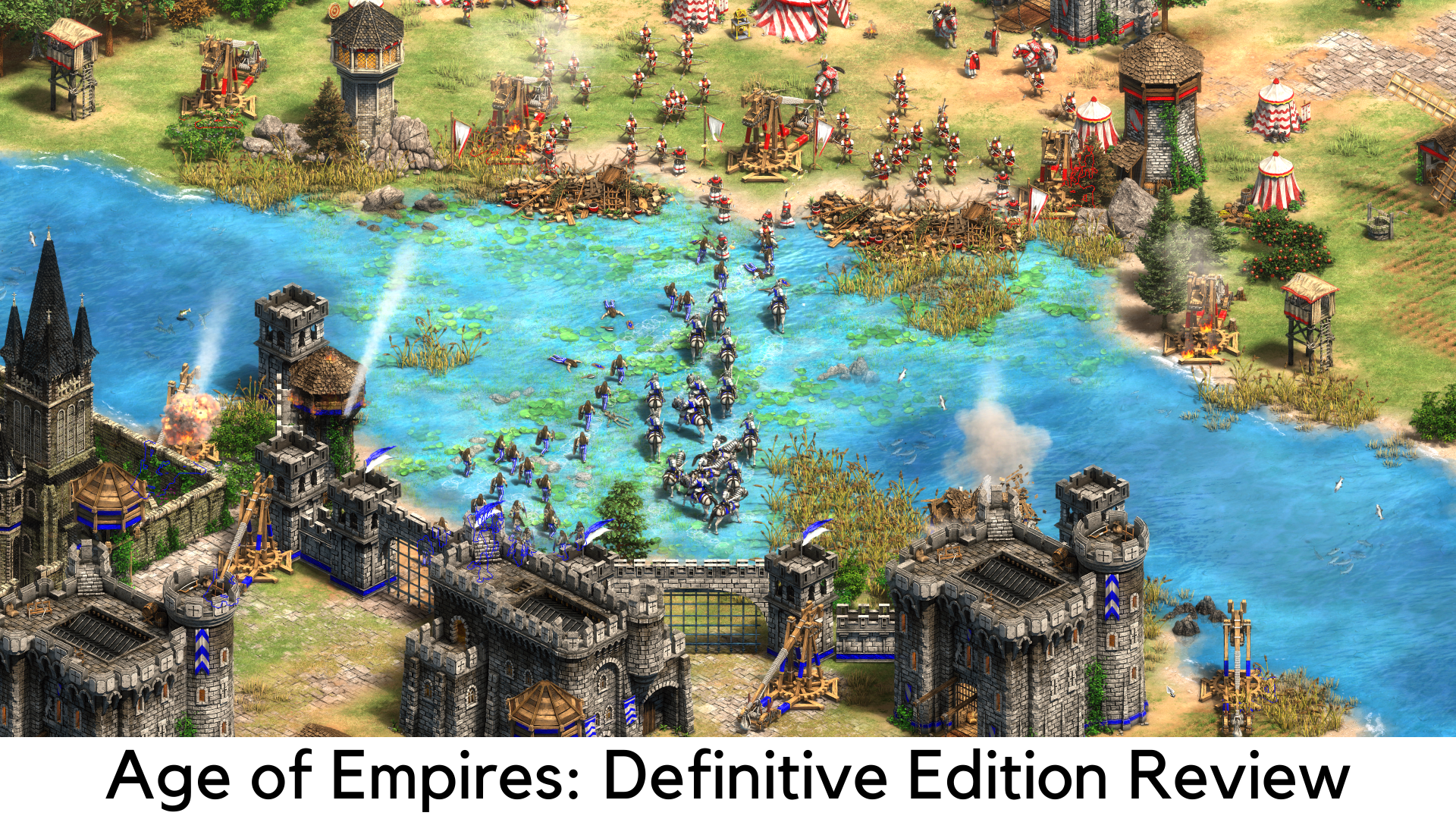
    Age of Empires: Definitive Edition is truly a groundbreaking strategy game continuing the legacy of its iconic predecessor Age of Empires as a renewed focus of Microsoft. It is a remastered version of its prequel and an opportunity to relive some of the most vital battles between the Iron Age and Stone Age. You can witness the base game with multiplayer support and some Rise of Rome expansion in the Definitive Edition. And the best part – it is exclusive in Windows Store.

    Age of Empires

    For all those nostalgic fans like you, Age of Empires: Definitive Edition has almost everything you can imagine. Along with all the original campaigns, which have been renewed with some remastered visuals and sound effects, the game comes with online and local multiplayer support with 8 players to the maximum. You can also create battles on your own in scenario builder mode. Most of the game seems to be true to the original and developers have tried hard to do that.

    The single-player campaigns have been set in ancient history and a lot of scenarios are set beautifully around 2000 years ago. You can relive some battles of Julius Caesar, go to early Japanese history to fight the battles, and even enter the conquests of Alexander the Great, as campaigns are beautifully set in the backdrop of Africa, Asia, and Europe.

    Even when you turn into a lower difficulty, the campaigns are still challenging as you will face the scenario where you can have only a few units at the beginning most of the time. It is purposely done to teach you how some empires were forged and this game successfully does that. You will really love it when you get back to your favorite campaigns, including the Yamato Empire from the Rising Sun, Glory of the Geeks, and The First Punic War.

    The game of Age of Empires: Definitive Edition has been designed to recreate everything great from the original and to evoke the feeling of nostalgia. This game is almost perfect in everything. Since the initial Age of Empires entered the arena, the RTS genre has come a long way.

    Other Findings

    The soundtrack and visuals are unmatched in the Age of Empires: Definitive Edition. You will feel how developers worked hard to make the buildings and units look stunning. When buildings are being destroyed, the animation they have worked on is commendable. You wouldn’t stop embracing the detail in every civilization.

    Sadly, the water and terrain don’t look that great. But when we look closely, it seems to be more of a purposeful decision of the designers than a loophole. One of the major highlights is its soundtrack which blends in with the campaigns’ themes very well.

    Despite all the perfections, we still noticed some bugs, especially when it comes to moving units from one place to another. The units often get stuck and circle around before joining the army. A transport ship was once stuck around the dock and couldn’t move even when there is nothing to block the path and water is all around the ship. You can also create several units in various buildings to go off-limits in population when it comes to reaching the limit.

    Despite some minor issues, we still loved the Age of Empires: Definitive Edition the most. There are some things missing in the sequel though. For example, there are no battle formations. Hence, your armies seem to be like a gang of thugs instead of a team of self-motivated veterans. There is also a missing pitch in storytelling. The same voice tells a paragraph of the story when starting and finishing the battle. It is not enough to encourage everyone to get into the campaign.

    Even when you successfully trigger some of the vital events in the game, there is still a lack of voiceovers. For example, you can notice a team of Phalanx units standing in a far corner in the last battle of the First Punic War. The scene would be much better if there was a voiceover explaining why they were going to join the Carthaginian army. This is the reason why we were unable to connect to the Age of Empires: Definitive Edition campaigns.

    The Multiplayer Section

    In this section, the story doesn’t matter but we were expecting that type of experience in the Age of Empires: Definitive Edition. Nevertheless, developers have cleared their stand as they wanted to stick to the last game as far as possible. Such improvements may not be suitable for their agenda.

    When it comes to multiplayer, there is no change in our experience with what we noticed in a closed beta version. We found most of the servers from the US and Europe. Hence, there were some glitches on the gameplay with our internet connection. Once the game becomes available worldwide, it could be improved well. It is still a center of concern for now. Our experience was fun overall with local play during the closed beta.

    All in all, the Age of Empires: Definitive Edition has successfully achieved its goal – giving a completely remastered game to its fans which gives proper justice to its original. But we still feel the missing part of storytelling could make the game even better. The game is extremely awesome, enjoyable, and super easy to play for hours. If you are a die-hard fan of Age of Empires, you must give this game a try. However, newcomers might have mixed opinions with the Age of Empires: Definitive Edition.

    Pros

      • Stunning visuals
      • Unmatched sound effects and quality soundtracks
      • Amazing single-player campaign

    Cons

      • Not designed with newcomers in mind
      • Minor glitches
      • Storytelling is not up to the mark

    Overall

    Age of Empires: Definitive Edition is a great work by the developers as it takes us back in time. Honestly speaking, we have enjoyed playing it far enough. Especially if you are a big fan of history, you will love witnessing the Early Japanese, Romans, and Greeks history. The Ancient Greeks are literally a hook for many players. Age of Empires: Definitive Edition is now available for US$20 in Windows Store.

  • Android Q Beta – How to get it

    Android Q Beta – How to get it

    What is Android Beta?

    Much like Microsoft’s Windows Insider program, it is nothing but a simple way to test or try the pre-release versions of the new Android OS. It is a work in progress build of the software that is made available to the customers before the rollout of the finished product.Android Q Beta The main aim of this is to collect user feedback and incorporate it into the newest version of the Android OS.

    Before the official landing of the software, it is a test that gives time to the developers. They re-run their codes and test the work it smooth without any bugs in the final version. The feedback from the users enables the developers to fix and optimize the details. Hence it is useful ensuring reliable and consistent operation.

    Devices that Support Android Q beta or the Developer Preview

    Earlier, the preview versions were available only for devices like Pixel. But with confirmation from Google I/O, the test version will cover over 21 devices from 13 different manufacturers such as Nokia, Sony, OnePlus, Xiaomi, Asus, Oppo, LG, Vivo, and Realme. The same beta program had been used for Android Nougat, Oreo, and Pie.

    Latest Version of Android – Android 10.0

    Unlike the previous Android versions, the latest Android 10.0 does not have a cute dessert code name and is only referred to with the version number 10.0. This version was initially released in September 2019 on Google Pixel devices.

    This version is packed with new and optimized updates covering almost all sections of the system. The features include a revamped gesture navigation, improved permission controls, a system-level dark mode, smart reply, and other security updates that are delivered through Google Play.

    Along with the mentioned features, Google delivers an Easter egg in the OS. It now has a puzzle that can keep you hooked on for hours of entertainment. It takes you to a nonogram puzzle game, which is nothing but a logic puzzle.

    How can you get Android Q Beta?

    Google, unlike the other years, has opened the possibility to test the beta program on several different devices than Pixel this year. It enables anyone to enroll for the update and preview it while receiving on-air updates. Let’s see how this is done-

    #1 You can sign-up for the Android beta program by visiting the google.com/android/beta

    #2 Sign-in to your Google account.

    #3 If your device is listed under the eligible devices, click to enroll in the Beta program.

    #4 Then go to Settings > System > Advanced > System Update to check for available downloads.

    Once this is done and you are enrolled, you will continue to be updated with the newer versions of Android Q beta almost automatically over the air.

    If you no longer wish to continue with the beta software, follow the above steps and click on the ‘unenroll device.’

    However, in case you have enrolled your device for the beta program of Android Oreo or Pie, you will need to re-enroll your device to receive the updates of Android Q automatically.

  • How to Export WhatsApp Chat as a PDF

    How to Export WhatsApp Chat as a PDF

    As reported by Statista, over 1.5 Billion people use WhatsApp every day. While some use the messaging app to stay connected with friends, colleagues, and family, others use WhatsApp for business purposes.

    In many cases, it becomes necessary to save a WhatsApp conversation as a PDF.

    While WhatsApp automatically makes a backup of your chats every night, it can be quite tricky to get a copy of a specific conversation using these backups.

    However, it is super easy to export individual chats on WhatsApp as PDFs. You can export your chats as PDFs in 13 easy steps!

    Let’s begin.

    Export WhatsApp Chat as a PDF

    People typically take screenshots of WhatsApp conversations; however, screenshots are only useful when needing to save specific parts of a chat.

    The large size and variable quality make using screenshots super inefficient when it comes to saving a whole chat.

    Here’s how you can export your WhatsApp conversations as PDFs:

    Step #1:

    Launch WhatsApp and open the chat you want to export.

    Step #2:

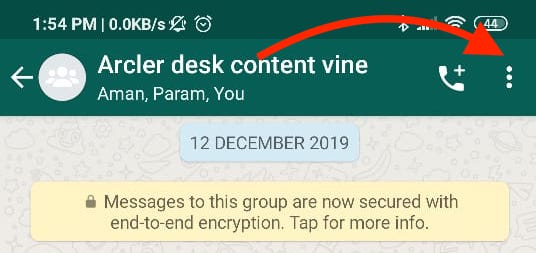
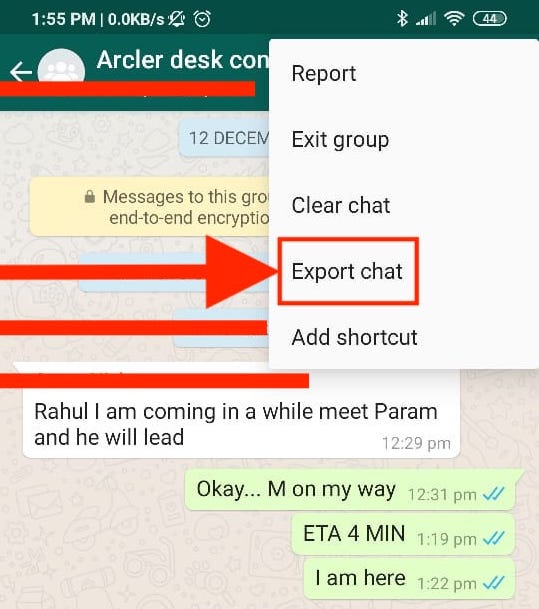
    Tap on the options button, which is the three-dotted menu icon located at the top-right corner of the chat.

    How to Export Whatsapp Chat

    Step #3:

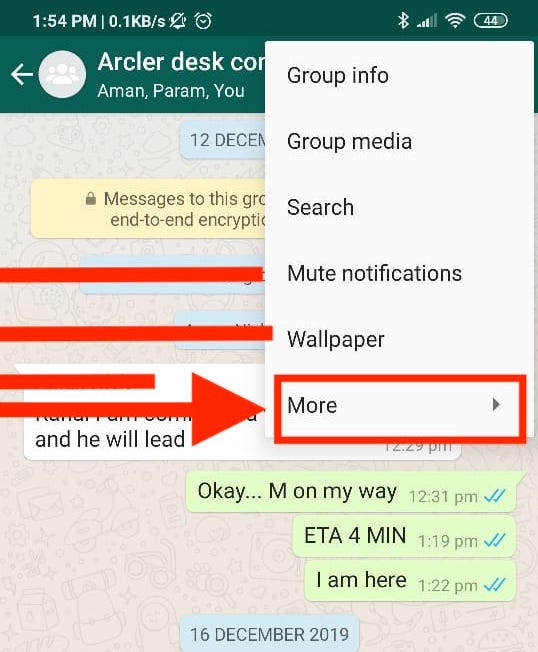
    Tap on ‘More.’

    Tap on export chat option -whatsapp

     Step #4:

    Tap on the ‘Export chat’ option.

    Tap on more- Whats app chat export

    Step #5:

    Next, WhatsApp will prompt you if you’d like to include the media in the chats in the file you’re about to export.

    Including media in your exported file will significantly increase its size. Therefore, it is recommended that you export the chat without including the media.

    Step #6:

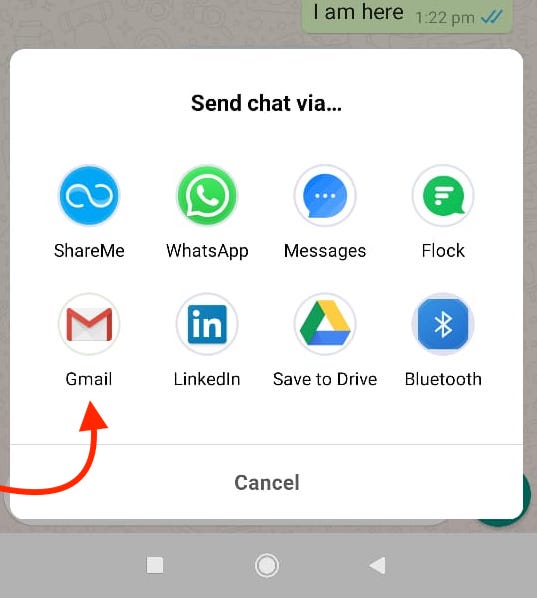
    A pop-up card appears on the bottom of the screen. Select Gmail or any other email client you usually use.

    Export to Gmail - Whats app chat

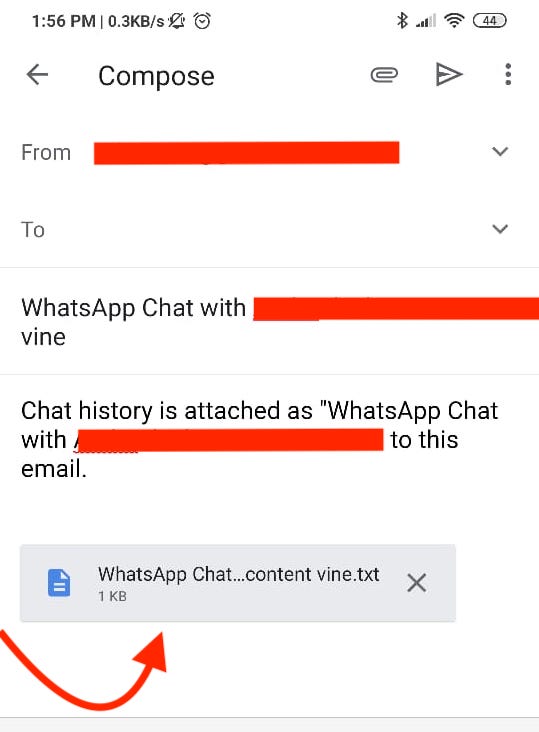
    When you do this, the chat will be attached to the email as a text file. Additionally, a copy of all the contact numbers that you have shared in the conversation will also be attached.

    Step #7:

    Gmail does not allow users to open the attached files directly. Save the mail as a draft by going back to the main menu (in Gmail).

    Step #8:

    Go to the drafts section on Gmail, and tap on the mail you just drafted. This way, you will be able to open the attached files.

    Step #9:

    Download the .txt file by tapping on the arrow button.

    Download the Text file by tapping on the arrow button.


    Step #10:

    Open the .txt file using a PDF maker app such as WPS Office. Alternatively, you can open the draft on your computer and use a PDF maker app there.

    Step #11:

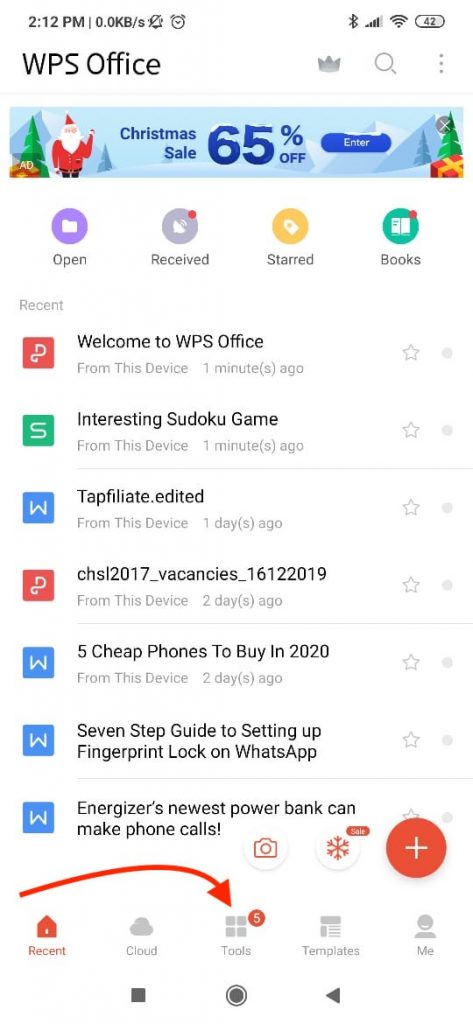
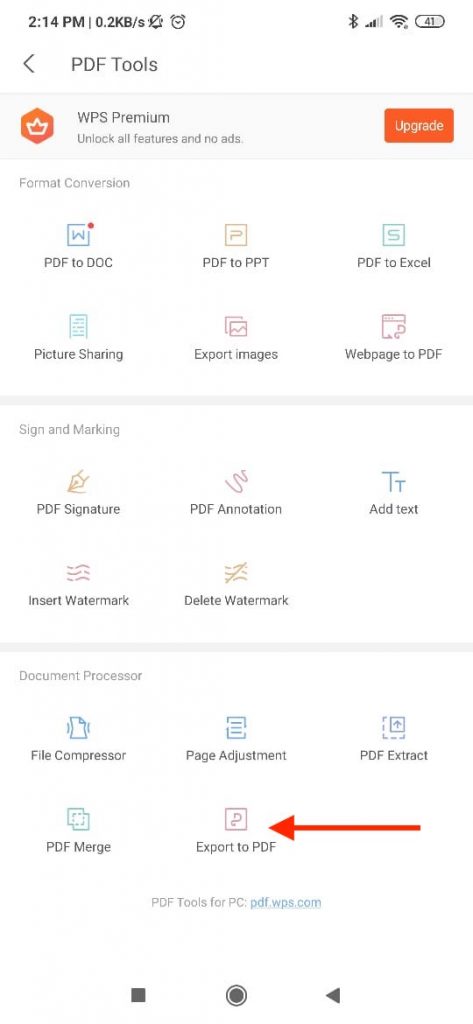
    Tap the ‘Tools’ icon on the bottom of the screen in the WPS Office app.

    What app chat Export- WPS Tools


    Step #12:

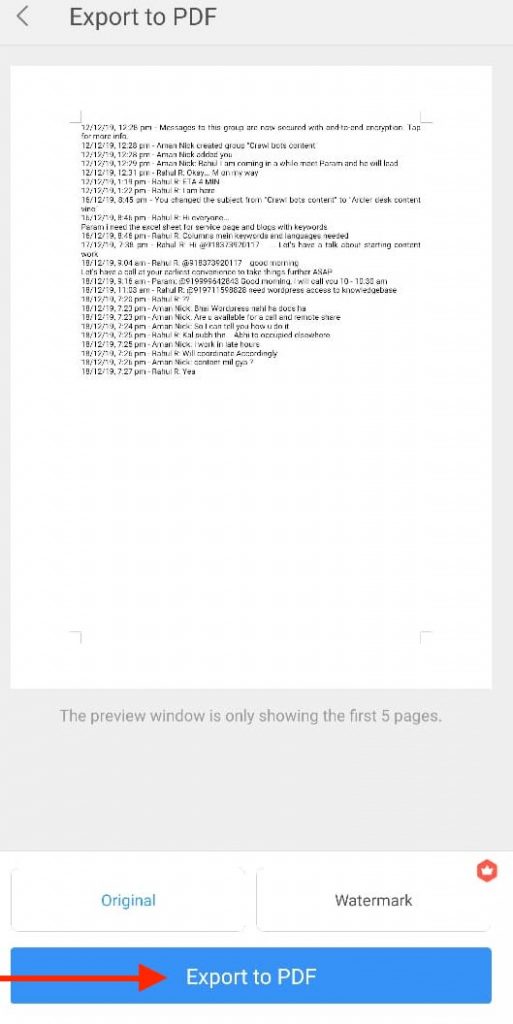
    Tap on the ‘Export as PDF’ option. A preview of the document will appear. Tap on the ‘Export as PDF’ button once again.

    Whats app chat Export as PDF option

    Step #13:

    A prompt will ask you where you want to save the exported PDF. Pick the appropriate location and hit ‘Save.’

    Whats App chat save as the exported PDF


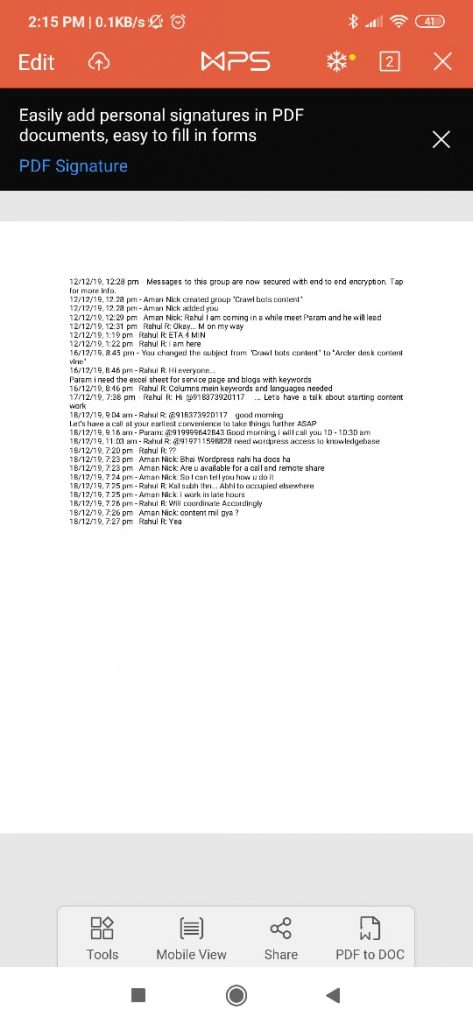
    You now have exported your chat as a PDF.

    Whatsapp chat WPS Exported to PDF

    PDF files are considered universal, and almost every machine can view them. They are difficult to alter and easy to transfer.

    Using this 13-step guide will help you quickly convert your chats into PDFs.

  • How iOS 13’s New Bluetooth Alerts Help Protect Your Privacy

    How iOS 13’s New Bluetooth Alerts Help Protect Your Privacy

    With every iteration of iOS, Apple’s focus on providing better security and privacy for its users becomes more and more evident.

    How iOS 13’s New Bluetooth Alerts Help Protect Your Privacy

    The newest iteration of the iPhone’s operating system, iOS 13, gives users more control over what an application can and cannot do. Users can now control individual applications’ permissions and choose what services an application can and cannot utilize.

    iOS 13 gives users an option to disable Bluetooth access for different apps via a new permission setting.

    The setting presents itself in the form of alerts that read, “App would like to use Bluetooth.”

    This particular setting deals with Bluetooth connectivity outside of audio streaming, meaning, if you disable Bluetooth access for an app, it should still be able to stream audio to your Bluetooth headphones and speakers.

    By forbidding an application from access to Bluetooth services, one can protect themselves from the collection of private Bluetooth LE Beacon data.

    Although Bluetooth services can be used by apps to exploit a user’s privacy, one cannot conclude that every application that asks for permission to use Bluetooth for purposes other than streaming audio intends to breach your privacy.

    For example, Spotify needs access to Bluetooth services to learn if the iPhone is using a car stereo. If yes, it automatically switches to the “Car View” mode.

    Another great example is Google Maps needing access to Bluetooth services. Bluetooth helps Google Maps determine your car’s parking location with higher accuracy.

    Nonetheless, some developers out there do intend to violate your privacy by stealing sensitive data.

    The new permissions settings help prevent such breaches.

    iOs 13 Apple New Bluetooth Settings

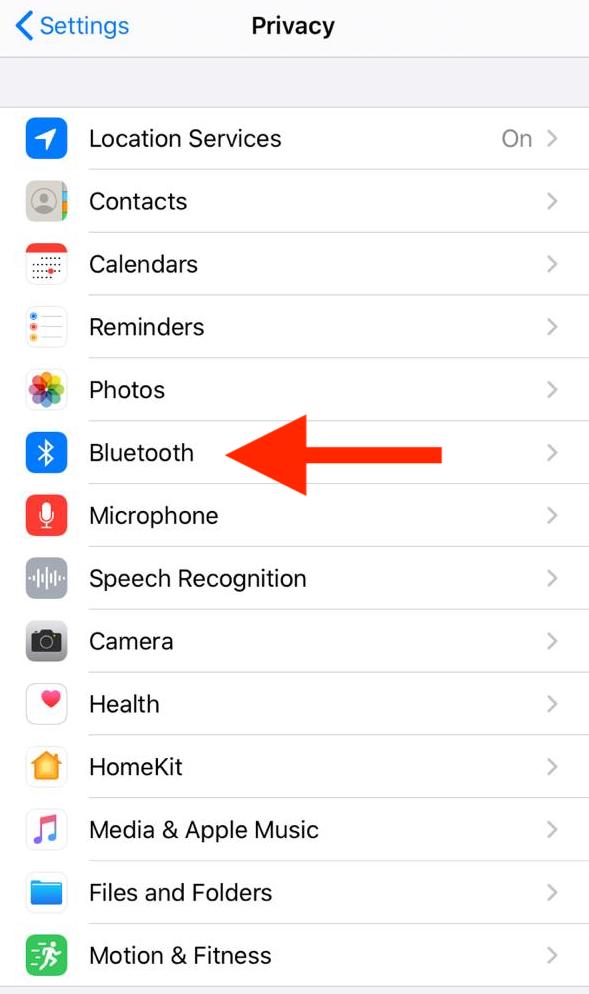
    With the details of this new feature out of the way, here’s a quick guide to disabling access to Bluetooth services for apps in iOS 13:

    • Go to Settings
    • Navigate to the Privacy section
    • Tap on the ‘Bluetooth’ option

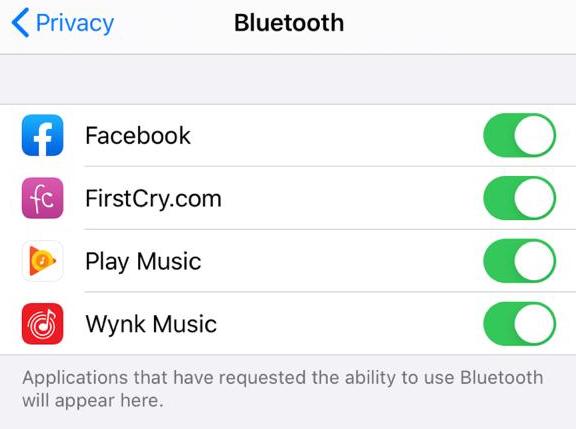
    Next, a list of applications appears with a toggle next to each app. Here, you can flip the toggle on or off as you like to enable or disable specific apps’ access to Bluetooth services.

    iOS 13Privacy Bluetooth Settings Apple

    Whenever you open an application for which you have disabled Bluetooth access, a window will pop-up stating that the app wants to use Bluetooth.

    If you think the application requires Bluetooth to work, you can grant permission to it right from that window. If you believe otherwise, you can choose to ignore the pop-up.

    However, if you’re unsure about the application’s need for Bluetooth access, you can deny access for the first time and see if the app works regularly.

    If it refuses to work correctly and breaks or crashes, you can go back and grant the app access to Bluetooth following the steps as mentioned earlier.

    Just remember that disabling an application’s access to Bluetooth services does not restrict it from connecting and playing media on Bluetooth devices like speakers or headphones.

    Every app can stream audio without asking for permission– it is the usage of Bluetooth for purposes other than streaming that Apple now provides better control over.

  • PlayStation Plus update: PS Plus news is big win for Titanfall 2 on PS4

    PlayStation Plus update: PS Plus news is big win for Titanfall 2 on PS4

    Following Sony’s recent announcement, dozens of new players joined the servers. A few weeks ago, we heard that Titanfall 2 and Monster Energy Supercross would be the last free PS4 games of 2019. Both the games are available for download from the PlayStation Store. All you need to enjoy this PlayStation Plus update is an active PS Plus account. Although Titanfall 2 is not a new game by any means, it received great reviews when it was first released in 2016. However, being a victim of bad release timings, we never got to see if it would have managed to maintain its popularity. Games like Call of Duty were released approximately around the same time. This didn’t help Titanfall 2 at all.

    Even when the game’s single-player mode came into being, its popularity didn’t increase as the developers had hoped. After this attempt, Respawn Entertainment started focusing on other games. For example, Apex Legends and Jedi Fallen Order were more popular among the players. The free updates for Titanfall 2 will not have planned free updates like before. Still, players would still be able to experience what is available with extra people.

    "<yoastmark

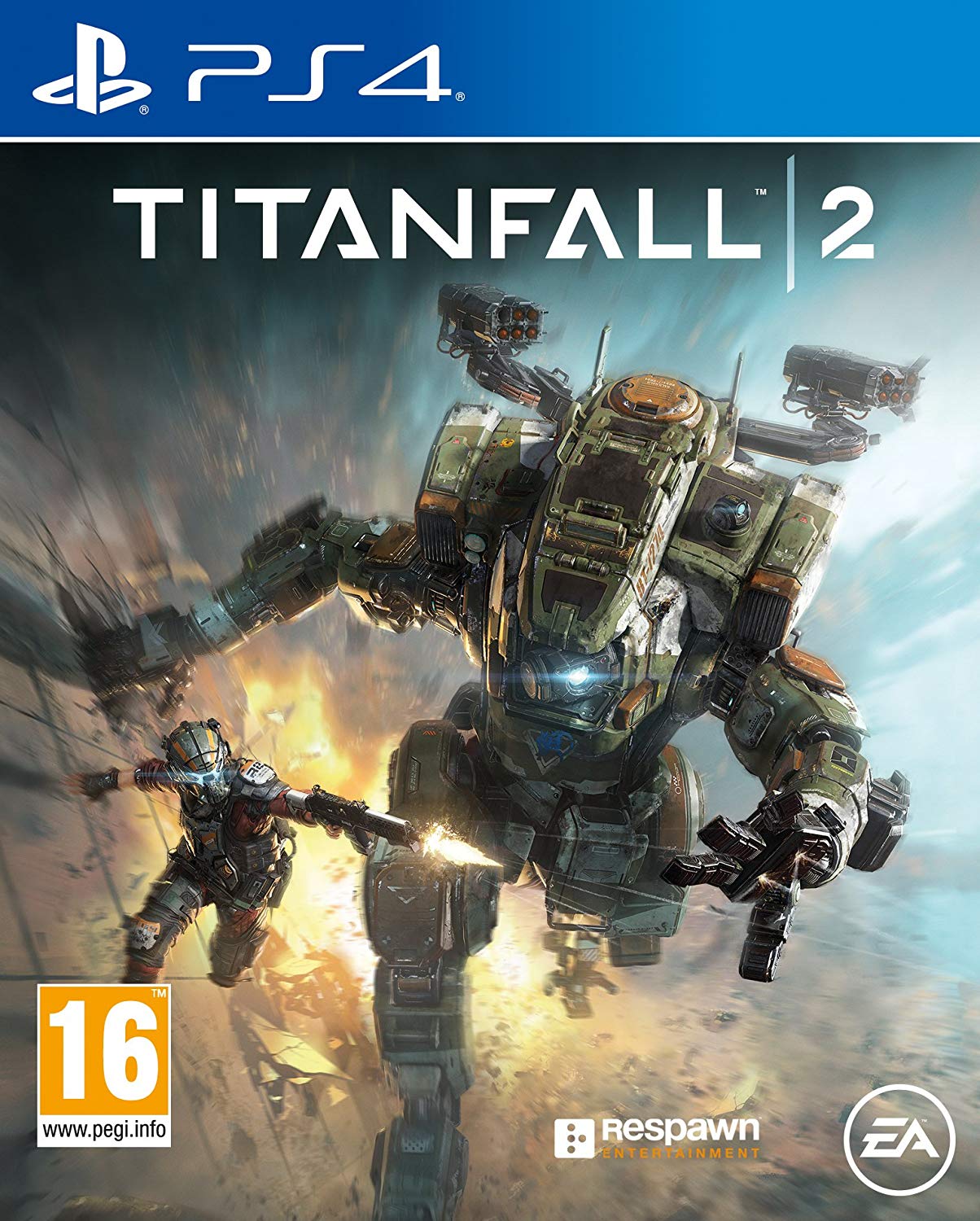
    Titanfall 2 on PS4

    The game’s player numbers increased to about 100,000 on PS4 servers right after the game was scheduled to become available to free play. According to a user online, “The Titanfall 2 player base on PS4 has been revitalized, from 1.5k players on a good day to 70,000. As some of you may know, Titanfall 2 is available on PlayStation Plus. The game is amazing and it’s wonderful to see it truly alive once again.”

    Many users agree that Titanfall 2 is indeed a great and fun game to play. Gamers are enjoying both the single-player and the multiplayer modes. The interest of the players in the game seems to have renewed. Thousands of PS Plus players are making use of this opportunity to try out the game. Some are even considering renewing their PS Plus so as to be able to continue playing it. After a sad decline to the player base in the past few years, it is invigorating to see a boost to the player numbers this December. It is yet to be seen if the new players can keep the servers alive, and if so, for how long.

    PlayStation Plus Update
    PlayStation Plus Update

    PlayStation Plus Free Games

    PS Plus offers free games to its players to keep them on their toes with a host of interesting and addictive games. In this month’s PlayStation Plus update, Titanfall 2 was offered to the users. This first-person-shooter game developed by Respawn Entertainment was once quite popular before other releases overtook it. You will take on the role of a pilot who has to manoeuvre around the battlefield. In the single-player mode, players will find themselves trapped behind the enemy lines. They will have to work together with their mates to escape and save the day.

    This is all that PS Plus has in store for the 2019 holiday month. We expect news of PS Plus free games for January after December 25, 2019.