Samsung mentioned that it is working on its Samsung’s Galaxy Buds Plus. They claim the upcoming Galaxy Buds Plus will be a much-improved product. The company plans to work on several different aspects of the earbuds and make it better. The most noteworthy update here probably would be the battery life of the product. Where the older Buds Plus was able to offer 11 hours on a single charge, the updated one would be able to last for about 22 hours. The buds have come a long way with the original Galaxy Buds only offering about six hours of runtime.
Galaxy Buds Plus
Most of what the users know has come from leaked sources. The same sources have revealed that the Galaxy Buds will come with dedicated woofer and tweeter drivers in each earbud. The older version of the buds had only a single speaker on each bud. With regards to sound quality, this will be a significant update. Samsung has included a second outer voice mic, making the total three now. Another issue with the Galaxy Buds was the quality of voice calls. Again, Samsung has taken note of the problem and has made it better.
Samsung Galaxy Buds Plus
Aesthetically speaking, both of the earbuds look pretty much the same, even down to the size. While the Buds Plus weigh more, there is not a lot of difference between the two models. The exterior touchpad will allow the user to open up Spotify on the user’s phone instantly. This is a feature added thanks to the partnership between Samsung and Spotify that has blossomed lately. In addition to this, you will be able to use the touchpad for regular things like managing volume and tracks.
Features
You will be able to pair the Galaxy Buds Plus simultaneously with multiple devices. This is a great step up from the single-device limit of the first Galaxy Buds. While the price of the buds has not been released yet, the product is expected to be announced along with the Galaxy S20 series. One thing we do know is that the earbuds will be available in white, black, blue, and red.
Galaxy Buds Plus
Samsung intended to release this as a rival for Apple’s AirPods. With significant updates surrounding improved battery life, clearer voice calls, and a shortcut to Spotify, Samsung has made a long-lasting impression in the market. The main reason that the Galaxy Buds Plus are a competitor to the AirPods is not due to one single thing. The entire package, with all its features, offered at a very reasonable rate, make it attractive.
It is quite easy to set up and pair the Galaxy Buds Plus with your phone. The buds are designed to be compatible with both Android and iOS devices. To start, briefly press the buds in your ears and it will start playing from wherever you left off the last time. The entire process is smooth, fast, and seamless. The fact that you will not have to launch Spotify on your phone separately makes the process even more convenient.
Samsung recently released Android 10 and One UI 2.0 for the Galaxy M20. The company had decided to release it in India first, which happened in December. Now, Samsung is planning to bring the Android 10 update for Galaxy M20 devices in Europe. As of now, the update is seeding in Germany, Luxembourg, and Greece. However, it is expected to expand to other countries within the continent quite soon.
Android 10 Updates
Europe is getting a taste of the latest Android 10 update. Samsung has decided to go ahead with the expansion of the update after the initial rollout was successful for its Galaxy M20 devices in India. The latest build does not support certain features, such as the built-in screen recorder. However, you will note that it has One UI 2.0 enhancements as well as Android 10 perks like better Digital Wellbeing with Focus Mode, granular location, and privacy controls. As usual, the update will be rolled over the air. In order to see if it has reached you, make your way to the Settings menu. Click on the Software Update menu. Here, you will be able to see if you have any pending updates.
Android 10 Update
Samsung Galaxy M20
With the M20 being in the news so much, let’s cover its features – a sort of a quick review! Regarding the design, one of the first things users came to know was Samsung’s Infinity – V display with the water-drop notch. The bezels are smaller and the display curves smoothly. The back of the phone is made using glossy polycarbonate. While it looks shiny, it does feel a bit cheap. The fingerprint sensor is pretty efficient but could have been located a bit lower.
The Galaxy M20 is powered by Exynos 7904 octa-core chipset. The phone comes with 4GB RAM, 64GB storage, and a dedicated card slot. These are the features that Samsung would not have provided at this price sometime back. Coming to performance, heavy-duty games like PUBG had some trouble running smoothly. However, casual games and daily use was perfect. The Galaxy M20 has a 13MP primary camera with a 5MP secondary wide-angle shooter and an 8MP selfie camera. The camera sensors manage to capture the lights, sharpness, and other details just perfectly. While Galaxy M20’s camera is better than Zenfone Max Pro M2, the Redmi Note 6 leads the way here.
Samsung Galaxy M20
The Samsung Galaxy M20 offers support for USB Type-C connector. It also has fast charging, which is nice to see on a budget smartphone. The device comes with a huge 5000mAh battery capacity which means you will easily be able to use for more than a day on a single charge. The speakers work well and the audio output via headphones is not bad either.
Wrap Up
No doubt that the Samsung Galaxy M20 is going to make news in Europe. Since the device owners there have been waiting for an Android 10 for a long time, the rollout is being awaited eagerly.
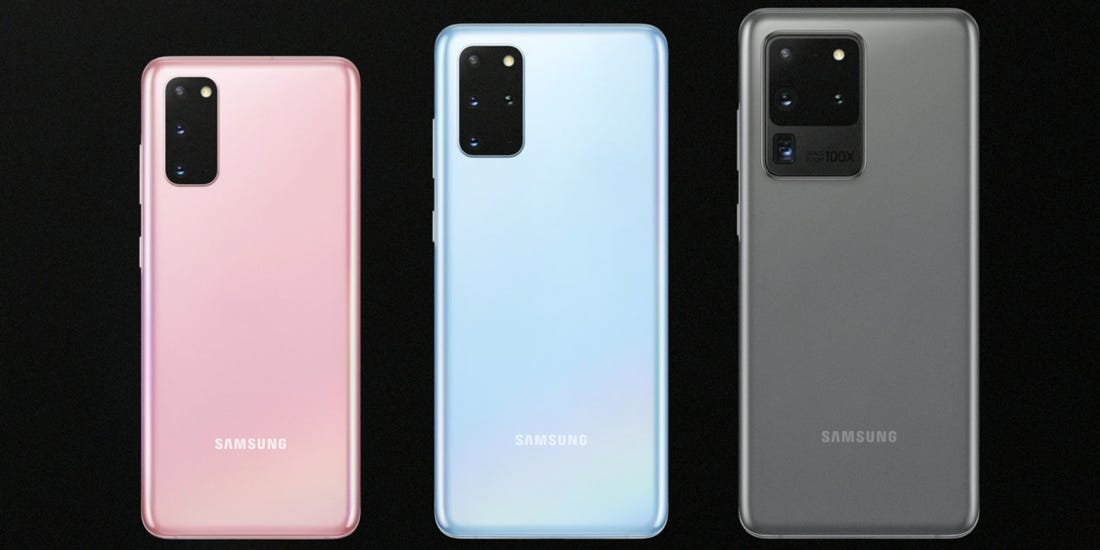
The latest by Samsung – the Galaxy S20 series – is out now. The flagship was announced at Galaxy Unpacked 2020. We can completely understand your dilemma since Google Pixel 4 XL has entered the market almost at the same time. So, which one is better overall? There are plenty of factors to consider here, including the camera, performance, and more.
Design and Display
The Galaxy S20 has rounded edges and a sleek build featuring glass. While the S20 features very slim bezels, the phone supports relatively larger bezels, especially at the top for selfie lens and face-sensing tech. Regardless of the XL size of Pixel, the S20 Plus has the larger screen at 6.7-inches. With regards to sharpness and clarity, both of them stand at pretty much the same place. Both of them have glass bodies and an IP68-rating for dust and water-resistance.
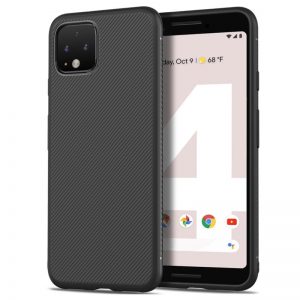
Pixel 4 XL
Performance and Battery
The Galaxy S20 Plus is powered by the Snapdragon 865 while Pixel 4 XL runs on Snapdragon 855. The former is naturally more powerful and faster as well. The S20’s processor is accompanied by 12GB of RAM whereas the Pixel has only 6GB RAM. With storage, the S20 offers 128GB with external 512GB. Pixel, on the other hand, only has 128GB of storage and no MicroSD card slot. The 4,500mAh battery on the Galaxy S20 Plus was welcomed quite enthusiastically while Pixel 4 XL only has a 3,700mAh. Although it is a good enough capacity, one would only be able to use it for a day or so before needing to charge it up again.
Camera
Samsung has done a good job with S20’s camera. The Galaxy S20 Plus camera features a 12-megapixel wide-angle lens, 64-megapixel telephoto lens, 12-megapixel ultra-wide-angle lens, and a time-of-flight depth-sensing lens. Its stunning Space Zoom feature comes with 30x hybrid zoom and A.I. stabilization. Additionally, there’s support for 8K videos. Coming to the Pixel phone, its dual 12-megapixel and 16-megapixel telephoto lenses are no less. Google’s Night Sight is second to none and lets you take gorgeous photos, regardless of what time of the day or night it is. Truly speaking, there is no real competition between Samsung and Google in this factor since both of them perform excellently.
Samsung Galaxy S20 Plus
Software and Updates
The Galaxy S20 Plus features Android 10 with Samsung’s One UI 2.0 software. It is not too bad since it comes with tons of additional features and different customization elements. Pixel 4 XL features Pixel-specific Android 10 software. However, there’s not a lot that is different. While there is no denying that they are different, they both perform well and offer a good experience. If you are waiting for the Android 11 update, the Pixel 4 XL will receive it sooner than the Samsung’s S20 Plus.
Wrapping Up: Samsung Galaxy S20+ vs. Pixel 4 XL
While the Google Pixel 4 XL is an awesome phone in many aspects, it does have some drawbacks. Samsung S20 Plus features these drawbacks as its strengths. The S20 Plus has unbelievably thin bezels, a better battery, and excellent performance. While the Pixel is priced lesser than the S20, most users would be happy to spend a bit more to get better features.
Metal Soldiers 2 is a popular action game where you use a pad to move around, target, and shoot your enemies. There are plenty of different grenades and weapons for you to use. In addition to that, you can make use of a Power Mech, a Battle Tank, or even a Helicopter! However, the other side comes prepared as well with many advanced equipment. A highlight of the features of the game includes the use of MS2 vehicles, new mission modes, different characters to choose, classic weapon designs, battle against enemy tanks and choppers, remarkable gameplay, and lots of enemies to fight.
Metal Soldiers 2
Metal Soldiers 2
This game is a sequel to a game of the same name where the player takes on the role of a mercenary. His mission is to go as far away from the rival soldiers as possible. The game is designed to get tougher as you progress. If you are new to the scene, you will be introduced to a tutorial that will take you through the different moves and strategies. Players generally start from the first level and move up the ladder as you successfully finish missions. Each level will feature a different challenge where you have to rise above it and kill your enemies to make it out safe. Once you do, the waiting helicopter will take you to your next adventure.
The Gameplay
As you play Metal Soldiers 2, you will have to keep an eye on the enemies as you cannot succumb to enemy fire. You will have to steer safe of shots from other soldiers, falling bombs, and tricks like closed doors that only open if you hit the right target. The player will also have to join a tank battle and finish the level before the time is out. The soundtrack and the fast-paced nature of the game make for an entertaining and enjoyable time.
Metal Soldiers 2 Android
The game could give you a nostalgic feel, especially if you have played early 90s Nintendo games. While the game showcases very basic aesthetics, it is highly responsive and excellently designed. It is your classic arcade game – one you just cannot put down. Once your mission begins, you have to be alert as the enemy fire will rain down on every side. You will have to have your weapon ready and start shooting. In addition to land soldiers creeping up on you, the enemies will also have parachute down on you.
You don’t live a very charmed life so you cannot take a lot of hits. Aiming, shooting, and launching a grenade are simple enough tasks. The game has been designed to be quite simple although the gameplay is sufficiently detailed to keep it entertaining. However, you will not have any trouble with the controls since they are all easy enough. At the end of every mission, a helicopter will be waiting for you. Once you get on, your final score will be calculated and displayed. The score relies heavily on the number of enemies you managed to kill.
Let’s directly jump into the article to learn the top ten tips and cheats you need to know to play Modern Combat 5: Blackout!
#1 The Four Classes
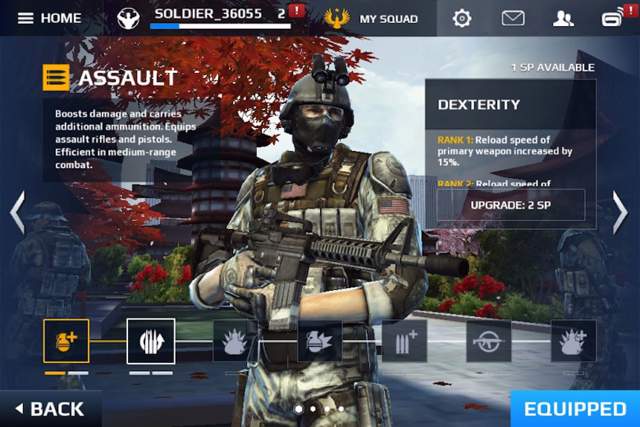
The game has four different classes to play. Each one of them has their own skills and weapons. You can attend the Recon class at the beginning which will allow you to practice and learn how to deal with firearms. The Assault class offers assault rifles and pistols while the heavy class is ideal for close-range combat and use of shotguns. The last class in the sniper one where sniper rifles are used for long-range shots.
#2 Accuracy Levels
Players will always need to keep an eye on the colour notifiers. This will give you an indication of how accurate you are. It is perfect on point when you are crouching or using a scope, a little less when standing, and goes down as you walk or run.
Modern Combat 5
#3 Weapons Have Their Own XP Meter
Did you know that the guns can have increased range, clip size, damage and more? Every kill with a specific weapon can get you more points, allowing you to unlock better ones.
#4 Set Controls and Speed Sensitivity
Before getting started, we suggest setting up your controls and speed sensitivity. Enable the Auto-Sprint option. Ideally, weapons wheel to your right and knives to the left should do the trick.
#5 Auto-Shoot
If you are new to the game, you may want to enable the Auto-Shoot option. This will automatically fire your weapons as soon as you focus on the enemy. Do note that this option can only be used in the single-player model.
#6 Medals for In-Game Accomplishments
Achieving in-game plays will get you medals and XP. For instance, a player will be awarded the Executioner medal if you successfully kill ten or more people.
Modern Combat 5 Gameplay
#7 Skill Point With Level Increase
Players can use skill points to upgrade their classes. You can earn this by completing missions, going up a level, and more. Class skills can be upgraded with better SPs.
#8 You Have the Ability to Shoot Your Foes Through Some Walls
Did you know that you have some freakish ability as well? You will be able to shoot your enemies right through the wall! If the enemy tries to hide behind an obstacle, that’s no problem. You can get a better outline of the enemy by using a scout drone.
#9 Reload!
One of the first things you need to remember in the game is to always keep reloading your weapon. As you enter the battlefield, ensure you keep reloading by tapping on your equipped piece. You can also change your weapon by simply sliding a finger across.
#10 Gain More XP
You can earn more XP by firing tricky shots, such as headshots. Having more XP will get you access to more guns, gun attachments, classes, and different sets of grenades. You will also be able to use character customization options.
Xiaomi started working on its MIUI software quite sometime before it got down to developing smartphones. In the tenth version as of now, MIUI has come a long way and is considered to be quite enticing. Let’s talk about some of the MIUI tips and tricks that will help you take full use of the phone.
App Drawer
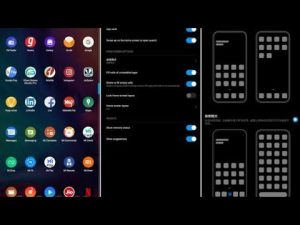
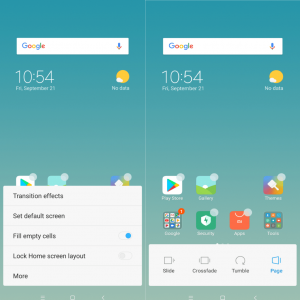
If you have never used a Xiaomi phone before, you could find it a bit odd the first time to turn it on. This is usually because the App Drawer is hidden, as part of the default settings. If you would rather have it, you can easily turn it on. If you have always used Android smartphone, having the app drawer will help you get used to the interface faster. To do so, long-press on the home screen. Select Settings and click on More. Choose ‘With App Drawer’ on the screen.
MIUI App Drawer
Themes
A fun aspect of using MIUI is the ability to customize your smartphone by using themes. You will not have to let go of the style or use external applications to make use of themes. However, by using it, you can completely change the aesthetics of your device, giving you a respite from your usual interface. In order to change the theme of your Xiaomi smartphone, you will first need to download one. To do this, open Themes app. You will be redirected to the online shop where you can easily search, download, and buy the theme you like. The browsing option is really cool, and you can check out a wide range of themes across various categories.
Once you have done this, it is time to decide whether you would like to apply the theme to all the aspects of your Xiaomi smartphone or to only a certain part of it. For instance, you can choose to use only the fonts or the icons instead of giving your phone a full makeover. This is the best part of MIUI since it allows an unbelievable amount of customization. In fact, it seems as if you can even create your own personal theme! It is one of the best MIUI tips and tricks to know.
Display
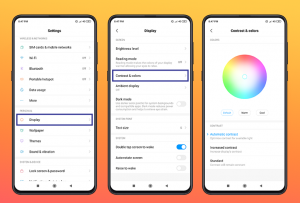
Yes, every display has some issue or the other or is simply not the best version of itself. However, with MIUI, you know that the display is designed to keep its users as happy and satisfied as possible. To check out the appearance customization, head to the Settings page and click on Display. This will open up a large number of screen customization, some of them mentioned below.
MIUI Colours and Contrasts
Colours and Contrasts is an option that changes the temperature of white and the intensity of colour saturation. With the reading mode, you can reduce the blue light on the display to prevent strain on the eyes. You can also automate it to enable and disable it automatically after sunset or at certain times. The System fonts options will allow you to customize font type and size.
The always-on mode can be activated as well if you want to see the time, date and notification icons even when the display is “off”. This is all the more useful if you have an AMOLED display-based smartphone. Raise to wake is a feature which activates the display as the user lift their phone. This was first implemented by Apple on its iPhone and was received very well. The Dual Touch to Awaken feature will wake your smartphone up with a double touch anywhere on the screen instead of having to use the power button.
Status Bar
Xiaomi MIUI has certain options that let the users show additional information in the status bar. The bar also changes the colour according to the app on the top. To make changes and customize the status bar, head to the Settings menu and choose the Notifications And Status Bar option. Within that menu, you will note certain options.
MIUI 11
One is the Show Connection Speed option where you will easily be able to see the speed of the data connection or the Wi-Fi that you are connected to. Within the Notification Folders, you will be able to group notifications together into separate folders so that you can organize your life better. You will even be able to change the name of your operator. For instance, you can set the name of your First SIM card to Business and the second SIM to Private or anything you wish. Lastly, you can add the battery indicator which will show the remaining battery power either in percentage or in a graph.
Unlock Your Smartphone Easily
Another one from the popular MIUI tips and tricks list is this. Xiaomi’s MIUI has an “Unlock With A Smile” feature, which is a major highlight. In this method, you will be able to unlock your smartphone using facial recognition. It speeds up the process of unlocking and your phone and you no longer have to rely on your fingerprint scanner. In fact, you may notice that this method is way faster than your traditional unlock methods. To set it up, visit the Settings menu and tap on Unlock Screen and Password. Within that, you will see an option called Add Face Data. Click on that and the software will take you through the motions.
Split Screens
Split-screen on MIUI allows the users to maintain multiple profiles or accounts on their phones. The best thing here is that you can switch accounts swiftly without having to wait for anything. You can use two different accounts at the same time! This functional is called Dual App and can be found at the bottom of the Settings menu.
MIUI Split Screens
Security
MIUI by Xiaomi is a stickler for privacy. It comes with various features, designed especially for data and app security. Within the App Lock option in the Settings menu, you can select the apps you want to lock up. By doing so, no one except you will be able to open it.
Relax and Chill
MIUI has a special function, specially designed for meditation and relaxation. To enable this, you can visit the app and head to the Timer located under the duration selector. Now, you would be able to select the one that appeals the most to you from a large collection of options. This includes the likes of Summer Night, Rain, Forest, and Beach. Hope this post on MIUI tips and tricks helped!
Vine was the first one to come up with the concept of short videos. It proved that it could become a great trend and inspire creativity like never before. However, it had a rigid six-second format. Instagram soon followed up on Vine’s footsteps and relaxed the time frame. Later, TikTok purchased Vine and did the same. Soon after this acquisition, Vine disappeared from sight. Dom Hofmann, the co-founder of Vine, still believes in his creation and the format. He has been working on a successor for quite some time now. Byte, Vine’s successor, has now been officially released. Over the last few months, the app underwent an extensive beta phase, following which, it is now released on Play Store in a stable condition.
Byte App – Vine’s Successor
Byte works in pretty much the same way as Vine did, in a manner of speaking. If you are using an Android device, you will need to have a Google account to sign in. Once you are done, you can choose a user name. You are all ready to take your first step into the latest social network out there. You will notice immediately title after title of a vertical-scrolling stream of videos playing in loops. These videos feature comments and likes as well. These are usually full-screen and are six-second videos.
Byte Interface
Byte has a bar at the bottom where you can search for categories, creators, and specific terms. In addition to this, it also offers you a shortcut to the camera, your activity page, and your profile. The camera is not yet up to the mark, but maybe after a few updates, it could catch up to the others in the market. All you can do with the camera is to hold the shutter button to start recording.
You can do so multiple times within the six seconds of your time limit. Users can also choose the option to overlay a ghosting effect. In addition to a front camera switcher, there are no filters or stickers to be seen on the app. Maybe the developer wanted Byte to be something different or maybe they plan to bring it in an update, or maybe that’s just how the app is designed to be. Something different, for sure!
Byte App
Byte in the Play Store
Byte’s developers recently tweeted, “dear friends, today we’re bringing back 6-second looping videos and a new community for people who love them. it’s called byte and it’s both familiar and new. we hope it’ll resonate with people who feel something’s been missing.”
The app is ad-free at the moment. However, chances are that there would be some monetization in the future considering that the developer has plans for a pilot version of a partner program. This is designed so that the most popular Byte members will be able to earn money here. With similar apps like TikTok and Instagram already quite popular, Byte will have a huge job in making progress. However, with TikTok under investigation by the US government, Byte could have come in at just the perfect time.
If you are a PlayStation 4 enthusiast or a video game fan, you are most likely to have worn your controlled down. Of course, there is an official gaming pad sold for £50, but there are nicer alternatives available out there as well. Sometimes, the could even end up being cheaper while still offering a good level of quality. If you are simply purchasing one for multiplayer games, we totally understand that it is ideal to spend less on a basic pad. However, if you are a more focused gamer, you should look for professional PlayStation 4 controllers that can offer you so much more and make the gaming experience so much better. There are many alternatives to PlayStation’s DualShock 4, regardless of your budget. In this post, we will take a look at some of the best PS4 controllers out there. The options for the Best PS4 Controller discussed here range from basic ones to the most professional ones.
How To Choose The Best PS4 Controller For You
There are plenty of things that come into consideration when you want to purchase a PS4 controller. One of the first things you need to think about is whether you need a wired or a wireless controller. Sony’s official DualShock 4 pad uses a low-power Bluetooth to connect to the PlayStation. On the other hand, the newer, official pads are coming with a wired USB connection as well. The main difference between the both is that wired ones offer a faster, more reliable connection. While it could just a fraction of a second, pro gamers can use even that to gain an advantage in multiplayer contests. While wireless controllers may not offer the same speed, they do not force you to hover around your PS4 either!
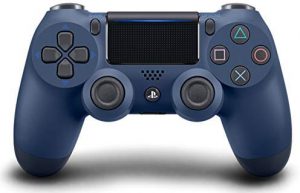
Sony DualShock 4
Quick Review of Sony DualShock 4
The Sony DualShock 4 controller is considered to be one of the best all-round PS4 controllers. As the official controller, it is one of the best you could use. It is highly responsive, comfortable to use, and charges via a micro-USB connection. More recent versions of DualShock 4 brings the feature of data transfer via USB. This means that if you want lower latency, you can simply plug and play. It also comes with a rechargeable lithium-ion battery that can be easily used as a Bluetooth controller for your Android tablet or PC. All in all, it is one of the best PS4 controllers out there.
#1 Nacon Asymmetric Wireless Controller
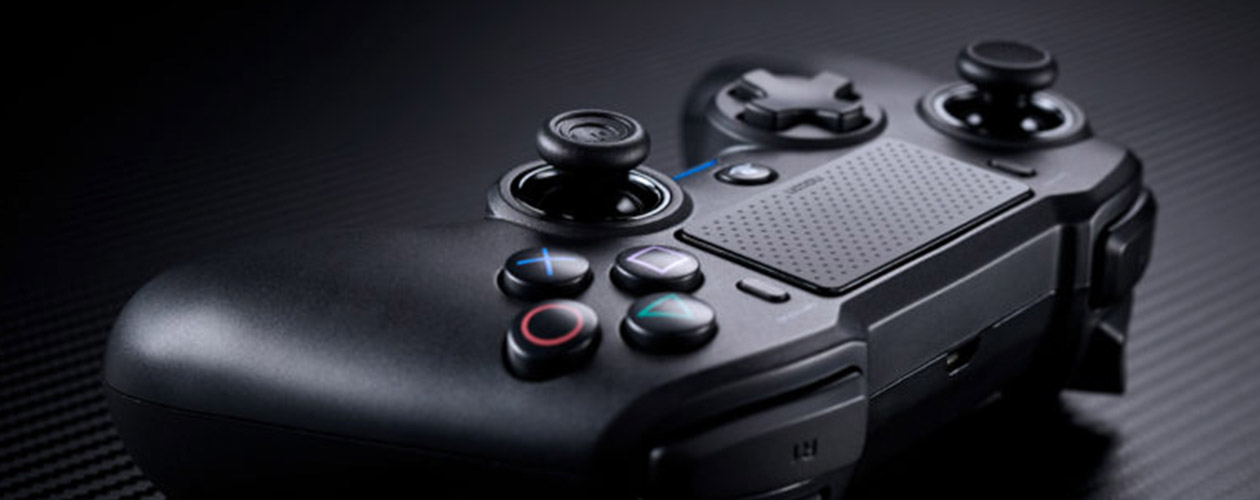
This Nacon controller is considered to be the best value PS4 controller in the market. It is not all that pricier than DualShock 4 but offers equally to the users. It is robust and feels quite sturdy in our hands. While it is not very expensive, it doesn’t feel cheap either. However, its design could have been made better. It does have the bright lights and mappable inputs that we are used to seeing in higher-end models. The Nacon controller has an asymmetrical layout and large buttons that are quite fun and useful. Players can plugin in the USB Bluetooth receiver into the PS4 and enjoy up to seven hours of fun.
Nacon Asymmetric Wireless Controller
#2 Nacon Revolution Unlimited Pro
The Nacon Revolution Unlimited Pro is a high-end PlayStation 4 controller. If money is not a consideration, then this is the absolute best you can go for. You will get complete control over stick length, custom gaming profiles, controller weight, trigger sensitivities, and so much more. While it could look like an Xbox controller, the model comes in a wide range of different weights. You would also be able to customize the width of the analogue stick heads. Gamers will be able to spend hours working out the settings. They can choose to assign different settings to different gaming profiles. The best part here is that one would be able to switch profiles instantly. Other things that you can do here include reversing the sticks, changing the responsiveness of the sticks, adjust the vibration intensity, modify the sensitivity of the triggers, and even alter the colour of the LED that surrounds the right analogue stick. The highlight here is the controller’s grip coating that ensures you always have the best grip regardless of how sweaty your palms are!
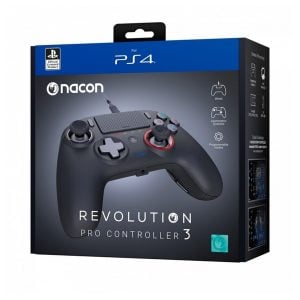
#3 Nacon Revolution Pro
This option is a great one if you are a budget-conscious gamer. The Nacon Revolution Pro is an ideal option for those who want something more than Sony’s official controller but cannot quite afford the higher-end ones. This model uses the same layout as an Xbox One controller. While it is known to be a bit bulky with a floating D-pad, the controller itself works excellently. The buttons are smooth, the thumbsticks responsive, and the matte finishes a great touch for good grip. Thanks to the interchangeable weights, you can adjust the pads.
Nacon Revolution Pro
#4 Razer Raiju
Razer’s Raiju Tournament Edition pad is perfect if you want to be a pro. It is designed in a way that it could give the marginal gains to take on your opponent. It is bigger than the standard DualShock 4. The buttons have a delightful tactile click to them with the directional consisting of individual buttons. The thumbsticks are responsive, and the touchpad is awesome. The controller features a hair-trigger mode which reduces the travel distance to the two primary triggers. It also features four mappable buttons, with two near the shoulder buttons and two on the underside.
#5 Scuf Impact
The Scuf Impact controller is known to be one of the best options if you are looking for customizability. It boasts of many different features, all designed to make your gaming experience more pleasant. The features include quick shift trigger stops, adjustable hair triggers, and textured anti-slip grips. The controlled has an impact ring lock system making the switch easy. The Impact includes extra interchangeable thumbsticks and the option to choose between domed and concave surfaces. You can get it customized before buying it by adding the style, colour, and other factors you want.
Pixelbite revealed their new game in early August. Xenowerk Tactics will be made available for iOS and Android this year. While at the time of reveal, the exact time and date was not specified, the details have been shared now. The Pixelbite game, Xenowerk Tactics, is set to release on 10th October. While Pixelbite is known for its Space Marshals series, it is not their first time in the Xenowerk universe. The original game was a twin-stick shooter where the player had to fight against a mutant infestation. With Xenowerk Tactics, the developers are planning to do something different while sticking to the main theme.
Xenowerk Tactics Pixelbite
Xenowerk Tactics Gameplay
The player will take on the role of the commander of an emergency response team. The team has been sent to look into a disaster that took place in a secret lab. Naturally, the mysterious element is necessary! You can choose whether to save the world or to cover up the incident. The twist here is that you will have to make your decision on the go since it is a real-time strategy game. As you battle with mutants, you will have to work on your strategy to get out alive while also saving the world. Thankfully, you will be able to rely on the various skills you have along with other ammunitions. This includes the likes of traps, grenades, and something new called Pyrokinesis!
If things get too fast for you or if you want instructions, you can go with the Tactical Pause option. This will give you a short break while also offering instructions on how you can move ahead for the win. The better you play, the more efficiently you will be able to improve your rank. You should note that there is some risk with doing this. Some of your men could have potentially dangerous mutations or questionable traits. While this could definitely impact gameplay, we have no idea how it will.
Xenowerk Tactics
Other Deets
The game will require iPhone 6, iPad Air 2 or newer. The idea behind the player’s role is that they cover up the incident at the secret lab in the artic and maximise profits for the Xenowerk corporation. Or, alternatively, you can be heroic about it and choose to save the world. The landscapes are beautifully designed with the game fast-moving enough to keep you on your toes all the time. You will be able to explore the different surrounding, including swamps, laboratories, factories, jungles, and the artic, of course.
In addition to this, you will also have to carry out several missions, such as securing strategic safe zones, finding and rescuing M.I.A. operatives, and more. The player will also be able to use different skills like Bait & Trap, Adrenaline, Frag Grenade, Pyrokinesis and much more. If you want a larger troop, feel free to recruit marines, scientists, and ranger. However, you have to be careful who you choose since they could have dubious mutations. Overall, it looks like a fun and engaging game!
The original Super Mario Maker came for Wii U in 2015, it suited every aspect of Wii U. If you had to develop your own 2D Super Mario levels, you would have loved the experience too! You can easily modify the levels by simply making use of the touchscreen tablet on your hand. Once done, you can play it on your TV. It was the perfect blend and balance of software and hardware. Moving forward a few years, Super Mario Maker 2 made its way on to the Switch and is generally considered to be the ideal sequel. The game features different building options, such as custom win conditions. on / off switches, and slopes. Let’s take a quick look at this Super Mario Maker 2 Review.
Super Mario Maker 2 Review
Nintendo has also managed to develop a robust story mode. This is particularly awesome if you don’t know much about the game. It teaches you the basics and helps you get started. The developers have made sure that almost every aspect of the experience has been improved. However, one thing most users miss is the Wii U and its controller!
Super Mario Maker 2
The overall experience on Super Mario Maker 2 is pretty much the same as the previous releases. More than a game, it could be seen as a tool where the players can build classic 2D Super Mario levels. You can choose the gadgets, determine what it is supposed to do, choose the terrain, the enemies, and the power-ups. Once you create the level, you can share it with other users online. This led to the formation of a large community of creators who were designing challenging and innovative levels.
Super Mario Maker 2
The Switch version of the game offers a lot more to the game. The custom clear conditions change the types of levels one can design. Usually, you win a Super Mario game if you finish it without dying. However, what if you want to have a different condition? What if the player only wins if they make it to the end without jumping the entire game? These are now possible with custom clear conditions. There is also a new range of building blocks, thanks to which, you can add Cat Mario power-up, a Koopa Troopa Car, and more. The best part about building here is that it is very intuitive and can be done by using the drag-and-drop interface.
Endless Options
The fun part here is that you will have so many options for designing the level that you may find it hard to find your way around at first. However, Super Mario Maker 2 is known to gently bring you into the game. It offers tutorials so that you can find inspiration, learn how things work, and get started. The game also features a story mode. Here, you will not have to go through the different themed worlds. Instead, the players will be making their way through a series of distinct levels to earn enough coins to rebuild the Mushroom Kingdom. As you begin developing the castle, new paths will open up.